

How to access the Expo tab in Zoom Events? | Community
Skip to main content
Newcomer
May 21, 2023
Question

How to access the Expo tab in Zoom Events?

  • May 21, 2023
  • 1 reply
  • 0 views

I am having difficulty accessing the Expo tab in Zoom events. I have a Zoom Events license. This is what Zoom Support provides in regards to accessing Zoom Events Expo, but it does not exist in my . 
How to access the Expo tab in Zoom Events

  1. Create a Zoom Event or edit an upcoming event to access the event setup.
  2. In the event creation flow navigation menu, click Event Experience, then click Expo.
    The Expo page will appear.

When I go to my right side navigation bar, "Event Experience" does not appear. How do I turn my Zoom Event into an expo? This is what appears in my Navigation tab:
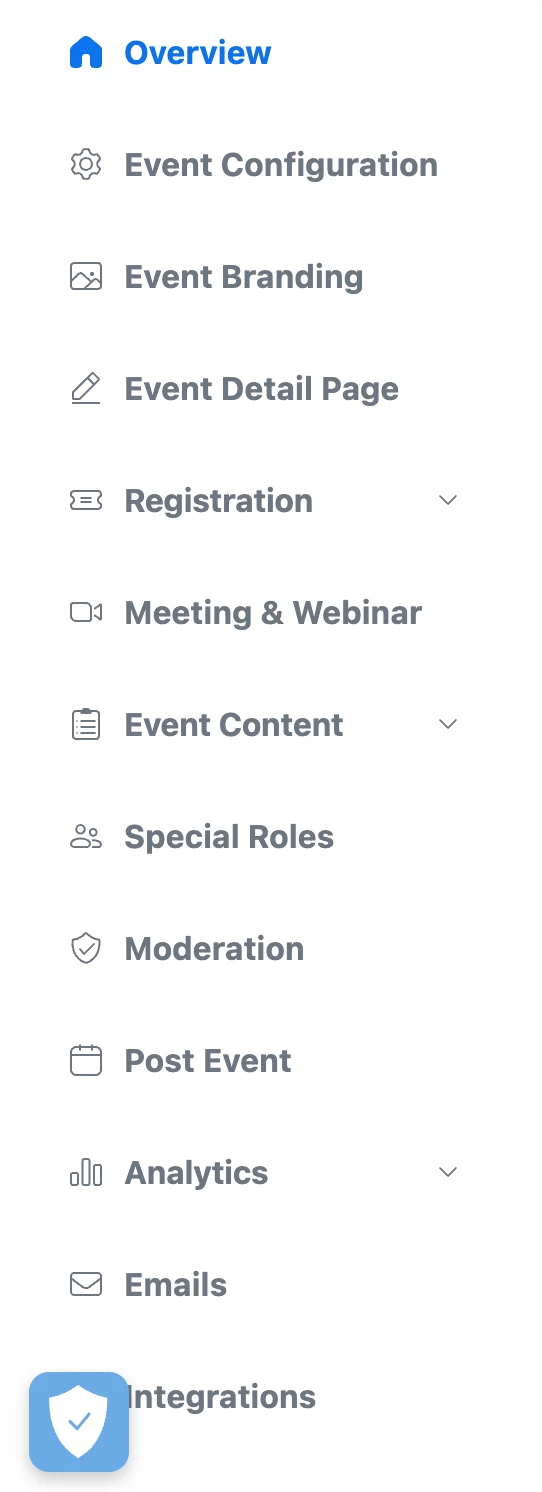
 

Thanks in advance!
Connor

    1 reply

    Ray_Harwood
    Community Super Champion | Customer
    Community Super Champion | Customer
    May 21, 2023

    Welcome to the Zoom Community and Zoom Events, @NurseRecruit /Connor!


    First, note that Expos are not available on Recurring Sessions Event types:

    https://support.zoom.us/hc/en-us/articles/4411702803213-Comparing-the-functionality-of-Zoom-Events-types 


    It appears to me like you have a single session Event. Based on my sample single-session Event, I don’t think you can have one there either. 

    Look here for Multi-Session Event types:

    You have to configure the Expo and create Exhibitors.