Chat appearance has turned black instead of white | Community
Skip to main content
Newcomer
March 14, 2026
Solved

Chat appearance has turned black instead of white

  • March 14, 2026
  • 9 replies
  • 729 views

How can I reverse the black background back to white in the chat window during a zoom meeting

Best answer by Groot_ding

Hi ​@Karen Whitney could you follow these setting
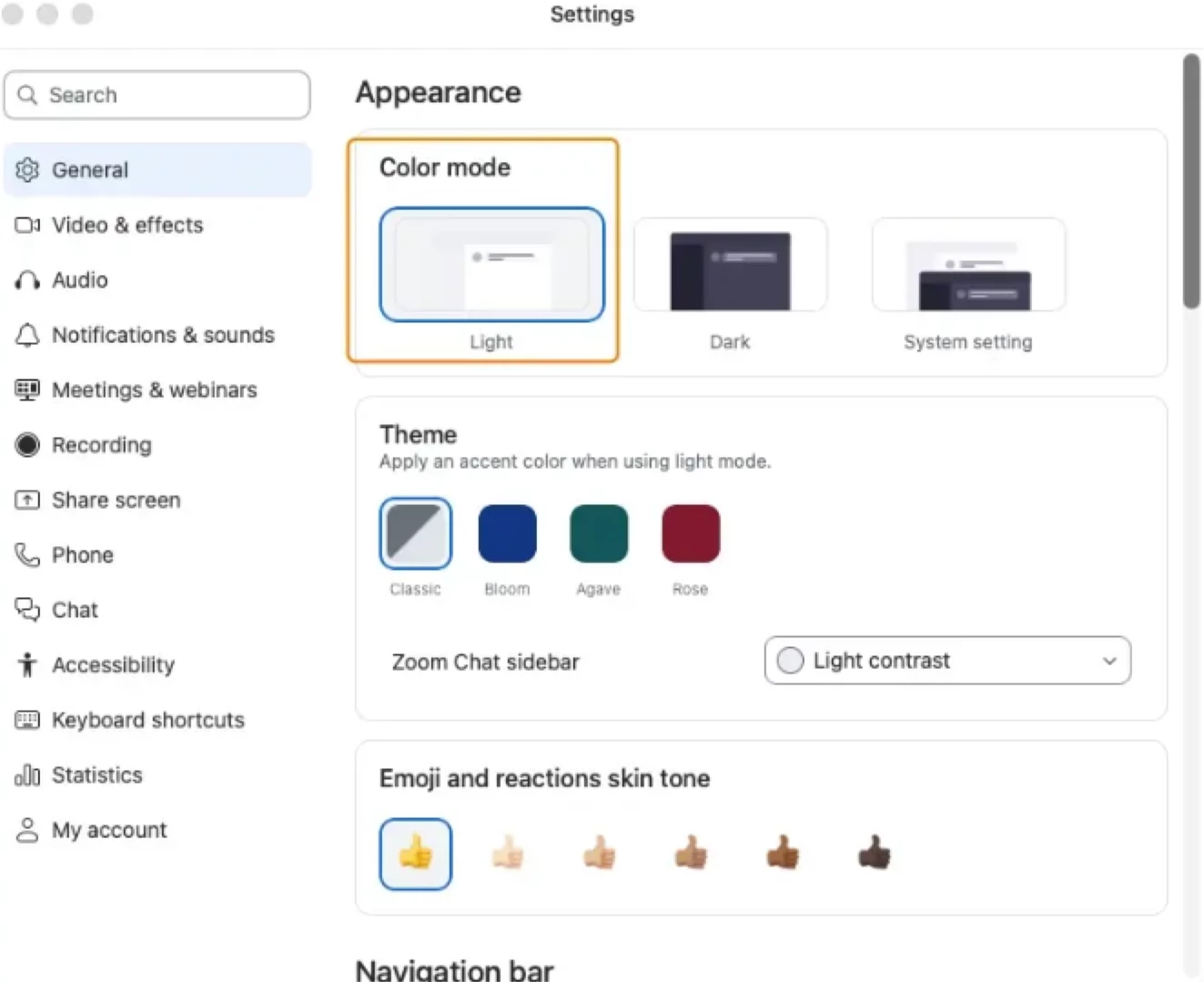
1. color mode change to Light
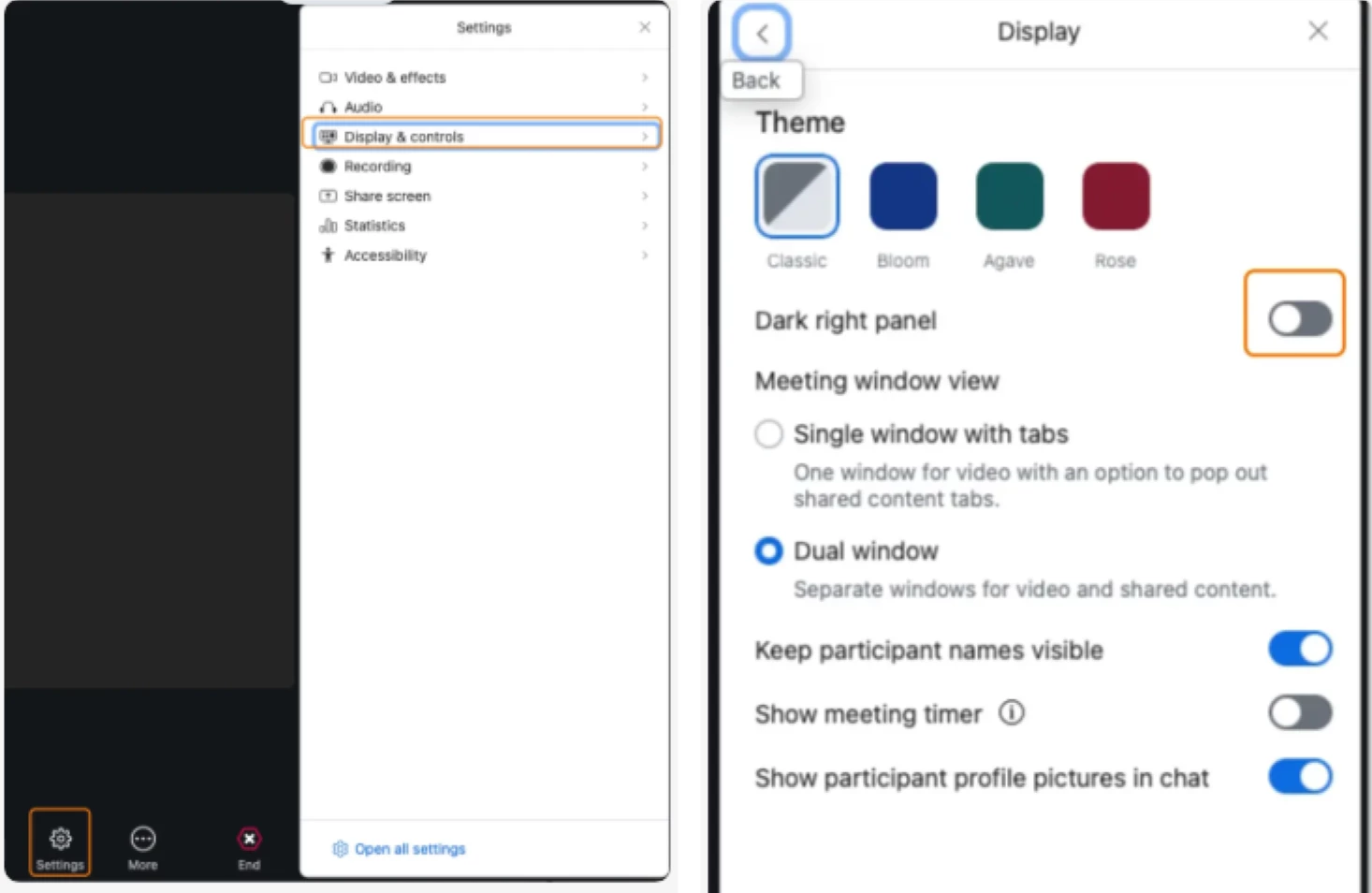
2. meeting toolbar, “Display & Controls” => “Display”, Uncheck “Dark right pannel”. 


9 replies

Newcomer
March 17, 2026

I have the same problem. The AI help desk tells me to change the color scheme under the general tab/ appearance from dark to light, but I do not have a color scheme setting. So, where exactly can I do that? I would also like to know. The black background with white letters is horrible! And even worse, why does Zoom change that without the user’s permission?

Newcomer
March 17, 2026

I have the same proble. WHY does Zoom change things and not tell us how ti fix it. I hate the BLACK Background. They also changed the method to do Advanced Share…. IS there a USER Manual ?  I have a Free Account, but my wife has a paid account and Zoom is getting more difficult to use….. Is Zoom wanting to loose Customers?


MGSR
Community Manager
Community Manager
March 17, 2026

Hello ​@Ken Hughes,

Currently, Zoom does not offer a built-in option to change the chat window background color from black to white during a meeting. The appearance of the chat window is typically controlled by your system's dark mode or light mode settings.

If your chat window turned black, it's likely because your Mac or Zoom app is set to dark mode. To switch it back to white, try these steps:

  1. Exit dark mode on your Mac:

    • Go to System Settings > Appearance.
    • Select "Light" mode.
  2. Restart Zoom after changing your system appearance.

If Zoom has its own dark mode setting (in some versions), you can check Zoom's Preferences or Settings for a "Theme" or "Appearance" option and select "Light" if available.

Newcomer
March 19, 2026

This is a bug.  I know how to adjust setting in both my computer and in Zoom.  It’s currently stuck in dark mode. Before it would change automatically between light and dark according my computer settings.  My version is current.  Please fix this bug. 

Newcomer
March 19, 2026

I am also having a hard time with the dark background change.   I played around with it and found the following worked.   Go to Settings in Zoom.  On mine there is an option for “Display”,  Go in to Display and there is option for Dark Right Panel to be ON or OFF.  I toggled mine to OFF and the white background came back on the Chat, Participation, etc side panels.  I did this during an active Zoom session.  I will have to wait to see if it carries over to any future sessions.  

Newcomer
March 19, 2026

Was this on a PC, ​@ZoomZiz? I have a Mac and also know how to disable light/dark mode. But that has no effect on the chat box in Zoom. *sigh*

But I don’t see “Display” in my Zoom settings either in the app or on the web settings. 

grrr.

Community Champion | Customer
March 20, 2026

Hello,


On a Mac go to the following menu as ZoomZiz suggested;


Go in to Display and there is option for Dark Right Panel to be ON or OFF.  


Regards

ExpertswhoJohn
Community Super Champion | Customer
March 21, 2026

hi ​@ZoomZiz ,

Open your workplace app and click on the gear icon bottom left and then from the settings - general you have the controls

https://www.linkedin.com/in/johndrinkwaterlordzoom/
See my latest content. events, live and prerecorded to showcase features
https://lordzoom.com/go/hub
I run many events and upload most on my channel.
https://www.youtube.com/@boomwithlordzoom


Newcomer
March 23, 2026

Your “solution” does not work. It is a bug.  I want to see you state clearly and unequivocally that you understand that it is a bug and that nothing you have said is useful to fix it. 

New Member
March 25, 2026

I agree.  These so called solutions do not work.  Zoom should be sued under the ADA (Americans with Disabilities Act) on behalf of people with visual impairment.  I could not read the chat today in an important meeting because it had a black background!

Newcomer
March 26, 2026

Sounds like you’ve been switched into Dark Mode. If you don't see the appearance settings under the "General" tab, it’s usually because your Zoom app needs a quick update or you're looking in the web portal instead of the desktop client.

Try it:

  • Open the Zoom Desktop App (not the website).

  • Click your Profile Picture/Initials in the top right and select Settings.

  • Go to the General tab.

  • Under Appearance, select Light.

Check: f the "Appearance" section is missing, click "Check for Updates" in your profile menu first. Sometimes older versions hide these toggle options.

New Member
March 26, 2026

This is SO annoying. What can’t I change the stupid chat background from black back to white????

Employee
March 26, 2026

Hi ​@Karen Whitney could you follow these setting
1. color mode change to Light
2. meeting toolbar, “Display & Controls” => “Display”, Uncheck “Dark right pannel”. 


New Member
March 27, 2026

Thank you, this worked!!!

Even from inside a meeting my chat window turned to white background right away. You made my day!

New Member
March 30, 2026

Hello! I had the same problem and could not change it back to the white background by going to the regular setting menu.

I finally fixed it by starting a new meeting, clicking on the small arrow above the “chat”-box in the lower menu, choosing “chat settings”. Then, when the box with the chat settings appeared to the right, I clicked on the top left arrow, chose “show” (top choice in the new menu for me) and then toggled of the “dark right panel” there. 

Hope it helps! 

New Member
March 30, 2026

There is no display option in my Zoom app. I have Windows 11.

New Member
March 30, 2026

There is no Display option in my Settings either under More or under my Profile. I have a Samsung tablet. I have tried every fix listed above but unable to find the Dark to Light option. Even when i am in a meeting there is no up arrow by the chat option. HELP me get rid of this black... please..

New Member
March 31, 2026

I am part of an enterprise account and I agree with the others - this is a bug that needs to be fixed . I have my settings set on light mode with agave. The app’s chat background is white, but the chat in meetings has the black background.

New Member
March 31, 2026

Hi,

I’m on an enterprise account as well, and I’m seeing the same issue. My settings are on light mode (Agave), and while the main chat stays white, the in-meeting chat turns black.

I’ve been running meetings with my team at Fast Junk Experts and this has been coming up consistently—it really feels like a bug rather than a setting issue. Hopefully Zoom rolls out a fix soon.🙂