
The Zoom Feature Hiding in Plain Sight: Voice Translator
Hey Zoom Community!
Quick question: Have you ever been in a meeting, watched someone switch languages mid-sentence, and wished you could just... understand? Turns out, our customers already can — and most people have no idea.
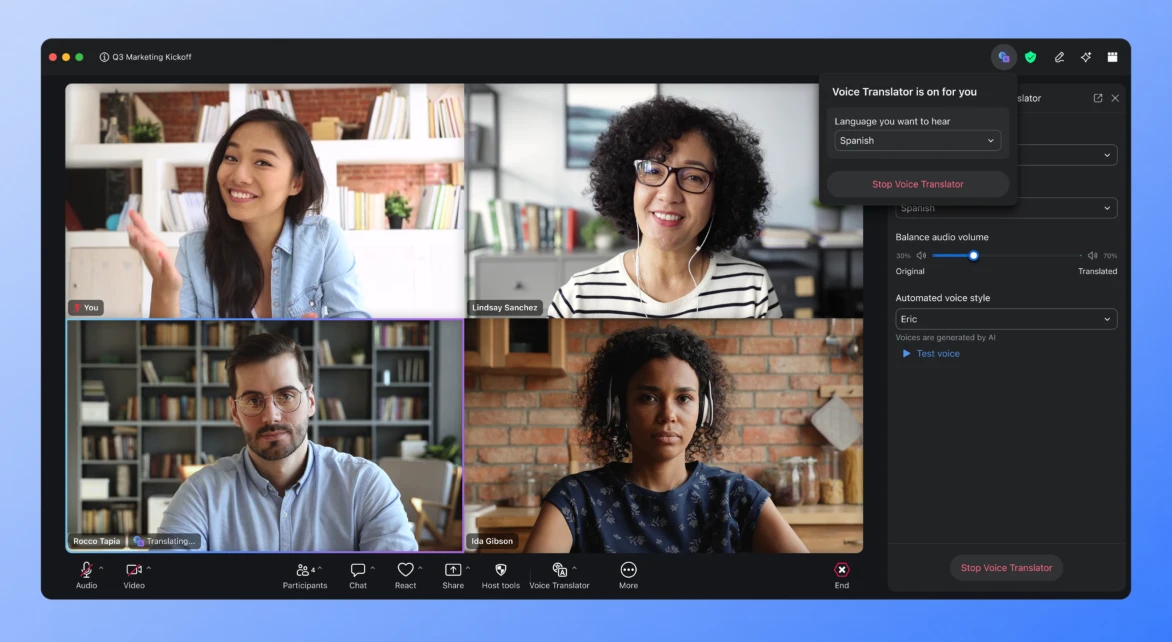
Meet Zoom Voice Translator. It's a real-time speech translation capability built right into Zoom Meetings, quietly working in the background to turn spoken words in one language into interpreted audio in another — live, near real time. Instead of reading translated transcripts, participants can hear a translated version of the speaker's voice, which lets non-native speakers listen naturally and jump into conversations earlier. It's not a separate app bolted on — it lives right in the meeting toolbar under More → Voice Translator.
Why This Feels Like a Secret
Most people still think of Zoom as "the meeting app." Few realize it's quietly become a near real-time interpreter for global teams. One internal note captured this perfectly: *"When I'm reading transcripts I can't participate. This lets me listen and jump in sooner."*That's exactly why it deserves the spotlight.
Real Customer Use Cases That Show Its Magic
1. A Multinational Hospitality Brand - One customer at Accor purchased a Zoom Pro license along with Voice Translator specifically because meetings regularly included external participants outside the company — a classic multilingual, cross-organization use case the feature was built for.
2. Healthcare Consultations Across Borders - A company in Madrid reached out wanting to set up a Zoom account specifically to use Voice Translator for consultations — showing how healthcare providers are looking at real-time voice translation to communicate with patients across language barriers.
3. Global Enterprise Collaboration - Internal guidance to Sales/CSM teams describes Voice Translator as particularly useful for "global team meetings, cross-regional collaboration, multilingual project discussions, and customer meetings with language barriers"— exactly the scenario one Zoomie demoed live in a customer-prep walkthrough, using Voice Translator to host a meeting with a Spanish-speaking client, Mr. Diaz, complete with adjustable volume between the original voice and the AI translation.
4. Portuguese-Language Expansion - A team requested dedicated help with the Voice Translator tool specifically for Portuguese, pointing to real customer demand for broader language coverage beyond the initial launch set.
So… What Do You Need?
Good news: you probably have most of it already.
You'll need a Basic, Pro, Business, or Enterprise account, plus either the Live Translation add-on or a ZoomMate license. Make sure Voice Translator is turned on, and that your Zoom app is on version 7.0.0 or higher. That goes for the desktop app and the mobile app.
It currently speaks English, Chinese, French, Japanese, Spanish, German, Italian, Arabic, and Portuguese. One small catch: you can only set your speaking and preferred languages during a meeting. So hop on a call, flip it on, and you're set.
The Takeaway
Zoom Voice Translator isn't flashy. It doesn't ask for attention. But across hospitality, healthcare, and global enterprise meetings, our customers are already using it to quietly remove one of the oldest barriers in human collaboration — language.
Sometimes the most powerful tools are the ones customers forget are even running.