


Stop Paying More for Tools You May Already Have and Start Saving Time and Reducing Costs with Zoom AI
Start Saving Time and Reducing Costs with Zoom AI
-
Unlock Cost Savings and Productivity with Zoom AI
-
Drive Business Efficiency and Savings Through Zoom AI
-
Reduce Operational Costs with Zoom AI-Powered Workflows
-
Maximize Productivity While Minimizing Costs with Zoom AI
-
Transform Everyday Workflows into Measurable Business Savings with Zoom AI
Unlock Cost Savings and Productivity with Zoom AI
Identify the opportunities to reduce operational expenses, eliminate repetitive tasks, improve employee productivity, and maximize your existing Zoom investment through Zoom AI. Maximize your Zoom investment by unlocking its built-in AI capabilities. Replace redundant third-party applications, eliminate unnecessary subscriptions, and streamline workflows. Work smarter, save more, and get greater value from the technology you already pay for.
1. Drive Business Efficiency and Savings Through Zoom AI
educe time spent on administrative work and improve the efficiency of meetings, communication, and collaboration.
Business challenges
-
Employees spend too much time taking meeting notes.
-
Managers manually prepare meeting recaps and action items.
-
Teams spend time searching through lengthy conversations and discussions.
-
Employees repeat discussions because decisions and responsibilities are not documented.
-
Administrative tasks reduce time available for customer-facing activities.
Reduce time spent on administrative work and improve the efficiency of meetings, communication, and collaboration.
Zoom AI solutions and use cases
| Zoom solution | Practical use case | Business benefit |
|---|---|---|
| Meeting Summary | Automatically generate meeting summaries and action items. | Reduce manual documentation. |
| Meeting Questions | Ask AI to recap what was discussed or identify key points during a meeting. | Save time and improve meeting participation. |
| Zoom Canvas | Convert meeting summaries into collaborative documents. | Reduce time preparing reports. |
| Zoom Team Chat AI features | Summarize lengthy conversations and catch up on discussions. | Reduce time spent reading messages. |
| Smart Recording | Generate chapters, summaries, and highlights from recordings. | Make reviewing meetings more efficient. |
Example scenario:
A customer success team conducts 10 customer meetings daily. Each employee spends approximately 15 minutes preparing meeting notes and follow-ups.
By using AI-generated meeting summaries and action items, the team can reduce manual documentation time and redirect that time toward customer engagement.
2. Reduce Operational Costs with Zoom AI-Powered Workflows
Simplify workflows, minimize duplicated effort, and reduce dependency on manual processes and additional productivity tools.
-
Employees use multiple applications to complete everyday tasks.
-
Teams manually create reports, summaries, and documentation.
-
Information is scattered across different collaboration platforms.
-
Employees spend time switching between applications.
-
Organizations pay for third-party tools that may overlap with existing Zoom capabilities.
Zoom AI solutions and use cases
| Zoom solution | Practical use case | Business benefit |
|---|---|---|
| My Notes | Automatically capture important discussions, organize key takeaways, and identify action items | Reduce manual note-taking. |
| Zoom Canvas | Create and collaborate on documents. | Reduce fragmented workflows. |
| Zoom Tasks | Track and manage work resulting from meetings. | Improve accountability. |
| Zoom Clips | Record asynchronous video updates and instructions. | Reduce unnecessary meetings. |
| ZoomMate | Support organization-specific knowledge and workflows, depending on configuration and availability. | Reduce time spent searching for information. |
Example scenario:
A company currently uses separate applications for meeting transcription, meeting summaries, task tracking, and internal documentation.
The organization can evaluate whether Zoom's existing capabilities can replace some overlapping third-party subscriptions.
3. Maximize Productivity While Minimizing Costs with Zoom AI
Increase employee productivity without proportionally increasing headcount, working hours, or operational expenses.
oom AI solutions and use cases
| Zoom solution | Practical use case | Business benefit |
|---|---|---|
| ZoomMate | Draft emails, brainstorm ideas, and generate content. | Reduce time spent on routine writing. |
| Meeting Summary | Capture discussions, decisions, and action items. | Improve productivity after meetings. |
| Zoom Scheduler | Simplify appointment booking and scheduling. | Reduce scheduling administration. |
| Zoom Clips | Share training materials, updates, and instructions asynchronously. | Reduce repetitive meetings. |
| ZoomMate | Support role-specific workflows and organizational knowledge. | Improve access to relevant information. |
| Zoom Whiteboard AI features | Help brainstorm, organize, and develop ideas. | Accelerate collaboration and planning. |
Example scenarios
1. A Customer Success Manager handles 30 customer accounts and conducts multiple business reviews each week.
With Zoom AI:
-
Generate meeting summaries automatically.
-
Identify customer concerns and action items.
-
Draft personalized follow-up emails.
-
Convert discussions into actionable tasks.
-
Spend more time on proactive customer engagement.
2. An HR team conducts multiple interviews and employee discussions daily.
With Zoom AI:
-
Generate interview meeting summaries.
-
Capture key discussion points.
-
Reduce manual documentation.
-
Create onboarding materials using Zoom Docs and AI assistance.
-
Share training instructions through Zoom Clips.
3.A sales team spends significant time preparing for meetings and documenting customer discussions.
With Zoom AI:
-
Summarize customer meetings.
-
Capture customer requirements and objections.
-
Generate follow-up email drafts.
-
Identify next steps.
-
Share recorded product demonstrations through Clips.
4. Transform Everyday Workflows into Measurable Business Savings with Zoom AI
Translate AI adoption into measurable business outcomes, demonstrate return on investment (ROI), and establish a sustainable AI adoption strategy.
-
Organizations invest in AI but struggle to measure its impact.
-
Employees do not consistently use available AI features.
-
Management cannot quantify time saved.
-
AI adoption is not connected to business objectives.
-
Organizations struggle to justify technology investments.
Zoom AI solutions and use cases
| Zoom solution | Practical use case | Business benefit |
|---|---|---|
| Zoom AI | Support everyday productivity tasks. | Reduce time spent on manual work. |
| Meeting Summary | Measure time saved on meeting documentation. | Quantify administrative efficiency. |
| Smart Recording | Reduce time spent reviewing lengthy recordings. | Improve information retrieval. |
| Zoom Canvas | Standardize documentation and collaboration. | Reduce duplicated work. |
| Zoom Analytics and Dashboard | Monitor relevant usage and adoption metrics. | Support adoption and utilization decisions. |
| ZoomMate | Support specific organizational workflows. | Align AI with business priorities. |
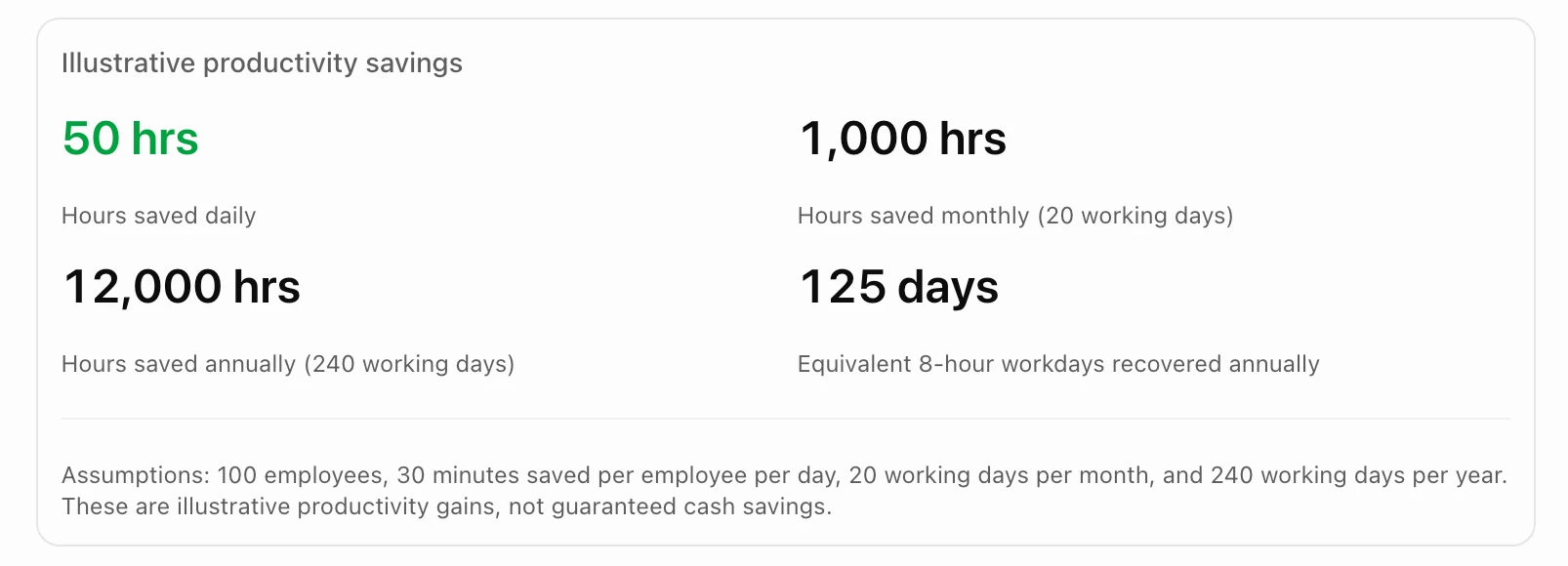
Example: Calculating potential savings
Consider an organization with 100 employees who each save 30 minutes per working day through AI-assisted workflows.
How to turn productivity into financial savings
For example, if the organization values employee time at 500 per hour:
-
12,000 hours saved annually.
-
500 estimated loaded hourly labor value.
-
6,000,000 in potential annual productivity value.
This represents recovered employee capacity, not necessarily direct payroll savings. Actual financial savings depend on how the organization redeploys that capacity.
Ultimately, The goal is to help your organization get more value from Zoom by not simply by using more features, but by making everyday work more efficient.
We want to identify opportunities where Zoom AI can help your employees save time, reduce repetitive work, simplify collaboration, and generate measurable business value.
Let's start identify your workflows to start, measure the results, and build an AI adoption strategy that supports your organization's business objectives.