no video on zoom | Community
Skip to main content
Newcomer
May 7, 2023
Solved

no video on zoom

  • May 7, 2023
  • 2 replies
  • 3 views

Hi all, 

\has anyone encountered no video on zoom lately? I am pretty tech savvy and I cant figure out why there is no host video on my zoom when I am the host. I teach online and it annoying the student s cant see you.

my Czur document share I working fine, and I checked my Mac camera and its working fine too.

any help will be appreciated.


    Best answer by rn-zm

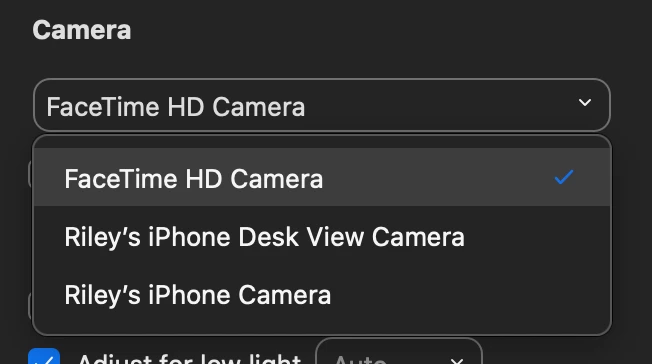
    Hi @standy welcome to the community! Interesting what you've came across with macOS. I am currently running Zoom Desktop Client version 5.17.5 and macOS, 14.3.1 with no issues. 


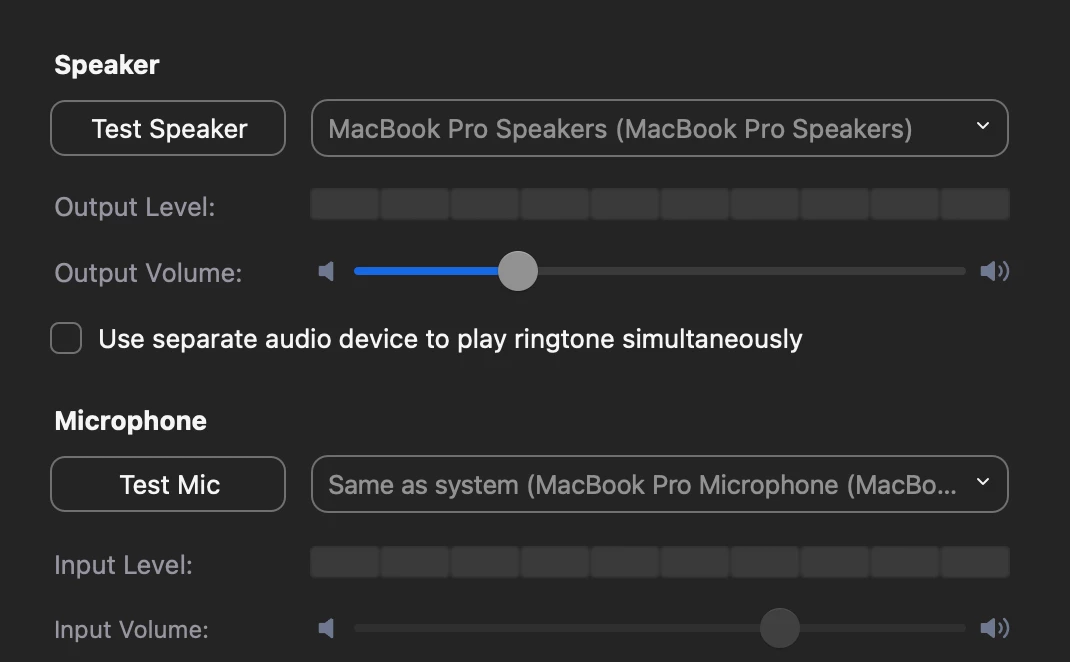
    Here are the selected settings from my Zoom desktop client settings: 

    Video 


    Audio


    Here is more info on Troubleshooting camera issues during a meeting, let me know if that helps! Also, if you don't mind providing some screenshots of your camera and audio settings to determine if it maybe at the device level. 

    2 replies

    Community Champion | Employee
    May 7, 2023

    Hi sorry you are having issues, pls review this support document for your Mac video issues on Zoom.


    https://support.zoom.us/hc/en-us/articles/205062849-Camera-video-unavailable-on-Mac-OS-10-7

    Newcomer
    February 14, 2024

    Still a problem. I have an M1 iMac running macOS 14.3.1 and it not longer will let me have a voice (permanently muted) or be seen (no video). My MacBook Air with OS 14.2.1 works fine.

    rn-zmAnswer
    Community Manager
    February 20, 2024

    Hi @standy welcome to the community! Interesting what you've came across with macOS. I am currently running Zoom Desktop Client version 5.17.5 and macOS, 14.3.1 with no issues. 


    Here are the selected settings from my Zoom desktop client settings: 

    Video 


    Audio


    Here is more info on Troubleshooting camera issues during a meeting, let me know if that helps! Also, if you don't mind providing some screenshots of your camera and audio settings to determine if it maybe at the device level.