
How can I transfer licenses to a new owner | Community
Skip to main content
Newcomer
March 22, 2026
Question

How can I transfer licenses to a new owner

  • March 22, 2026
  • 1 reply
  • 14 views

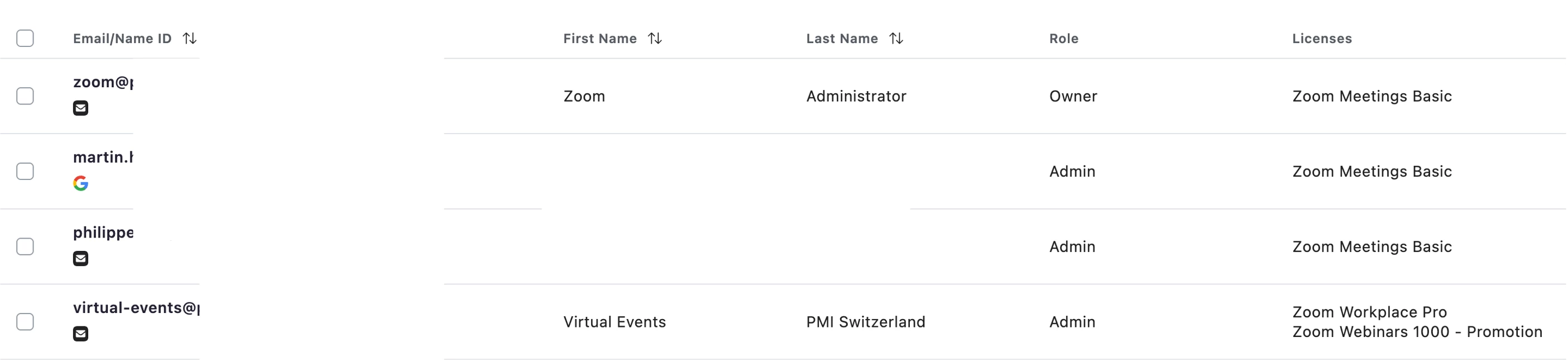
Hi, I have transferred ownership to a new owner, from virtual-events@ to zoom@. However, the licenses are still with the former user. How can I transfer those?

 

    1 reply

    ExpertswhoJohn
    Community Super Champion | Customer
    Community Super Champion | Customer
    March 24, 2026

     HI ​@Zoom Administrator 
    You must first make the account for the new user.
    They have to then accept it
    You can then take the licence away form one person and then attach it to another

    Please like and mark as the solution if this helps

    All the best


    John Drinkwater

    Zoom Community Super Champion.

    Zoom Developer Champion

    Community Champions are not paid to provide this support and have no access to customer settings or data. I am not personally an employee of Zoom


    Newcomer
    March 24, 2026

    Hi ​@ExpertswhoJohn 

    Thank you very much for this hint. The new account is created. Where do I take away the license from one user and give it to another? Will that have an impact on invitations that have already been sent?

    Thanks!

    Martin

    Community Manager
    March 27, 2026

    Hi ​@Zoom Administrator,


    To transfer a Zoom license from one user to another, you need to first unassign the license from the current user and then assign it to the new user. This can be done in the Zoom web portal under User Management.


    Be aware that if you remove a license from a user who is hosting upcoming Zoom Events or Webinars, the associated hub may become inactive and any scheduled events or invitations could be deleted if assets are not transferred properly. Always make sure to transfer any necessary events or assets before removing the license from the original user to avoid disruptions.

    You may visit this article to learn more.
