

Removing AI Companion button from Zoom Client | Community
Skip to main content
Newcomer
October 11, 2023
Solved

Removing AI Companion button from Zoom Client

  • October 11, 2023
  • 3 replies
  • 9 views

We will not be allowing the AI companion in our organization. Despite me disabling it in the org, the button is still showing up in user's Zoom Clients. This means our team is getting bombarded with requests to enable it. How do we hide the button in the Zoom Client?
Best answer by Bort

Hi @csatola 

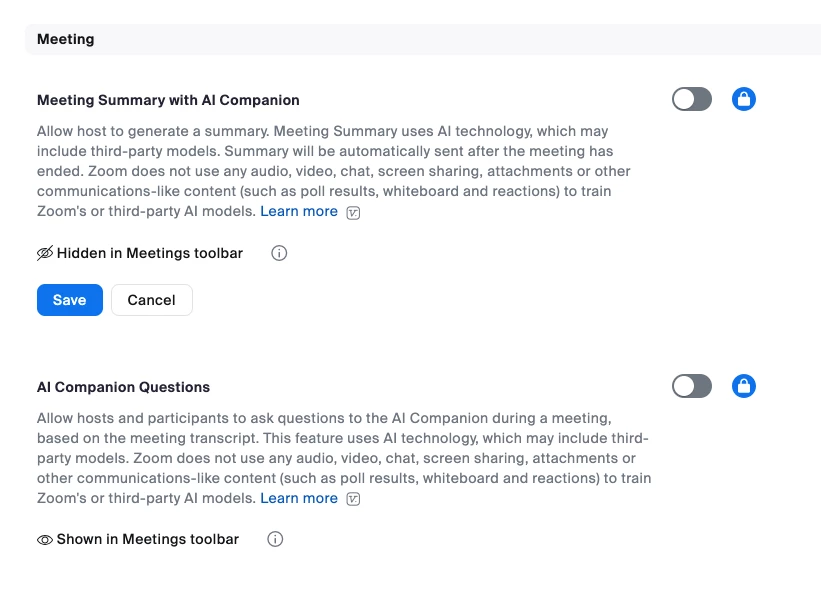
Admins can control the visibility of these in-meeting options through the account-level settings. When either or both of the meeting settings are disabled, then additional options are shown to control if the option is shown in the Meetings toolbar: 

These articles have more information: 

Hope that helps and let me know if you have any further questions. Otherwise, make sure to mark the solution as accepted if this information is what you needed.

3 replies

Bort
Employee
BortAnswer
Employee
October 11, 2023

Hi @csatola 

Admins can control the visibility of these in-meeting options through the account-level settings. When either or both of the meeting settings are disabled, then additional options are shown to control if the option is shown in the Meetings toolbar: 

These articles have more information: 

Hope that helps and let me know if you have any further questions. Otherwise, make sure to mark the solution as accepted if this information is what you needed.

csatolaAuthor
Newcomer
October 11, 2023

Thanks Bort. I missed the "Hidden in meeting toolbar" option below. I had already turned them off. 

BethFell
Explorer
Explorer
October 16, 2023

I am also missing the "Hidden in meeting toolbar" option on my (EDU) account.  I opened a ticket with support about it. 

BethFell
Explorer
Explorer
November 28, 2023

UPDATE: This is the reply from Zoom Support on October 21, 2023:
"As per our backend team, there are some scenarios where show/hide is not available, such as for some Healthcare and Education accounts where it was hidden during the feature rollout. Our backend team released AI Companion in such a way that the AI button was removed from the Meetings toolbar when AIC was disabled for these accounts."

Newcomer
November 29, 2023

Thank you for your answer

but I still  dont undersatand how can I remove this AI butten ? 

BethFell
Explorer
Explorer
November 29, 2023

If you are the administrator of your Zoom instance you can disable AI Companion, as Bort described above, for the entire instance. If you are not an administrator you can disable AI Companion in your own settings on the web portal: