


Downloading Smart Recording content | Community
Skip to main content
yoshioka
Newcomer
Newcomer
December 15, 2023
Solved

Downloading Smart Recording content

  • December 15, 2023
  • 7 replies
  • 28 views

Greetings fellows Zoomies!

Not sure if this has been discussed before but the AI Companion Smart recordings are a game changer for staff tasked with creating minutes from meetings as well as students and faculty conducting research interviews on Zoom.  The Smart recording content, however, is not one of the components that can be downloaded from the cloud recording like the video and the transcript.  Is Zoom going to add that functionality?

Thanks,

Ken
Best answer by YaBoiB

Hello @yoshioka


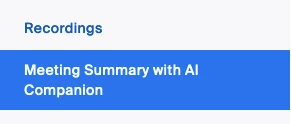
 I completely agree with you that the AI companion Smart recordings are a game changer. It has helped my productivity 10 fold since it was released to Zoomies internally. To answer your question, the meetings summary with AI companion has its own tab on the left side of your web UI profile. Just below your recordings tab. I will paste a screenshot for assistance. You can share and edit your summaries there if you so choose. 


We also have a KB article in our support page that is a helpful resource. 


Please click the accept solution button if my response was helpful. 


7 replies

YaBoiB
Community Champion | Employee
YaBoiBAnswer
Community Champion | Employee
December 15, 2023

Hello @yoshioka


 I completely agree with you that the AI companion Smart recordings are a game changer. It has helped my productivity 10 fold since it was released to Zoomies internally. To answer your question, the meetings summary with AI companion has its own tab on the left side of your web UI profile. Just below your recordings tab. I will paste a screenshot for assistance. You can share and edit your summaries there if you so choose. 


We also have a KB article in our support page that is a helpful resource. 


Please click the accept solution button if my response was helpful. 


Newcomer
September 11, 2025

The text in the AI Summary is NOT the same as the text under each Smart Chapter. So it doesn't work if you want to use smart chapter time stamps - they're not equivalent.


Please mark this UNRESOLVED again and let's get an answer!!!

Newcomer
December 21, 2023

That handles getting at and sharing the summary. How about the smart chapters recordings? Any solution on sharing that? Or downloading it?


YaBoiB
Community Champion | Employee
December 22, 2023

Hello @DorothyE , 


 I apologize; I am not familiar with what you are talking about. Can you explain what you mean? 


Community Super Champion | Partner
December 26, 2023

please try the following:


Using Smart Recording with AI Companion

Copy the smart chapter overview to share with others
On the recording, click Chapters Overview.
At the top of the dialog, click the copy icon to copy the text to your clipboard.
Click Close.
Share the text as necessary by pasting it, such as in an email.

https://support.zoom.com/hc/en/article?id=zm_kb&sysparm_article=KB0061101


Did my response answer your question? If so, please don't forget to mark the reply as an accepted solution.


thanks,  eliot

Newcomer
January 30, 2024

Sharing the text by sections is pretty easy.. What we were looking for is the ability to have the VIDEO download by chapter


Newcomer
May 10, 2024

Has this changed since original answers? I see the Summary and the Smart Chapters. There is a copy option for the Summary but there is no Smart Chapters Overview. This means that I would have to copy and paste the text produced in relation to each Smart Chapter. Am I missing something?

Newcomer
June 13, 2024

I'm starting to think I am going crazy - I can't find it either.

Don't want to have to copy and paste each chapter, timestamp and notes.  

yoshioka
Newcomer
yoshiokaAuthor
Newcomer
June 13, 2024

Thanks for all of the responses to my inquiry!  The Meeting Summary is easy to copy and paste into a Word document but in the Smart Recording, you need to copy and paste the main summary, each chapter summary and next steps into a document.  What I was wondering about is if Zoom will eventually have a download option to download the entire Smart Recording document as one file, just like the video, audio and the transcript.

Newcomer
August 13, 2024

Exactly, this would be a big step forward.  In the meantime, Otter.ai currently has a summary feature that generates chapter summaries live while an event/meeting is in process that can also be edited later (edits also improve the AI).  The summary feature is included in the freemium version.  See feature details here:

https://help.otter.ai/hc/en-us/articles/5093383818263-Automated-Live-Summary-Overview


Hopefully Zoom sorts this out soon so we'll no longer need multiple vendors/platforms to capture this content locally.

yoshioka
Newcomer
yoshiokaAuthor
Newcomer
January 9, 2025

@jmathias-You are right-I also saw Eliot's response and I also do not see a button for chapter overview and as a Zoom admin, I didn't see any options to enable chapter overview for ther smart recordings.  Unsure who gets access to that or how to enable it in our ccount.

Newcomer
August 22, 2025

The ability to easily copy chapter summaries either as a whole or individually really needs to be implemented.  You used to be able to go to each highlight and drag and copy directly.  Not a great solution, but it worked.  Now you can't even select the Highlighted chapter, you have to go to edit the chapter highlight and copy the Head and the body separately.  Seems very easy to implement an action to simply download all of the smart chapter titles and summaries.  C'mon Zoom.  This is remedial functionality.  Make it happen!