

audio recording along with AI Companion summary | Community
Skip to main content
Newcomer
April 25, 2024
Solved

audio recording along with AI Companion summary

  • April 25, 2024
  • 1 reply
  • 3 views

I turned on AI Companion to get a meeting summary but whatever I did (or di not do), there is no audio recording saved for the meeting. The summary is great but I need to hear the audio or view a transcript of the full meeting to record details of who was speaking or correct the AI summary, if necessary.


Please go through the required aspects for recording to the Cloud and generating an AI summary. For some reason, I just automatically assumed a recording would be available along with the summary.
Best answer by Ray_Harwood

Welcome to the Zoom Community, @SushiKat.


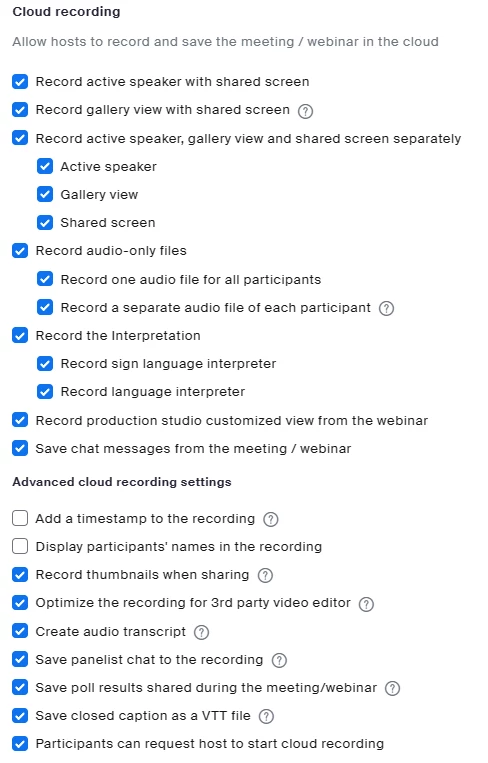
The AI Companion and Meeting Summary options use a temporary recording to generate their information.  If you want to create a saved copy, you will need to start Cloud Recording.  Note that each user has a set of Cloud Recording settings that dictate which specific recordings are made:


1 reply

Ray_Harwood
Community Super Champion | Customer
April 26, 2024

Welcome to the Zoom Community, @SushiKat.


The AI Companion and Meeting Summary options use a temporary recording to generate their information.  If you want to create a saved copy, you will need to start Cloud Recording.  Note that each user has a set of Cloud Recording settings that dictate which specific recordings are made:


Bri
Community Manager
Community Manager
May 2, 2024

Hello @SushiKat! I've gone ahead and marked @Ray_Harwood's response as an accepted solution. Please let us know if you need any additional assistance.