AI Companion Setting "Locked by admin" | Community
Skip to main content
Newcomer
October 10, 2023
Solved

AI Companion Setting "Locked by admin"

  • October 10, 2023
  • 15 replies
  • 58 views

I am the admin of my account, but I can't turn on the AI Companion because it says lock by admin.  What can I do to enable this feature. 

Best answer by Bort

Hi @PolinaKrasnova 

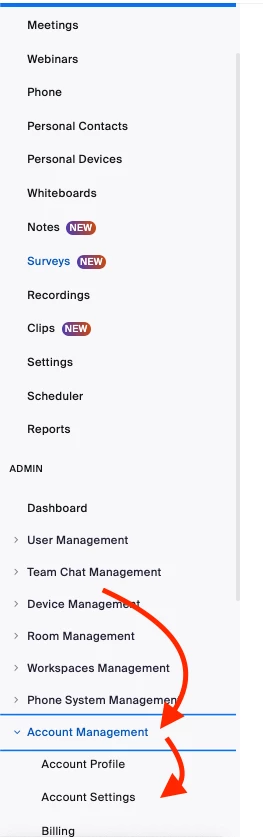
If you are signed-in to your account in the web portal, you should see the Account Settings option under Account Management

If you don't see this option, its likely you are not the owner or an admin on the account so you wouldn't have access to account-wide settings. You would also not have account settings if you are a free account, as there would be no other users to manage at the account level. 

15 replies

Newcomer
December 22, 2023

I managed to fix mine but I don't really know how. I just fiddled with a bunch of settings in the client after opening a Zoom meeting, and double checking all the settings on the web. Eventually it worked. Good luck! It's worth it.

Newcomer
February 10, 2024

This was a great question, and I appreciate @Bort's answer.

We turned off AI companion completely because it so badly misrepresented meeting contents.

We have spent actual hours trying to reframe stuff that AI Companion misspoke in its abstracts that it seems more like a liability than a help.


AI Companion is absolutely not ready for prime time. Have a real person write your minutes. The time wasted in damage control is not worth it.


Chris

Newcomer
April 5, 2024

I was experiencing the same thing. To resolve I had to open up a new meeting. Click on the more button and turn on the AI features for that particular meeting. So enabling the meeting summary in that meeting opened it up in the main setting as an option to automatically do for all meetings. When in doubt, just click anything that says AI in the actual zoom meeting and it should trigger the option we are all looking for. Good luck!

Newcomer
May 20, 2024

3 months later and still it's not possible to acitivate or deactivate because of "locked by admin". I pay for this app and you are not able to solve this bug. I tried out 1 hour now to deactivate this feature, because the results are bad, but I cant get it done.
Tried 3 different browsers and restartet my computer twice. So sad. I will cancel my subscription if I do not get proper help. 

Thank You

Newcomer
May 20, 2024

I found  a solution on youtube. Thanks for nothing.


https://www.youtube.com/watch?v=SNS6FyCuRZE

Newcomer
November 12, 2024

man, the simple delineation between user tools and admin tools certainly could have been mentioned by Community Champions in these answers!! As a former UX designer, I'm offended with this UI. Thank you SO much for removing hours of time wasting.