

White board | Community
Skip to main content
Newcomer
February 19, 2024
Solved

White board

  • February 19, 2024
  • 1 reply
  • 0 views

My business runs on the ability for two or more participants to write on the white board at the same time. Since the update, all I get is a dysfunctional white board that I can't share with anyone. The the Bot is very dumb and can't help with any questions. In the not so distant past, I could use the share screen and click on the board, but now.. I get a one way board that won't erase or allow for any writing. I run the business exclusively on iPads and a MacBook Pro. They have worked well in the past. How do I make tis work?
    Best answer by Palmer

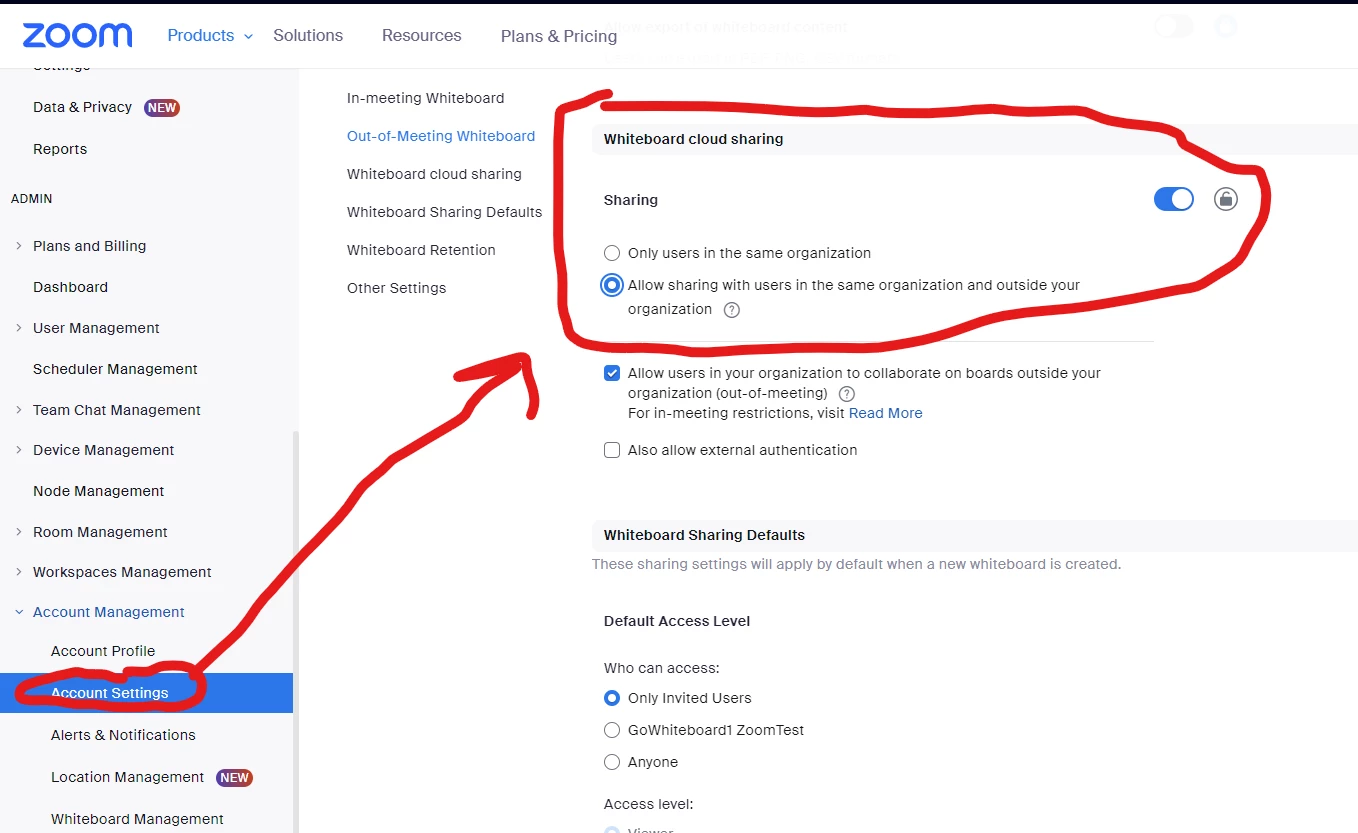
    Hi @Timberwolf , this could be an issue with your account share settings being set to "only users in the same organization". You can check by going to Admin -> Account settings -> Whiteboard -> Whiteboard Cloud sharing. 

    Does changing this setting to "allow sharing with users in the same organization and outside your organization" fix the issue? 

    1 reply

    PalmerAnswer
    Employee
    February 22, 2024

    Hi @Timberwolf , this could be an issue with your account share settings being set to "only users in the same organization". You can check by going to Admin -> Account settings -> Whiteboard -> Whiteboard Cloud sharing. 

    Does changing this setting to "allow sharing with users in the same organization and outside your organization" fix the issue? 

    Community Manager
    February 26, 2024

    Hey @Timberwolf were you able to look into those settings to determine if you're able to to share your whiteboard outside and in your organization? By reviewing @Palmer's reply, I have gone ahead and marked this as the solution. Also wanted to note the KB on Sharing Zoom Whiteboard with external authentication for more info around changing those permissions on the account. If you believe this isn't the solution, as the author, you are able to mark the reply as "not the solution", and let us know what didn't work and are still experiencing this issue, thank you! 

    Employee
    March 4, 2024

    Hi. I have similar problem and Zoom settings do not allow me to click “allow sharing with users in the same org “. It’s not clickable. I have personal paid license. Please advise how can I solve this problem. 


    Hi @Oliko , would you mind pasting an image of what you see and @mentioning me? That will help us figure out the issue!

    -Palmer