Resgistration export before meeting started | Community
Skip to main content
Newcomer
January 7, 2024
Solved

Resgistration export before meeting started

  • January 7, 2024
  • 2 replies
  • 2 views

Hey everybody,


i want to see who ist registrated AND whiche answers these persones gave us with the regsitration before the meeting started.
Does anybody has an idea how I can find out?

We use Zoom Webinars. All answers were necessary.


greetings from germany

    Best answer by Ray_Harwood

    Welcome to the Zoom Community, @menton95.


    The reports are available to the meeting host from the Webinars menu:
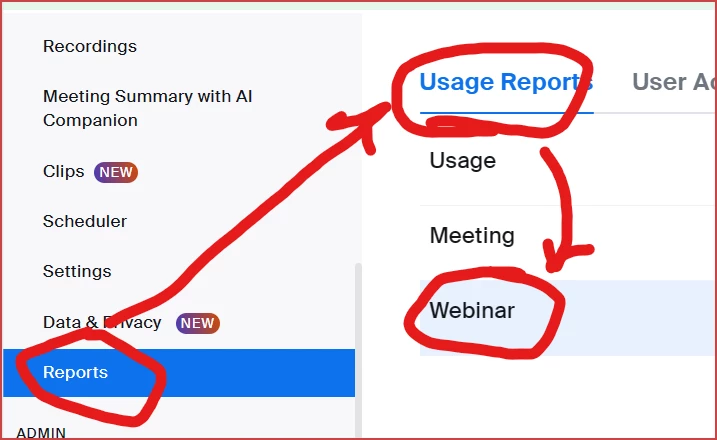
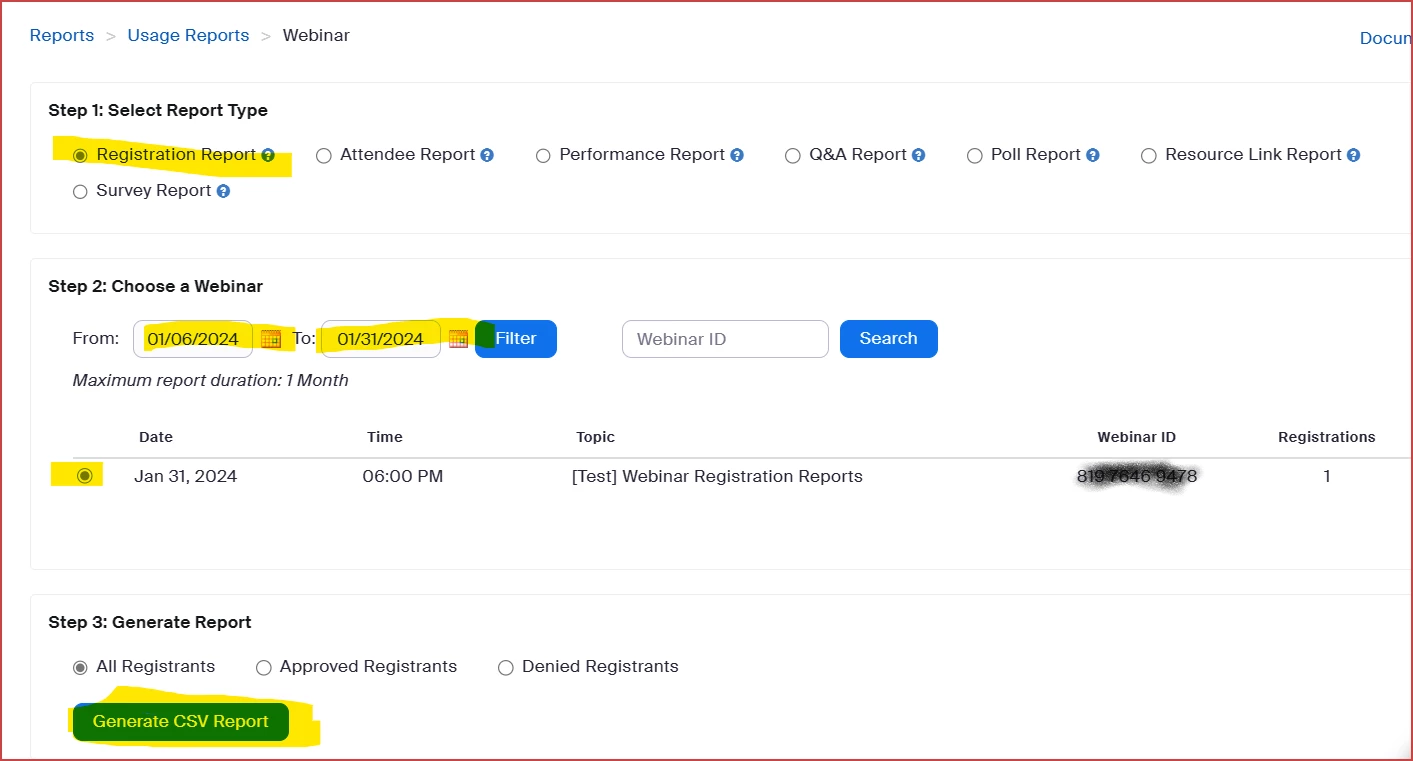
    Once there:  In Step 1: Select Report Type, click the Registration Report radio button.  In Step 2: Choose a Webinar, enter the appropriate dates in the date fields or enter the webinar ID, and once the desired webinar is found, click the radio button on the far left.  Then in Step 3:  Generate the Report,  click the blue Generate CSV Report button. 
    Your report will be downloaded to your browser's Download folder.  Open with Excel or any other CSV reading program.  I created one custom question, "Are you a member?". The answer is highlighted.

     

    2 replies

    Ray_Harwood
    Community Super Champion | Customer
    Community Super Champion | Customer
    January 8, 2024

    Welcome to the Zoom Community, @menton95.


    The reports are available to the meeting host from the Webinars menu:

    Once there:  In Step 1: Select Report Type, click the Registration Report radio button.  In Step 2: Choose a Webinar, enter the appropriate dates in the date fields or enter the webinar ID, and once the desired webinar is found, click the radio button on the far left.  Then in Step 3:  Generate the Report,  click the blue Generate CSV Report button. 

    Your report will be downloaded to your browser's Download folder.  Open with Excel or any other CSV reading program.  I created one custom question, "Are you a member?". The answer is highlighted.

     

    menton95Author
    Newcomer
    January 10, 2024

    Thanks a lot! Very helpful 🙂
