Remove All Participants | Community
Skip to main content
Newcomer
July 27, 2023
Solved

Remove All Participants

  • July 27, 2023
  • 1 reply
  • 6 views

Hello,


In webinars specifically, is there a way to remove/kick all participants (not including hosts & panelists) all at once? We would like to have just the hosts & panelists hang back for a debrief, and thought this might be more convenient than a separate meeting, as sometimes we lose the panelists before the debrief. Has anyone done this successfully, or perhaps accomplished the same sort of thing somehow e.g. by kicking attendees to a waiting room, or using a breakout? Thanks for any help.

    Best answer by Ray_Harwood

    Hi, @PLRBwebinars.  @joshbrage_ZE's answer is spot on.  I have Zoom Events licenses, and the Backstage feature comes in handy most of the time.


    If you are not interested in doing Zoom Events, but would still like to have access to the Backstage feature, you can purchase the cheapest possible Zoom Events license -- a Pay Per Attendee 50 attendee license for $125 (think of it as "about $10.50/month").  Like most Zoom licenses, that license can only be assigned to one Zoom user; if you had more users needing the Backstage access, each would require the PPA 50 license (or higher, if you end up producing Zoom Events). 


    The PPA license is good for one year from the date of purchase.  Note that while the duration of the license is "annual", it is not like other Zoom annually renewable licenses which prorate the first partial-year purchase and then renew on your Zoom Anniversary Date... it starts on the date of purchase and any unused Attendees expire one year later.  At that point you can buy another PPA 50 license which would enable Backstage for another year.


    FYI, when this is enabled, you have the choice of having either "Practice Sessions" or "Backstage" when setting up a webinar.

     

    With Backstage enabled, after you have started the Webinar for Attendees and are winding down, the End button in the lower right gives you these options:
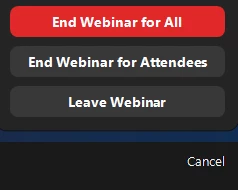
    End Webinar for Attendees removes all Attendees and puts all Hosts, Co-Hosts, and Panelists into the Backstage area.


    Happy to entertain questions on Zoom Events licensing!  I have one of each: PPA, Annual/Unlimited, and Legacy.

    1 reply

    joshbrage_ZE
    Employee
    Employee
    July 27, 2023

    @PLRBwebinars this is one of the main features with webinar Backstage, available with Zoom Events/Zoom Sessions licensing! Here's a link to a video on how it works and here's a link to pricing

    Ray_Harwood
    Community Super Champion | Customer
    Community Super Champion | Customer
    July 31, 2023

    Hi, @PLRBwebinars.  @joshbrage_ZE's answer is spot on.  I have Zoom Events licenses, and the Backstage feature comes in handy most of the time.


    If you are not interested in doing Zoom Events, but would still like to have access to the Backstage feature, you can purchase the cheapest possible Zoom Events license -- a Pay Per Attendee 50 attendee license for $125 (think of it as "about $10.50/month").  Like most Zoom licenses, that license can only be assigned to one Zoom user; if you had more users needing the Backstage access, each would require the PPA 50 license (or higher, if you end up producing Zoom Events). 


    The PPA license is good for one year from the date of purchase.  Note that while the duration of the license is "annual", it is not like other Zoom annually renewable licenses which prorate the first partial-year purchase and then renew on your Zoom Anniversary Date... it starts on the date of purchase and any unused Attendees expire one year later.  At that point you can buy another PPA 50 license which would enable Backstage for another year.


    FYI, when this is enabled, you have the choice of having either "Practice Sessions" or "Backstage" when setting up a webinar.


    With Backstage enabled, after you have started the Webinar for Attendees and are winding down, the End button in the lower right gives you these options:

    End Webinar for Attendees removes all Attendees and puts all Hosts, Co-Hosts, and Panelists into the Backstage area.


    Happy to entertain questions on Zoom Events licensing!  I have one of each: PPA, Annual/Unlimited, and Legacy.
