

Reassign Host Role Prior to Webinar Start | Community
Skip to main content
Newcomer
August 17, 2021
Solved

Reassign Host Role Prior to Webinar Start

  • August 17, 2021
  • 2 replies
  • 1 view

Hello,

I am new to using Zoom Webinar.

Background:

I manage Zoom / Marketo webinar integration and am needing to set up a webinar for a regional marketer.

Can I give the marketer "Host" role prior to the webinar starting or do I need to login at the time of the webinar and pass  the "Host" Role off to the marketer in real time during the webinar?
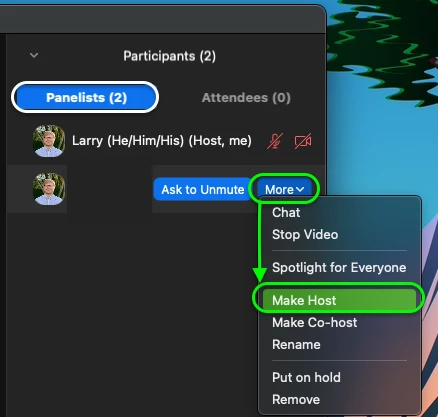


    Best answer by rn-zm

    Hey @Sphillips21, you can assign the alternative host role prior to the webinar, you can read up on the Alternative Host role within our KB article. Just note the Limitations and the Prerequisites of that role within a webinar.


    However to your point, if the user you want to make host joins as an attendee, you will need to promote that user to a panelist and give Host permissions. 


    Hope this helps! 🙂

    2 replies

    rn-zmAnswer
    Community Manager
    August 18, 2021

    Hey @Sphillips21, you can assign the alternative host role prior to the webinar, you can read up on the Alternative Host role within our KB article. Just note the Limitations and the Prerequisites of that role within a webinar.


    However to your point, if the user you want to make host joins as an attendee, you will need to promote that user to a panelist and give Host permissions. 


    Hope this helps! 🙂

    Newcomer
    August 18, 2021

    @RN52_2 yes, this is super helpful and the solution that I was looking for.

    The regional marketer does have the proper licensce and is on the same company account  so using Alternative Host should do the trick.

    Good to know that I would need to make them a host if they join as an attendee.

    Thank you so much!

    Newcomer
    August 18, 2021

    I would assume that if you needed to promote an attendee to panelist in order to make them a host, that would need to happen in real-time, during the webinar. Can you confirm @RN52_2 ?

    Community Manager
    August 18, 2021

    Hey @Sphillips21, correct! You can import panelists when setting up the webinar and they will receive the meeting info, however, these invites are unique to every panelist you invite. You can check out this KB article, Adding or importing panelists to a webinar.