Lite-Version vs Fullversion | Community
Skip to main content
Newcomer
May 3, 2024
Solved

Lite-Version vs Fullversion

  • May 3, 2024
  • 2 replies
  • 21 views

Hello,
I have created several webinars in Zoom. Now I see that there are different versions.
Lite version and full version.
Unfortunately, I can't find out how they differ. Does anyone from the forum here know?


Best Regards

tjamaker

    Best answer by Ray_Harwood

    Welcome to the Zoom Community, @tjamaker.  And welcome to the often-confusing world of Zoom’s scattered terminology. 

    The “Lite” Version is a scaled down Zoom Sessions type. Licensing (cost) is much different for anything in the Zoom Events and Zoom Sessions product lines, of which Sessions Lite is a part.


    If you are using what I refer to as “classic standalone webinars”, there’s only one “type” available to you, for which you pay a monthly fee for up to a certain limit of the number of participants, the lowest increment being 500. 


    Zoom Sessions licenses come in two varieties:

    • An annual “Unlimited” license which, like the classic Webinar license, allows you to have as many (non-concurrent)  Webinar-format sessions. There are a number of benefits to this license type, but is much more expensive at the 500 attendee level:
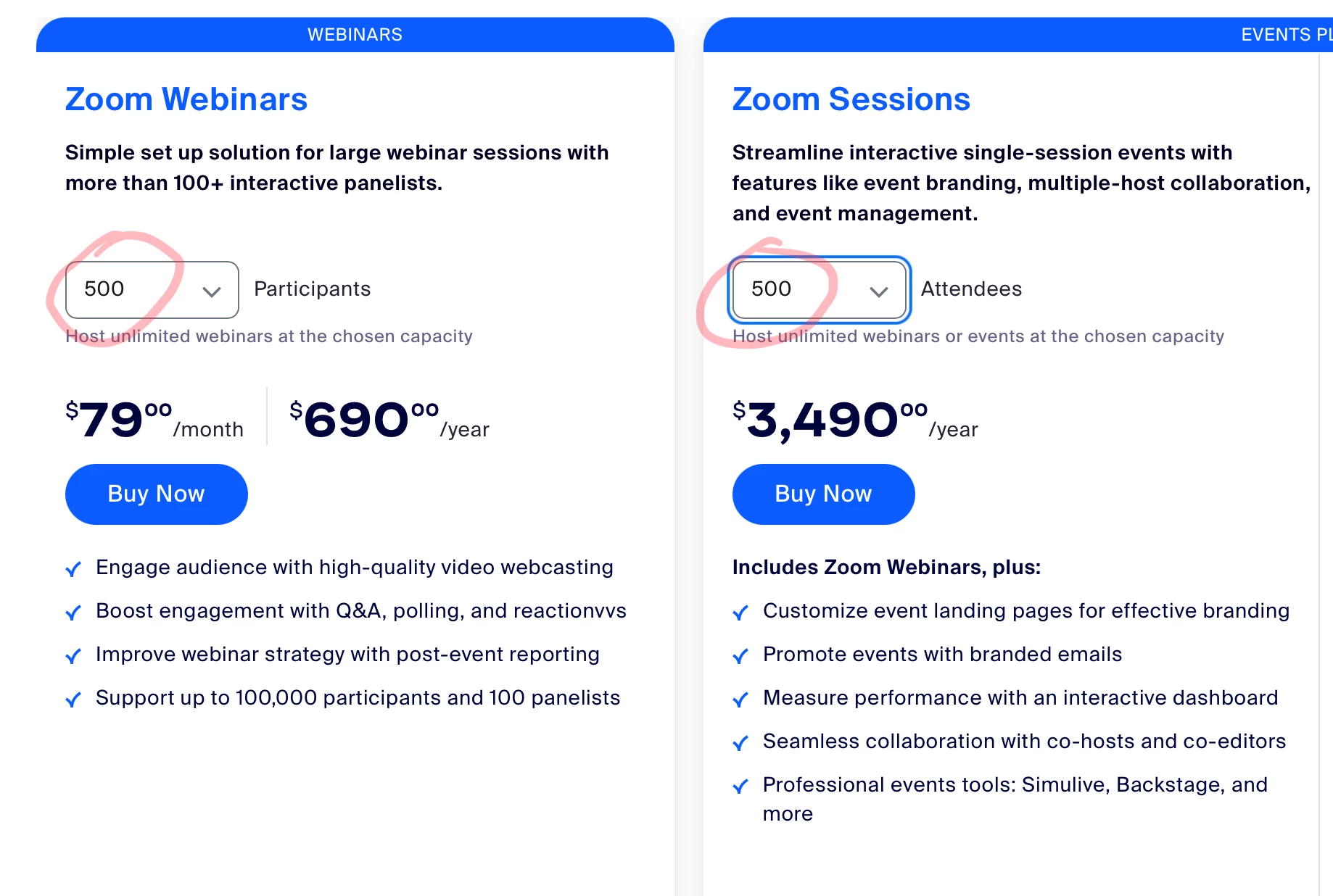
    • The Pay Per Attendee license model lets you buy “seats” at a price per seat starting at $1.80 per attendee bought in small quantities, down to $1.25/seat in large quantities.  You really have to decide whether the additional cost is warranted for your use case. Many large companies are moving to them, but I find smaller organizations can’t justify the extra expense. 

    If you’d like to discuss the pros and cons in detail, reach out to your Zoom Account Executive for information, or reach out to me via Z-SPAN at the link below. 

    2 replies

    Ray_Harwood
    Community Super Champion | Customer
    Community Super Champion | Customer
    May 4, 2024

    Welcome to the Zoom Community, @tjamaker.  And welcome to the often-confusing world of Zoom’s scattered terminology. 

    The “Lite” Version is a scaled down Zoom Sessions type. Licensing (cost) is much different for anything in the Zoom Events and Zoom Sessions product lines, of which Sessions Lite is a part.


    If you are using what I refer to as “classic standalone webinars”, there’s only one “type” available to you, for which you pay a monthly fee for up to a certain limit of the number of participants, the lowest increment being 500. 


    Zoom Sessions licenses come in two varieties:

    • An annual “Unlimited” license which, like the classic Webinar license, allows you to have as many (non-concurrent)  Webinar-format sessions. There are a number of benefits to this license type, but is much more expensive at the 500 attendee level:
    • The Pay Per Attendee license model lets you buy “seats” at a price per seat starting at $1.80 per attendee bought in small quantities, down to $1.25/seat in large quantities.  You really have to decide whether the additional cost is warranted for your use case. Many large companies are moving to them, but I find smaller organizations can’t justify the extra expense. 

    If you’d like to discuss the pros and cons in detail, reach out to your Zoom Account Executive for information, or reach out to me via Z-SPAN at the link below. 

    Newcomer
    October 15, 2024

    I can't find Zoom Lite in the list of products, The Workspace thing is horrible.  It's totally meetings orientated,  not client orientated.  Our business is single client based, often with very pressured folk who need to change appointed date at short notice, fine for them, but fiddling through Zoom is a stressful nightmare!!!!

    Ray_Harwood
    Community Super Champion | Customer
    Community Super Champion | Customer
    October 15, 2024

    Dear @pissedoff2,


    The original post and my response were specifically referring to the Zoom Webinar product, along with the expanded products called Zoom Events and Zoom Sessions.


    There is no “Zoom Lite”.


    You don’t give much detail about your business operation, but I recommend looking at Calendly as a way to permit relatively easy scheduling, cancellation, and rescheduling of meetings among individuals and small groups. Zoom also has a Scheduling app – free for Business accounts and higher, but extra charge for Pro accounts – but personally I still prefer Calendly for its flexibility and coordination features.  https://calendly.com