

Can chat be disabled in Zoom Webinar? | Community
Skip to main content
Newcomer
January 14, 2022
Solved

Can chat be disabled in Zoom Webinar?

  • January 14, 2022
  • 5 replies
  • 7 views

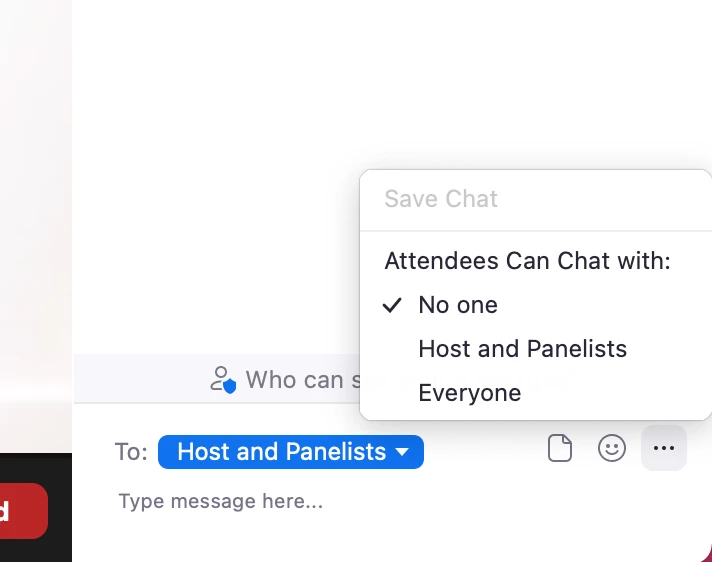
I want to have a training event using Zoom Webinar where attendees can only ask questions via the Q & A option and not in chat. I want to disable chat to prevent private conversations amongst the attendees during the event.  Is this possible and if so, how do I do that?
    Best answer by Dan_ZoomSE

    Hello @CLynch39,


    Absolutely!  


    Once you start the Webinar, open chat, click the three dots in the bottom right and you can choose how chat will work for Attendees.


    If this has answered your question, please click the Accept as Solution button below so that others in the Community may benefit as well.

    Thanks!

    5 replies

    Dan_ZoomSE
    Employee
    Employee
    January 14, 2022

    Hello @CLynch39,


    Absolutely!  


    Once you start the Webinar, open chat, click the three dots in the bottom right and you can choose how chat will work for Attendees.


    If this has answered your question, please click the Accept as Solution button below so that others in the Community may benefit as well.

    Thanks!

    CLynch39Author
    Newcomer
    January 14, 2022

    Thanks very much!

    Newcomer
    January 21, 2022

    That is good info.  Is there a setting that Admin can set for chat to be only to host and co-host


    Dan_ZoomSE
    Employee
    Employee
    January 21, 2022

    No, you cannot restrict to just host/co-host, all other Panelists would be able to chat with each other as well.  But the Host and Co-Host could send private messages to each other.  If host and cohost need to chat but they do not want anyone else to be able to, then I would recommend that the Host and Co-Host use Zoom IM (outside of the webinar).


    If this has answered your question, please click the Accept as Solution button below so that others in the Community may benefit as well.

    Thanks!

    Newcomer
    July 12, 2022

    When the in-webinar chat is set to "no one," can hosts and panelists still use the chat to send to just each other or does the "no one" apply to them as well?

    Newcomer
    March 16, 2023

    Is there a way for a participant to stop seeing the chatter on-screen during a webinar?  It would be nice to be able to just watch the presentation without everyone chiming in with whatever comes to mind. It would be a richer experience if I could click in and out of chat without seeing all of the traffic on-screen.

    Ray_Harwood
    Community Super Champion | Customer
    Community Super Champion | Customer
    June 30, 2023

    Welcome to the Zoom Community, @Moimode.


    Each person controls whether or not the chat text shows up as "previews" by clicking on the ^ symbol next to the Chat button and toggling Show Chat Previews on or off:


    Newcomer
    June 30, 2023

    I'd like to know this too. Much of the advice I've seen is for administrators and those who are giving the sessions, but as a participant, I find it really distracting to be constantly bombarded with chat messages that pop up on the bottom of the screen. How can we as participants turn off these pop up annoyances when we don't want to see them?

    Newcomer
    July 5, 2023

    This does the trick! Love these easy fixes!


    Thank you, Ray!