
ASL Interpeter in Webinar | Community
Skip to main content
Newcomer
March 17, 2022
Solved

ASL Interpeter in Webinar

  • March 17, 2022
  • 5 replies
  • 10 views

In a webinar, is there a way to have an ASL interpreter appear smaller than the main presentation window or give people the option to minimize the interpreter if they do not need ASL? 

    Best answer by TomO

    Hi Tim,

         In a Webinar the host or co-host has the option to allow Multi-Pinning for participants. As a participant, with this setting enabled you can set your own pins.
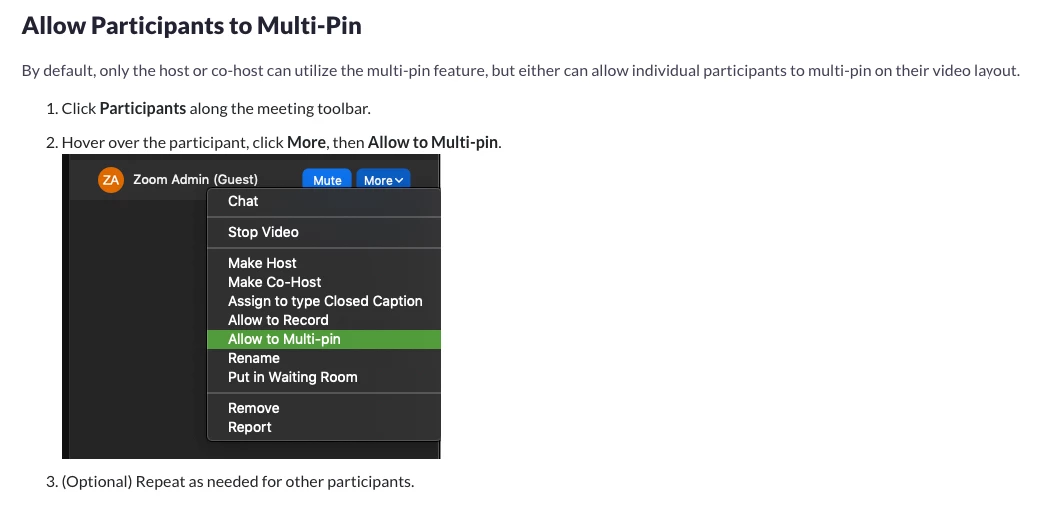
     

    https://support.zoom.us/hc/en-us/articles/201362743-Pinning-participants-videos


    I hope this helps! Please mark my reply as an accepted solution if it answers your question.


    5 replies

    TomO
    Community Champion | Employee
    TomOAnswer
    Community Champion | Employee
    March 17, 2022

    Hi Tim,

         In a Webinar the host or co-host has the option to allow Multi-Pinning for participants. As a participant, with this setting enabled you can set your own pins.


    https://support.zoom.us/hc/en-us/articles/201362743-Pinning-participants-videos


    I hope this helps! Please mark my reply as an accepted solution if it answers your question.


    Community Champion | Employee
    March 17, 2022

    Unfortunately, as @TomO mentions, the only option is to pin who you want to see, but there is no way to hide an interpreter (or specific participant) or adjust the size of their window at this time.

    Newcomer
    April 22, 2022

    We've run into these requests from our volunteers as well! This is an important question and while multi-pin allows more than one speaker to be pinned for an attendee it doesn't appear to allow the attendee to opt to select which ones work for them and to have the ability to resize different video feeds. We would request these features as well for future Zoom development - is there a best way to file such a request beyond posting here in the forums?

    Participant
    April 22, 2022

    How great would it be... dare I say "how much happier one could Zoom"... if Sign Language was simply a choice when adding language interpreters to a webinar (or meeting)? If Zoom made this possible, Sign Language interpretation would be on par with spoken language interpretation instead of relegated to workarounds like spotlighting/pinning that make it difficult to use and have limitations. A webinar attendee could then simply pick the Sign Language interpreter from the list of interpreted languages, and presto... a picture in picture video window appears with the Sign Language interpreter on the attendee's screen that they could move, resize, etc. 

    Help Zoom understand how important this is in order for us all to "Zoom Happy"... submit feedback to: Feedback - Zoom

    Participant
    September 6, 2022

    Zoom... Thank you for solving this sign language interpretation challenge as requested... you have greatly improved the user experience in this regard.

    Newcomer
    June 25, 2024

    I'm an ASL interpreter working on Zoom frequently.  It would be helpful if multi-pin authority was on by default for everyone in the room to begin with, unburdening the host from having to go through the steps of giving multi-pin permission to the ASL interpreters and consumers in the room who wish to use it.  

    Community Champion | Employee
    June 25, 2024

    @butterfly_mtn - Definitely something we can look into, but we are really putting more time into improving the natural sign-language view so that you would have 1 window with DHH participants you are interpreting for, and the other window would have the general meeting for you to see what is going on.