

Adding a survey from the survey tab to a webinar | Community
Skip to main content
Newcomer
January 17, 2025
Solved

Adding a survey from the survey tab to a webinar

  • January 17, 2025
  • 2 replies
  • 1 view

I created a general survey a while ago under the Survey tab on the Zoom menu. I now want to add this survey to a webinar template, but the only options I have in the webinar settings are to create a new survey from scratch or to add a third-party survey. Am I missing something somewhere, or is there not an option to do this?

Best answer by lancetlc

Hey @PTCMA-Janine,


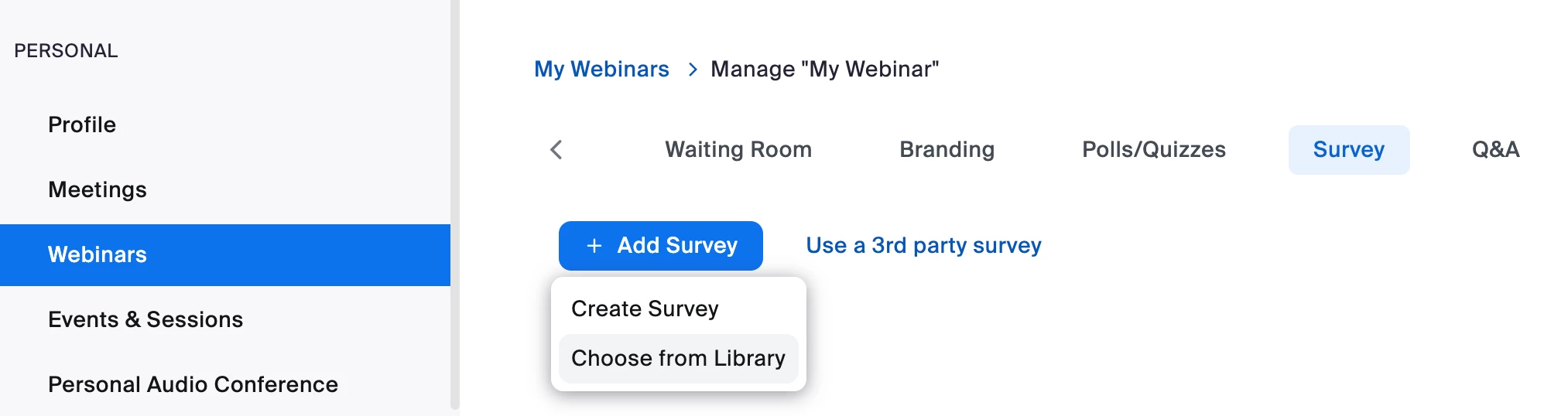
Thank you for your question. You can access or edit your Webinar, go to the "Survey" tab, Click on "Add Survey" and then "Choose from Library"

2 replies

lancetlcAnswer
Employee
March 31, 2025

Hey @PTCMA-Janine,


Thank you for your question. You can access or edit your Webinar, go to the "Survey" tab, Click on "Add Survey" and then "Choose from Library"

MGSR
Community Manager
Community Manager
July 21, 2025

Hi @PTCMA-Janine! I wanted to let you know that I’ve marked @lancetlc's response as the accepted solution, as I believe it answers your question. If you have any more questions or need further clarification, feel free to ask.