

- Mark as New
- Bookmark
- Subscribe
- Mute
- Subscribe to RSS Feed
- Permalink
- Report Inappropriate Content
2023-02-06 08:21 AM
Solved! Go to Solution.
- Mark as New
- Bookmark
- Subscribe
- Mute
- Subscribe to RSS Feed
- Permalink
- Report Inappropriate Content
2023-02-06 08:22 AM
i TRIED TO START A ZOOM MEETING AND IT TELLS ME i CAN'T DO THAT UNTIL i UPDATE. The instructions say to get my IT depat to do that. I am the IT department and they is no way to update. i am starting a meeting in 20 minutes!!!!!!!!!!! BUT CAN't


- Mark as New
- Bookmark
- Subscribe
- Mute
- Subscribe to RSS Feed
- Permalink
- Report Inappropriate Content
2023-02-06 08:59 AM
Hello,
Please follow these steps to Update your Zoom App
https://support.zoom.us/hc/en-us/articles/201362233-Upgrading-Zoom-to-the-latest-version
If this response helps, please accept the answer as an accepted solution, so others can benefit as well.

- Mark as New
- Bookmark
- Subscribe
- Mute
- Subscribe to RSS Feed
- Permalink
- Report Inappropriate Content
2023-07-13 07:14 AM
I have this issue do annoying. It is recurrent, I have a paid account, I cannot find the option to check for updates from my profile. What did you do to sort this out please?


- Mark as New
- Bookmark
- Subscribe
- Mute
- Subscribe to RSS Feed
- Permalink
- Report Inappropriate Content
2023-07-13 10:39 AM
Hey @CurlyToller welcome to the community! Have you attempted to look into the solutions along this thread? For example, it seems like traditionally Uninstalling and reinstalling the Zoom application or running 'clean Zoom' resolved some users issues!
- Download and run CleanZoom.
Note: Use of the clean uninstaller will completely remove the Zoom desktop client, as well as the Zoom plugin for Outlook. The Outlook add-in, Chrome/Firefox extensions, and Google Workspace add-on are unaffected. - Once completed, download Zoom from our download center and reinstall.
Zoom Community Moderator
he/him/his
Have you heard about Zoom AI Companion? ➡️ Check it out!
- Mark as New
- Bookmark
- Subscribe
- Mute
- Subscribe to RSS Feed
- Permalink
- Report Inappropriate Content
2023-02-06 09:07 AM
I had the same issue and this article does not help. I cannot log in so therefore cannot use the profile icon. When I downloaded using the link, I still encountered the same issue. I am a private, paid user that does not have an IT department. Any suggestions would be appreciated as I have already had to cancel two meetings today due to this issue.

- Mark as New
- Bookmark
- Subscribe
- Mute
- Subscribe to RSS Feed
- Permalink
- Report Inappropriate Content
2023-02-07 07:06 AM
Uninstall Zoom from your PC then download and reinstall it, that's the only way I've been able to get around this issue but it worked.
- Mark as New
- Bookmark
- Subscribe
- Mute
- Subscribe to RSS Feed
- Permalink
- Report Inappropriate Content
2023-02-06 10:11 AM
I agree that the article does not help. It doesn't not resemble my site at all. I need to have this up and running by the end of the day today! I am my IT department. Come on Zoom! What is going on???
- Mark as New
- Bookmark
- Subscribe
- Mute
- Subscribe to RSS Feed
- Permalink
- Report Inappropriate Content
2023-02-06 10:26 AM
I tired the download links and they don't work. Before I can execute the download I have to sign in. It tells me I can't sign in until I update. PLEASE ZOOM -- FIND A SOLUTION!
- Mark as New
- Bookmark
- Subscribe
- Mute
- Subscribe to RSS Feed
- Permalink
- Report Inappropriate Content
2023-02-06 11:41 AM
Hi @janetwall are you on windows or macOS? If you already have the Zoom desktop client installed, to check for updates as stated in the KB Upgrading Zoom to the latest version first, you will need to Sign in to Zoom desktop client.
Zoom Community Moderator
he/him/his
Have you heard about Zoom AI Companion? ➡️ Check it out!
- Mark as New
- Bookmark
- Subscribe
- Mute
- Subscribe to RSS Feed
- Permalink
- Report Inappropriate Content
2023-02-06 11:48 AM
This issue just popped up today and seems to be affecting many users. The common solutions are not working
- Mark as New
- Bookmark
- Subscribe
- Mute
- Subscribe to RSS Feed
- Permalink
- Report Inappropriate Content
2023-02-06 11:53 AM
Hi @nextstep @janetwall @silo20 when you say you are unable to log-in/sign-in, what methods are you using to sign into the Zoom client? Are you prompt any specific error codes?
Zoom Community Moderator
he/him/his
Have you heard about Zoom AI Companion? ➡️ Check it out!
- Mark as New
- Bookmark
- Subscribe
- Mute
- Subscribe to RSS Feed
- Permalink
- Report Inappropriate Content
2023-02-06 11:56 AM
- Mark as New
- Bookmark
- Subscribe
- Mute
- Subscribe to RSS Feed
- Permalink
- Report Inappropriate Content
2023-02-06 12:01 PM
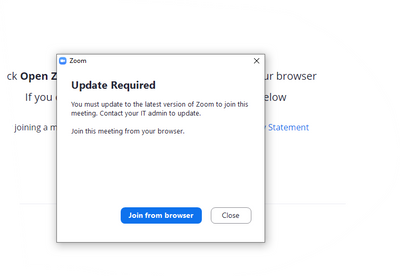
Hi @nextstep gotcha, thank you for the screenshot! This is helpful.
So, are you an IT admin on the account?
As an Account owner or Admin, you can require users with older versions of the Zoom desktop client or mobile app to update to the specified minimum client versions. This can be applied to only internal users or to include external meeting participants, as well as configured at the group level for granular version requirements across different groups.
This setting is enforced when users try to sign in or start a meeting/webinar. Users will be prompted to update to the specified version before they can sign in or start the meeting/webinar as to what you're experiencing currently.
This KB on Requiring users to update Zoom should help further clarify
Zoom Community Moderator
he/him/his
Have you heard about Zoom AI Companion? ➡️ Check it out!
- Mark as New
- Bookmark
- Subscribe
- Mute
- Subscribe to RSS Feed
- Permalink
- Report Inappropriate Content
2023-02-06 12:42 PM - edited 2023-02-06 12:47 PM
I followed the instructions and I still get the same error. I am not an IT Admin. Just the admin on my account.
- Mark as New
- Bookmark
- Subscribe
- Mute
- Subscribe to RSS Feed
- Permalink
- Report Inappropriate Content
2023-02-06 12:47 PM - edited 2023-02-06 12:48 PM
@nextstep hmmm, interesting. I did see from the discussion unable to sign in to update that seemed to work was running the 'clean zoom' from the KB on Uninstalling and reinstalling the Zoom application
- Download and run CleanZoom.
Note: Use of the clean uninstaller will completely remove the Zoom desktop client, as well as the Zoom plugin for Outlook. The Outlook add-in, Chrome/Firefox extensions, and Google Workspace add-on are unaffected. - Once completed, download Zoom from our download center and reinstall.
Let me know if that helps!
Zoom Community Moderator
he/him/his
Have you heard about Zoom AI Companion? ➡️ Check it out!
- Mark as New
- Bookmark
- Subscribe
- Mute
- Subscribe to RSS Feed
- Permalink
- Report Inappropriate Content
2023-02-06 01:19 PM
The problem went away but for some reason the platform looks different with icons on the side and my Camera is cloudy. Very strange goings on with Zoom
- Mark as New
- Bookmark
- Subscribe
- Mute
- Subscribe to RSS Feed
- Permalink
- Report Inappropriate Content
2023-02-06 02:23 PM
@nextstep interesting, mind attaching a screenshot of what you're currently experiencing?
Zoom Community Moderator
he/him/his
Have you heard about Zoom AI Companion? ➡️ Check it out!
- Mark as New
- Bookmark
- Subscribe
- Mute
- Subscribe to RSS Feed
- Permalink
- Report Inappropriate Content
2023-02-06 02:34 PM
Clean zoom worked, but the other directions I got from support said to restart my computer. I did so and then reinstalled the latest version and all looks OK now.
It is really frustrating when somethin like this happens without any warning or notice from Zoom. I do not believe that I am the only person who had this issue.
- Mark as New
- Bookmark
- Subscribe
- Mute
- Subscribe to RSS Feed
- Permalink
- Report Inappropriate Content
2023-02-06 02:41 PM
Hi @janetwall great! I'm glad that 'clean zoom' worked! 🙂 This experience isn't intentional by any means, however, I will do some more research as to if there were other cases similar to this discussion. Thanks!
Zoom Community Moderator
he/him/his
Have you heard about Zoom AI Companion? ➡️ Check it out!
- Mark as New
- Bookmark
- Subscribe
- Mute
- Subscribe to RSS Feed
- Permalink
- Report Inappropriate Content
2023-02-07 12:12 PM
Well, I can't believe that it worked. And in the first try. Thank you!
- Mark as New
- Bookmark
- Subscribe
- Mute
- Subscribe to RSS Feed
- Permalink
- Report Inappropriate Content
2023-02-07 12:13 PM
@MyOwnSupport yay! Glad to hear this worked!
Zoom Community Moderator
he/him/his
Have you heard about Zoom AI Companion? ➡️ Check it out!
- Mark as New
- Bookmark
- Subscribe
- Mute
- Subscribe to RSS Feed
- Permalink
- Report Inappropriate Content
2023-02-06 11:58 AM - edited 2023-02-06 11:59 AM
When I get that message there is nothing to give me the option to update. There is no reason why I should be required to join from the browser. I get this message upon trying to log into a meeting or start a meeting on my platform
- Mark as New
- Bookmark
- Subscribe
- Mute
- Subscribe to RSS Feed
- Permalink
- Report Inappropriate Content
2023-02-06 08:29 PM
Cleanzoom worked for me too. I ran it, restarted, then downloaded zoom again. Thank you everyone for the tips.
- Mark as New
- Bookmark
- Subscribe
- Mute
- Subscribe to RSS Feed
- Permalink
- Report Inappropriate Content
2023-02-07 07:04 AM
A solution that works: Uninstall Zoom from your PC then download and reinstall it, that's the only way I've been able to get around this issue but it worked. I hope Zoom fixes this update bug as soon as possible. This was hella inconvenient for my meeting yesterday.
- Mark as New
- Bookmark
- Subscribe
- Mute
- Subscribe to RSS Feed
- Permalink
- Report Inappropriate Content
2023-04-13 10:20 AM
Hi @janetwall @MyOwnSupport @Savdub1 @silo20 @nextstep & everyone else on this thread! There is a knowledge base article out for Troubleshooting issues with Zoom update and installation, suggest looking through the troubleshooting suggestions and seeing if this resolves your issue(s). Thanks!
Zoom Community Moderator
he/him/his
Have you heard about Zoom AI Companion? ➡️ Check it out!
- Mark as New
- Bookmark
- Subscribe
- Mute
- Subscribe to RSS Feed
- Permalink
- Report Inappropriate Content
2024-07-30 07:53 PM
The Zoom Updater has been hung for the last half hour. Do not close this window it says, but I have a strong desire to do just that. Advice?
- Mark as New
- Bookmark
- Subscribe
- Mute
- Subscribe to RSS Feed
- Permalink
- Report Inappropriate Content
2024-07-30 07:58 PM
OK now. Just had to open the shield and OK the update. Who knew?
