

Zoomtopia is here. Unlock the transformative power of generative AI, helping you connect, collaborate, and Work Happy with AI Companion.
Register nowEmpowering you to increase productivity, improve team effectiveness, and enhance skills.
Learn moreKeep your Zoom app up to date to access the latest features.
Download Center Download the Zoom appDownload hi-res images and animations to elevate your next Zoom meeting.
Browse Backgrounds Zoom Virtual BackgroundsEmpowering you to increase productivity, improve team effectiveness, and enhance skills.
Zoom AI CompanionUser groups are unique spaces where community members can collaborate, network, and exchange knowledge on similar interests and expertise.
Help & Resources is your place to discover helpful Zoom support resources, browse Zoom Community how-to documentation, and stay updated on community announcements.
The Events page is your destination for upcoming webinars, platform training sessions, targeted user events, and more. Stay updated on opportunities to enhance your skills and connect with fellow Zoom users.
2025-01-23 09:46 AM
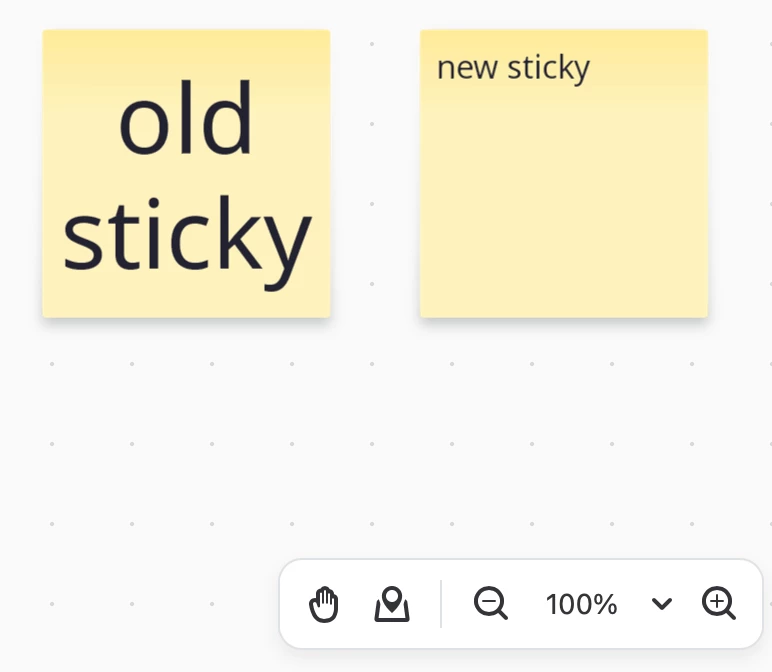
I don't know when the change happened, but on Zoom Whiteboards, Sticky Notes were always created with middle-center aligned auto-sized font. Now when I create stickies, they have top left aligned 16 point font. They're basically just textboxes with a background color now.
The whole point of stickes is that you and your team can read them at different magnifications. The new sticky behaviour makes Zoom Whiteboard undesirable for my staff so I can't get them to use it over other apps, since all other whiteboard apps have stickies that work like a normal human would expect.
Am I missing something? Is there a hidden default settings pallete or something? Why did Zoom do this?
2025-01-23 10:29 AM
hi @thomaspoca
I'm not aware there are any settings as such.
Yes, 16point onto sans top left is my default action.
They are NOT readable at any size; the text stays at the size given and does not grow to be readable when you zoom out.
all the best
john
2025-07-18 07:32 AM
@thomaspoca You can set font size to "Auto", text alignment to "Align center" and "Align middle" to go back to previous behavior.
2025-07-18 11:08 AM
@Shein you can in fact use six clicks to alter three separate format settings to an existing sticky or selection of stickies but those formatting options won't apply to new stickes. What I need is to be able to set defaults.
I'm not exaggerating when I say that the user experience is so bad because of this one change that I can't get my staff to use the whiteboard product on Zoom. Stickes are 90% of what non-power user staff use and they're illegible, so why would they use whiteboard?