

Prevent The New Whiteboard from Hijacking of your meeting | Community
Skip to main content
Newcomer
May 6, 2022
Question

Prevent The New Whiteboard from Hijacking of your meeting

  • May 6, 2022
  • 3 replies
  • 2 views
Prevent Hijacking with people using Whiteboard in Zoom Meeting. People with Zoom Version 5.10.3, That was released on April 18th, 2022.
Since the ad for the feature shows up in every client that updates, someone is sure to do an "OOh, I wonder what this is."
 
Admin Settings:
 
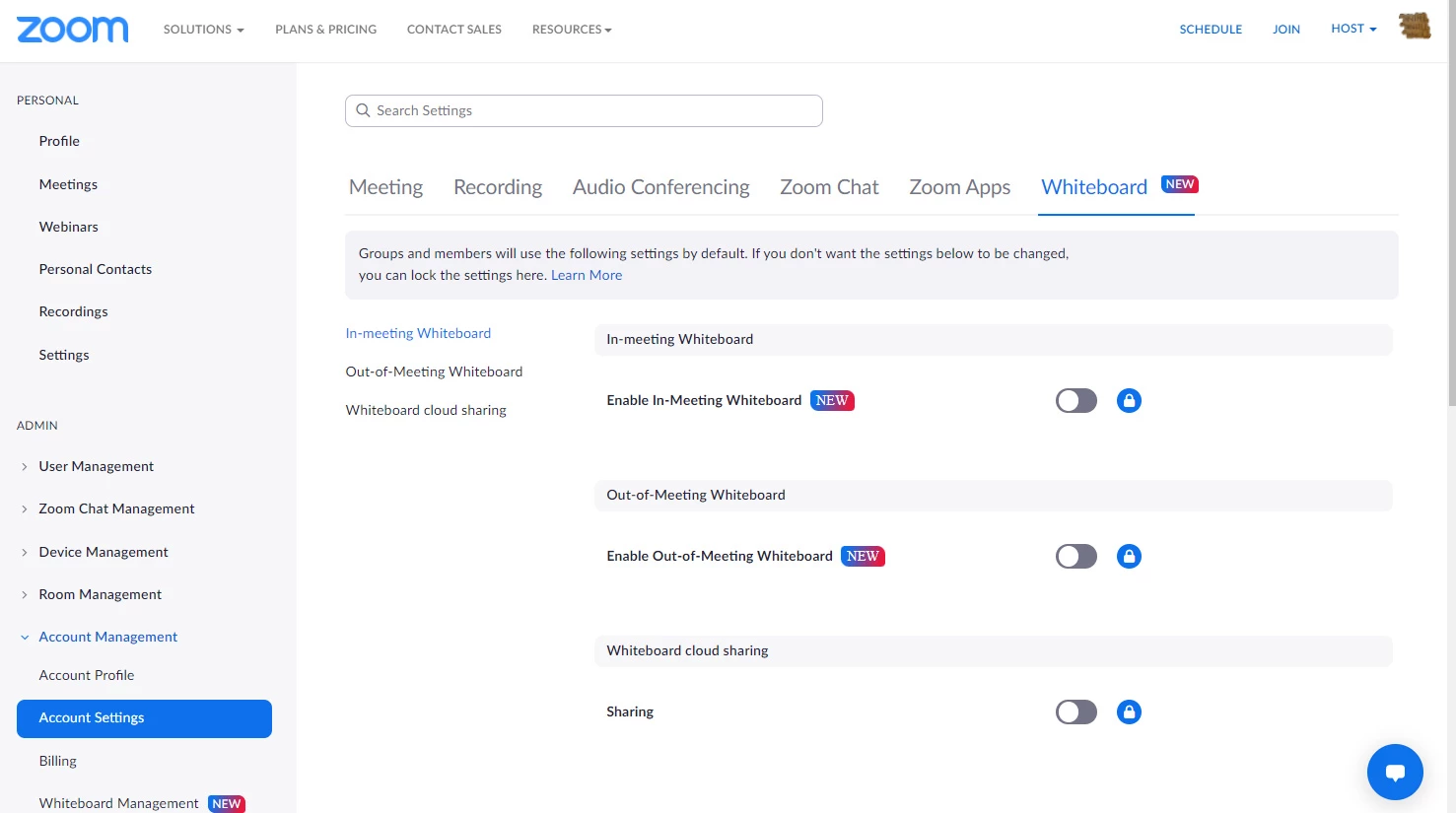
Login to Zoom Portal , Then Under Admin , Account Management , Account Settings. Then click on Whiteboard (New) at top , Their is the setting you would need to disable to get the options to disable. Push slider to the left and disable. Then push the lock on all 3 options.
In meeting whiteboard (NEW)
Out-of-Meeting Whiteboard (NEW)
Whiteboard cloud sharing
 
Hope this helps, They will not be able to Hijack meeting with Whiteboard Moving forward.

Love & Service
Brad W. , Tampa Nightly Newcomers Zoom


    3 replies

    Community Champion | Employee
    May 6, 2022

    Hi Brad,


    I love that you shared this find!


    There is also a less invasive way to do this, that will still allow whiteboard use when desired:

    In the security menu during a meeting, you can uncheck "whiteboard" and then re-enable it when you'd like to use it.


    You can also prevent editing of viewers when you share:


    Thanks,

    Micah


    Newcomer
    October 28, 2022

    I have been using it that way a few weeks.  I prefer to disable the whiteboard completely and not have to remember to do that anymore....thanks to  

    bradwttn
     
    Community Champion | Employee
    May 6, 2022

    Also, I believe that if you leave it unlocked and off in the account settings, it will be off by default and can be enabled from the security settings of the meeting at the meeting hosts discretion.

    Newcomer
    October 28, 2022

    Thank you so much!