

Can not collab on the whiteboard | Community
Skip to main content
Newcomer
January 7, 2024
Solved

Can not collab on the whiteboard

  • January 7, 2024
  • 6 replies
  • 0 views

Hi there,

I couldn't use the whiteboard collaboration mode and my participants were always in the viewer mode so they couldn't write any thing on the board. There are only 2 whiteboards on my zoom and I remember as long as I don't use more than 3 whiteboards I can still use the collaboration for free.
Please tell me how can I solve this problem
Best answer by FlexLiu

Hello, 
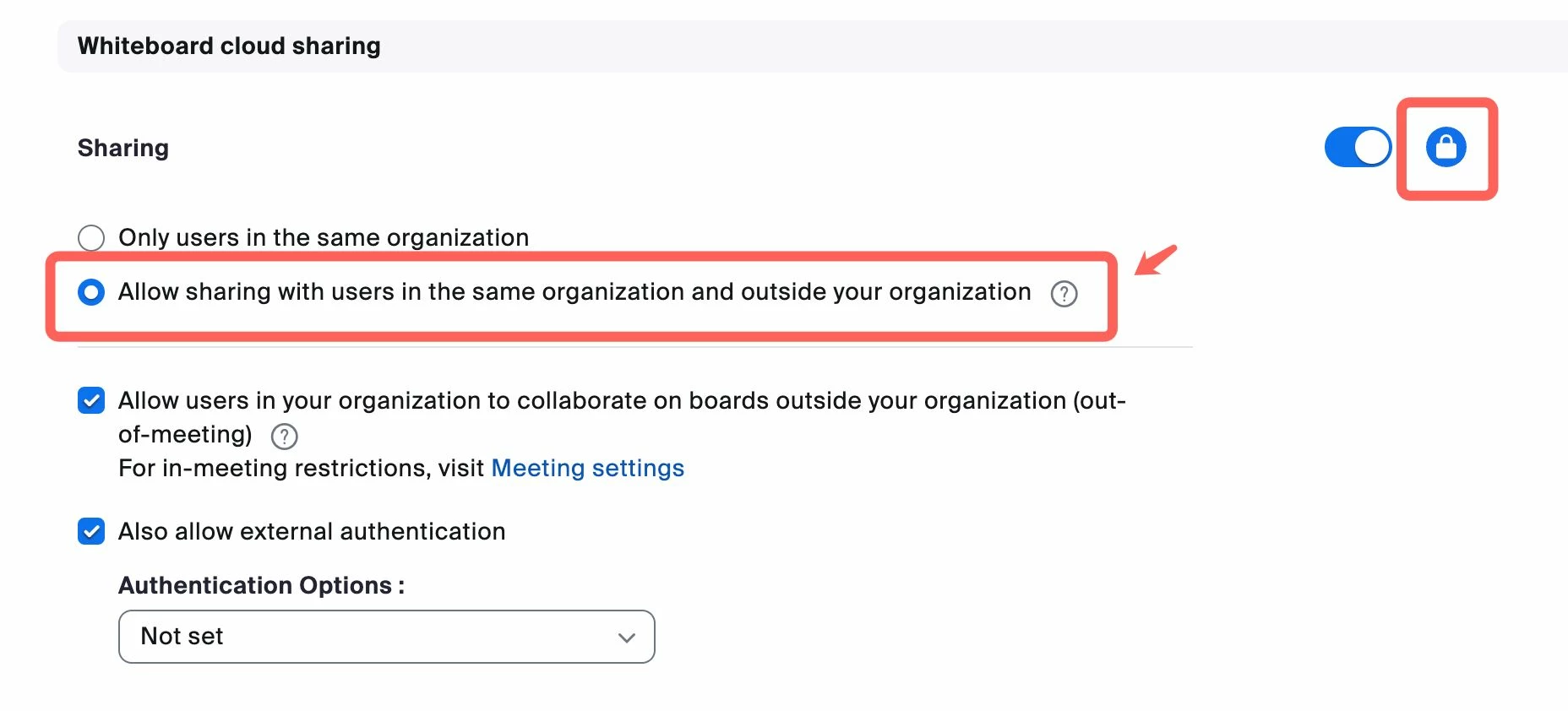
are you sure you already set the setting like the screenshot below? If you are in some group with different setting? if there are no security issues, you can lock the setting at account level. https://zoom.us/account/setting


6 replies

Employee
January 9, 2024

Hi, are you using the whiteboard during the meeting? Temporary permissions in meetings are also subject to the restrictions of the setting permissions now, so you need to make sure your sharing setting enabled and sharing scope is "Allow sharing with users in the same organization and outside your organization"  - https://zoomdev.us/account/setting -> whiteboard ->Whiteboard cloud sharing -> Sharing

Newcomer
January 10, 2024

I don't even have the option Whiteboard cloud sharing in my zoom setting for white board. And I can't find the option Allow sharing with users in the same organization and outside your organization as well. 

Employee
January 10, 2024

You can't find it at personal setting, it's an admin's setting, if you can't open this link - https://zoom.us/account/setting
you are not an admin, you need to ask admin to help you do this change.

Newcomer
January 9, 2024

Hi !

Hello, I think I have the same type of problem (I'm not sure because of my imperfect understanding of the language).

I don't use the whiteboard via the "share" function but through the "Whiteboard" icon.

I create instant meetings, and invite my students by copying them the invite link.

At the beginning of my zoom subscription, my students could collaborate (write...) on the whiteboard but they can't anymore for some time...

I changed the settings of the table in the cloud as advised but it didn't change anything unfortunately. Is it possible to get help please?)


FlexLiuAnswer
Employee
January 10, 2024

Hello, 
are you sure you already set the setting like the screenshot below? If you are in some group with different setting? if there are no security issues, you can lock the setting at account level. https://zoom.us/account/setting


Newcomer
January 10, 2024

Sorry, my mistake : the padlock at the top right was not selected. I've just selected it right now. Do you think this will solve my problem?

Newcomer
January 10, 2024

Hi !  yes, except the "also allow external autentication".

I've just selected it. I'll see during next meeting this afternoon...

Newcomer
February 15, 2024

I have the same problem of participants not being able to edit my whiteboards, even when I choose "collaborating". AND I cannot find this setting for "whiteboard cloud sharing". It's nowhere in my account settings and the link above doesn't take me to it either.
I am the account owner, but I see that that I am not listed as the Admin. I don't know why. I am the only user, but do not have the option to make myself Admin (and have access to more settings?). 
For a feature that is designed for the very purpose of collaborating, it is unbelievable that it is so hard to get the editing ability to work! I have wasted way too much time researching how to fix this, and will just make do with notes and chats like before (at least those feature still work)

Employee
February 19, 2024

Hi Jwag, sorry for your issues. Can you share with me a screenshot of the wb share dialog and I will try to find the root cause. BTW, is your accout a free account?


Employee
March 18, 2024

I have a paid account and still cannot give my participant’s editing ability. The only thing I can add in the share tab is the name of the “channel”, and even though it says “editor” none of the participants are able to do anything on the whiteboard. (they can view it only). See how the collaborators box is greyed out? That would seem like the obvious option to give currant participants editing ability. 

 
What is wrong? Please help me fix this or the whiteboard is useless.

Seems like your account only allow sharing with internal user from your screenshot, if you are an admin, you need to go to Account Settings -> Whiteboard -> Whiteboard cloud sharing to change the sharing scope to "Allow sharing with users in the same organization and outside your organization" as screenshot below.


Newcomer
March 18, 2024

I am having the same problem, owner of my account, but the option of Whiteboard Cloud sharing doesn't show up, how can I access it?


Employee
March 18, 2024

Hi, you need to jump to whiteboard tab to find this setting, like screenshot below


Newcomer
March 18, 2024

Thank you, I don't have the Whiteboard cloud sharing as an option.

I would like to know how to make my clients to be able to draw in the Whiteboard. Thanks!

Employee
March 18, 2024

Are you visiting account settings? this link - https://zoom.us/account/setting, you can see this option if you are on account settings page.

Newcomer
March 20, 2024

I am trying to paste a screenshot of my Settings, but I cannot upload it. Could you please let me know how to do it?

Thank you


Employee
March 21, 2024

You can get a screenshot and paste on the text box.