

Annotation and drawing tools not appearing for other user | Community
Skip to main content
Newcomer
January 14, 2022
Solved

Annotation and drawing tools not appearing for other user

  • January 14, 2022
  • 4 replies
  • 0 views

When I share my whiteboard the annotation and drawing tools are not appearing for the other user. I have checked that annotation is enabled in my meeting settings and I have checked during the screen share that annotation is enabled. Any suggestions welcome!
    Best answer by GreggG_aka_4G

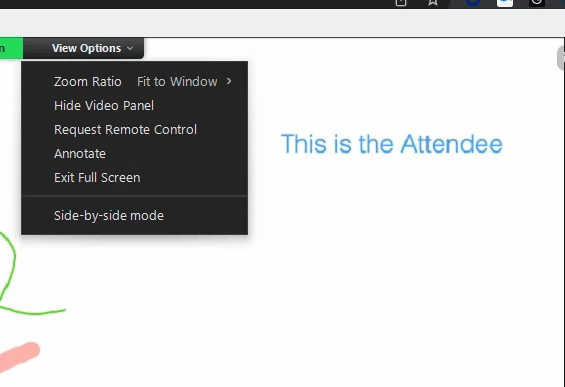
    Hello JessicaVlasova - I just tested this in my environment. When the host shares a whiteboard, the attendee has to select the view options to drop down and select annotate. See the following:


    Additionally, here is the Zoom support guide for annotation: https://support.zoom.us/hc/en-us/articles/115005706806-Using-annotation-tools-for-collaboration

    4 replies

    GreggG_aka_4G
    Community Champion | Employee
    Community Champion | Employee
    January 14, 2022

    Hello JessicaVlasova - I just tested this in my environment. When the host shares a whiteboard, the attendee has to select the view options to drop down and select annotate. See the following:


    Additionally, here is the Zoom support guide for annotation: https://support.zoom.us/hc/en-us/articles/115005706806-Using-annotation-tools-for-collaboration

    Newcomer
    February 27, 2023

    Annotate does not appear under View Options as indicated in this solution. Annotate is enabled in settings. Both parties are using app. I have seen multiple posts about this but no solutions.

    RHTirrell
    Newcomer
    Newcomer
    May 17, 2022

    I've enabled annotation in my Zoom settings so that attendees (who are not screen sharing) can annotate. However, the annotate option only comes up for hosts and panelists and not attendees. Why is that?

    Newcomer
    November 30, 2023

    I have the same problem. There are no annotation tools visible for my colleague who has checked all the right options and has been made an editor. The same happens if she starts a whiteboard. The annotation toolbar flashes up briefly and then disappears.

    It's a big problem. If zoom doesn't provide a solution then we'll have to switch to a different meetings platform.

    Newcomer
    November 30, 2023

    I have never seen it flash, but there are two other things I have learned. Annotation only works if the participant joins through the app (desktop client),  rather than their browser. Also, annotation does not seem to be supported on Chromebooks at all.

    Newcomer
    February 6, 2024

    I've also been trying different suggestions, and have enabled participants to write on the Whiteboard. It seems that 'guests' who join meetings without an account, simply by joining with meeting ID & passcode can only view the whiteboard. There is NO view options to select annotate, nor is there is tool bar to add to the whiteboard. Zoom, please add a fix for guests...