

Zoom Events - multiple meetings happening at the same time | Community
Skip to main content
Newcomer
February 8, 2023
Solved

Zoom Events - multiple meetings happening at the same time

  • February 8, 2023
  • 1 reply
  • 0 views

We are planning for an upcoming Conference and were contemplating using Zoom Events as opposed to a 3rd party managing Zoom for us.  I've watched many YouTube videos and it appears to be a good option for us, with one exception.  I did see something that indicated that only 1 meeting could happen at a time.  Our intention is that after the Introductions and Keynotes (webinar) that everyone would break out into their workshop (meeting).  We have always done multiple meetings happening at one time throughout the day.  This year, we will have 2 rotations of 10 workshops per rotation.

Can Zoom Events accommodate this?
    Best answer by Ray_Harwood

    Hi, @marghov123.


    Zoom terminology might be getting in the way of a complete understanding of what is and isn't possible.


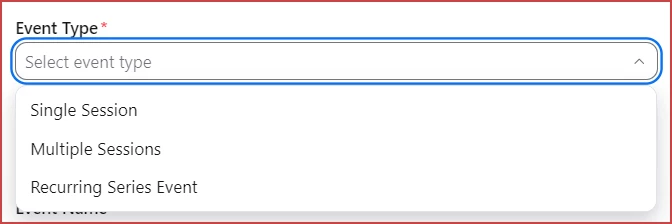
    Think of it this way: Zoom Events is a product line, with a couple of products, and Zoom calls these products "event types."  When you create an Event, the initial dialog box presents you with this:

    So the first and third options do indeed preclude concurrent sessions (each Meeting and each Webinar is a Session in Zoom Events).  The "Multiple Sessions" option has traditionally been referred to as a Zoom ConferenceThis is what you want!


    With a Zoom Conference, you can schedule as many concurrent sessions as you like -- up to a practical limit, of course.  Some Zoom documentation indicates the maximum number of concurrent sessions as 13 to 14.  If your number of concurrent sessions is under that limit, you'll be fine.


    Let me know if you have any additional questions.

    1 reply

    Ray_Harwood
    Community Super Champion | Customer
    Community Super Champion | Customer
    February 14, 2023

    Hi, @marghov123.


    Zoom terminology might be getting in the way of a complete understanding of what is and isn't possible.


    Think of it this way: Zoom Events is a product line, with a couple of products, and Zoom calls these products "event types."  When you create an Event, the initial dialog box presents you with this:

    So the first and third options do indeed preclude concurrent sessions (each Meeting and each Webinar is a Session in Zoom Events).  The "Multiple Sessions" option has traditionally been referred to as a Zoom ConferenceThis is what you want!


    With a Zoom Conference, you can schedule as many concurrent sessions as you like -- up to a practical limit, of course.  Some Zoom documentation indicates the maximum number of concurrent sessions as 13 to 14.  If your number of concurrent sessions is under that limit, you'll be fine.


    Let me know if you have any additional questions.