

cancel
Showing results for 
Search instead for 
Did you mean: 
The Zoom Community will be placed in read-only mode January 9th, 2026 through January 22nd, 2026 to deliver you a new and improved community experience!

The community will still be accessible, however, the creation of any new discussions or replies will be temporarily unavailable. We appreciate your patience during this time.

Webinar registration

BSCTC
Newcomer
Newcomer

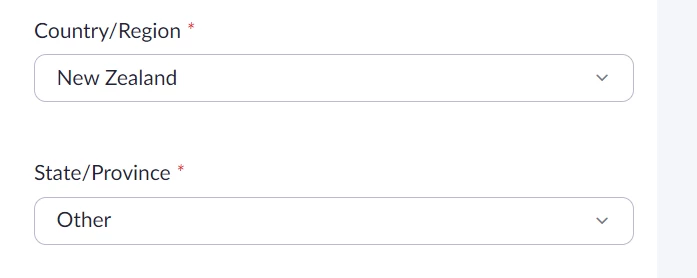
It does not list out the New Zealand dropdown states and provinces to select from that you do for other countries.  If choose USA it listed all states.  Missing important registration information.  How do we update state/Province for international users?
 

BSCTC_0-1651599906976.png


2 REPLIES 2

Happytohelp123
Community Champion | Employee

@BSCTC  Please submit a ticket to our support team, this may need to be an improvement that needs to be resolved by our engineering team. 


Thanks!

JBee
Newcomer
Newcomer

Looks like a similar issue as above exists.
I'm trying to register for a webinar. Both the organizer and me are in Canada.
The registration form requires that I identify my province, but none is shown in the list (only US states)!
The form only accepts items from the list.
Apparently, my status does not allow submitting a ticket.
Now what? Do I  have to get a US passport? No way! ...
See screen capture below:
NoProvinceListed.jpg