
Webinar meets 4 days at 4 different times | Community
Skip to main content
Newcomer
August 12, 2021
Solved

Webinar meets 4 days at 4 different times

  • August 12, 2021
  • 4 replies
  • 0 views

Is it possible to schedule a webinar that meets 4 different days and at a different time each day?

    Best answer by Bort

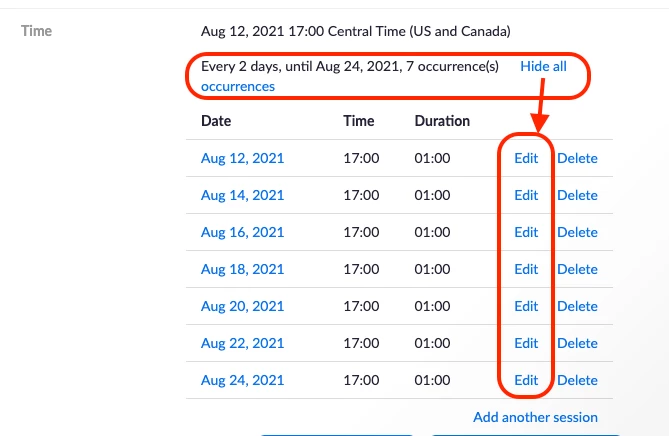
    I agree with @PK76_2 . While Zoom doesn't allow for that level of preciseness when initially scheduling, you can edit each occurrence's date and time after its been scheduled. Click the Show All Occurrences option to view the full list and click edit for each to adjust the data/time: 
    4 replies

    Newcomer
    August 12, 2021

    I try my best but not sure will be success

    PK76_2
    Employee
    Employee
    August 12, 2021

    Hi there! Because the options in the Zoom web portal only give you daily, weekly, and monthly, you could try to schedule your webinar series as closely as possible to the schedule that you want (for example: Daily at 3PM), and then modify each individual occurrence to the correct time. That way you can still keep the series. Hope that helps!

    Bort
    Employee
    BortAnswer
    Employee
    August 12, 2021

    I agree with @PK76_2 . While Zoom doesn't allow for that level of preciseness when initially scheduling, you can edit each occurrence's date and time after its been scheduled. Click the Show All Occurrences option to view the full list and click edit for each to adjust the data/time: 

    Newcomer
    August 16, 2021

    I would recommend using recurring webinar with "no fixed time"