

Webinar - allow participants to unmute themselves by default? | Community
Skip to main content
Newcomer
January 5, 2024
Solved

Webinar - allow participants to unmute themselves by default?

  • January 5, 2024
  • 2 replies
  • 0 views

Good morning, 


Is there a way or option to, by default, allow participants in a webinar the ability to unmute themselves? I have done some digging, and I believe I found a way to enable it per meeting, but we would prefer it to be a default "going forward" option that anybody in a webinar can unmute themselves to speak. 


Thanks, 


Tyler Kurth 
    Best answer by Ray_Harwood

    Hey, @tylerkurth.


    When you say "Participants", do you mean attendees (in the audience) or Panelists ("on stage")?  There is no way to enable Attendees to unmute themselves, except for individually by a Host or Co-Host from the Participant's window.


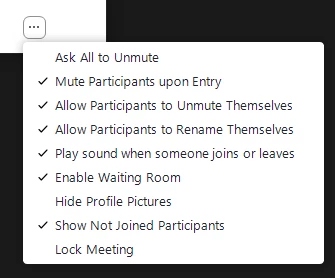
    For Panelists: As of Zoom Windows version 5.17.1, the Participants More/ellipsis menu looks like this:

    There is the menu option labelled "Allow Participants to Unmute Themselves" (which only pertains to Panelists, not Attendees).  Mine defaults to Enabled, but I haven't found where you can change that default setting, if yours defaults to Disabled.

    2 replies

    Ray_Harwood
    Community Super Champion | Customer
    Community Super Champion | Customer
    January 8, 2024

    Hey, @tylerkurth.


    When you say "Participants", do you mean attendees (in the audience) or Panelists ("on stage")?  There is no way to enable Attendees to unmute themselves, except for individually by a Host or Co-Host from the Participant's window.


    For Panelists: As of Zoom Windows version 5.17.1, the Participants More/ellipsis menu looks like this:

    There is the menu option labelled "Allow Participants to Unmute Themselves" (which only pertains to Panelists, not Attendees).  Mine defaults to Enabled, but I haven't found where you can change that default setting, if yours defaults to Disabled.

    Newcomer
    January 23, 2025

    Just done with a webinar with over 120 participants. Myself & two other panelists. Though I own the webinar, one of the other panelists joined before I did so had the host role. I attempted the method you suggested to allow all attendees to unmute but that did not work. Does it require me to reclaim host role in order for that to function?

    Newcomer
    January 8, 2024

    Het Ray, 


    Thanks for the reply. I figured that was the case seeing as I couldn't find the options either. Thanks! 


    Thanks, 


    Tyler Kurth