

cancel
Showing results for 
Search instead for 
Did you mean: 
Effective January 9th, 2026 through January 22nd, 2026: The Zoom Community is currently in read-only mode with login disabled, to deliver you a new and improved community experience!

The site is still accessible to view, however, the ability to login, create content, or access your community account is temporarily unavailable. We appreciate your patience during this time. If seeking support, please browse existing community content or ask our Zoom Virtual Agent.

Webinar Registration Marketing Consent Opt In Option

Joe-GRC
Explorer
Explorer

Is it possible that during the Webinar registration process that a recipient is given an option to conset to receiving marketing emails from our company?


We are collecting email addresses during registration and we would like our attendees to opt in to Marketing, this will help us being caught up in any spam laws in Australia.


I would be grateful for any possible solutions that don't require a separate external process.


Thank you

Joe
1 ACCEPTED SOLUTION

joshbrage_ZE
Zoom Employee
Zoom Employee

Hi Joe!

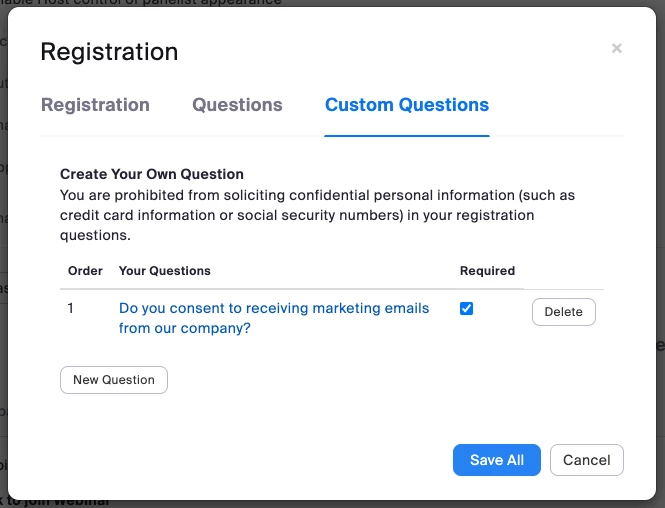
Using Webinar Registration, would allow you to ask a Custom Question - see screenshot below, hope this helps.


Also, this is also an option using Zoom Events/Sessions as well. You can ask for opt-in or opt-outs specifically or not ask at all, depending on your use case.


Screenshot 2023-07-05 at 9.39.24 AM.png

View solution in original post

3 REPLIES 3

joshbrage_ZE
Zoom Employee
Zoom Employee

Hi Joe!

Using Webinar Registration, would allow you to ask a Custom Question - see screenshot below, hope this helps.


Also, this is also an option using Zoom Events/Sessions as well. You can ask for opt-in or opt-outs specifically or not ask at all, depending on your use case.


Screenshot 2023-07-05 at 9.39.24 AM.png

Thank you for your reply Josh!


I will have this feature tested and if successful I will accept the solution.

Cheers
Joe

bkc-events
Newcomer
Newcomer

Does this still work? I am not seeing how to get to the image screenshotted above.