
cancel
Showing results for 
Search instead for 
Did you mean: 
Effective January 9th, 2026 through January 22nd, 2026: The Zoom Community is currently in read-only mode with login disabled, to deliver you a new and improved community experience!

The site is still accessible to view, however, the ability to login, create content, or access your community account is temporarily unavailable. We appreciate your patience during this time. If seeking support, please browse existing community content or ask our Zoom Virtual Agent.

My 5,000 capacity event was limited to 1K

Floreina
Newcomer
Newcomer

Hi! I created a Zoom event with the 5k capacity, but it is not allowing more than 1k to enter the room. Please help! I have 4k people who are very mad!!

1 ACCEPTED SOLUTION

Ray_Harwood
Community Champion | Customer

Welcome to the Zoom Community, @Floreina.


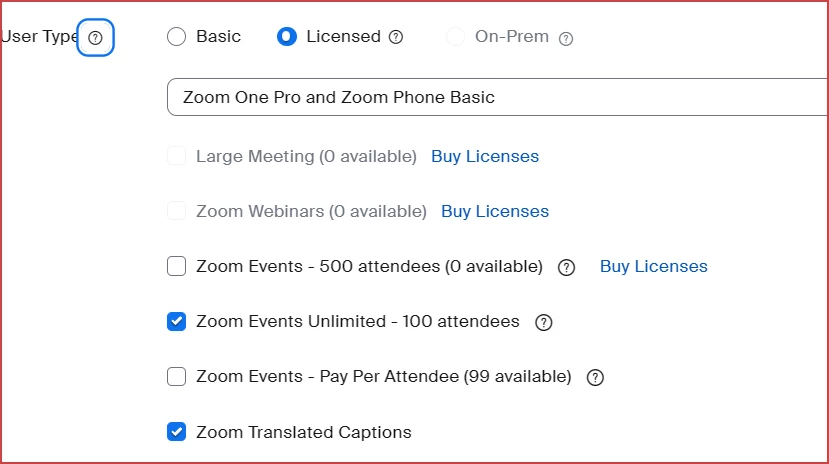
I'm assuming you have more than one Zoom Webinar licenses: perhaps a Webinar 1000 and a Webinar 5000.  You must assign the Webinar 5000 license to the Webinar Host.  Go to Admin -> User Management -> Users and click the email address of the host (probably you!).  Look for an unassigned Webinar 5000 license and enable it.  Here's an example of how that section looks:
Ray_Harwood_0-1705559078589.png


Ray -- check out the GoodClix website.

View solution in original post

1 REPLY 1

Ray_Harwood
Community Champion | Customer

Welcome to the Zoom Community, @Floreina.


I'm assuming you have more than one Zoom Webinar licenses: perhaps a Webinar 1000 and a Webinar 5000.  You must assign the Webinar 5000 license to the Webinar Host.  Go to Admin -> User Management -> Users and click the email address of the host (probably you!).  Look for an unassigned Webinar 5000 license and enable it.  Here's an example of how that section looks:

Ray_Harwood_0-1705559078589.png


Ray -- check out the GoodClix website.