

cancel
Showing results for 
Search instead for 
Did you mean: 
Effective January 9th, 2026 through January 22nd, 2026: The Zoom Community is currently in read-only mode with login disabled, to deliver you a new and improved community experience!

The site is still accessible to view, however, the ability to login, create content, or access your community account is temporarily unavailable. We appreciate your patience during this time. If seeking support, please browse existing community content or ask our Zoom Virtual Agent.

Manage participants during event

Joyl25
Newcomer
Newcomer

We have a Zoom Pro account  and I want to host a zoom meeting for about 75 participants and intend to make some confidential announcements so need to protect the privacy of some. Is there a way to make sure the chats are only seen by the host and that the participants cannot see each other? Do I need to host a webinar instead of a meeting to do this?
1 ACCEPTED SOLUTION

Ray_Harwood
Community Champion | Customer

Welcome to the Zoom Community, @Joyl25.


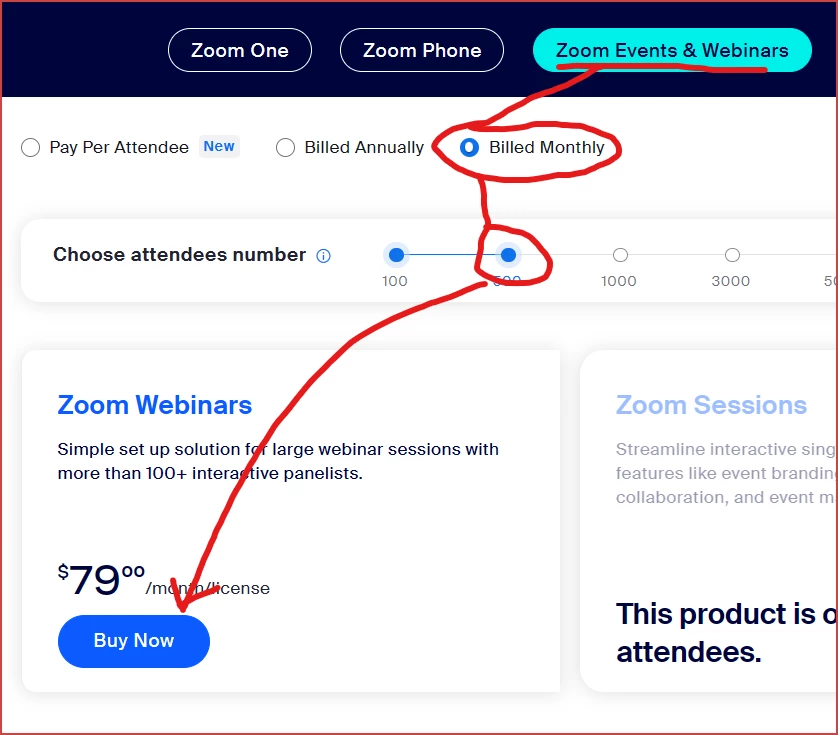
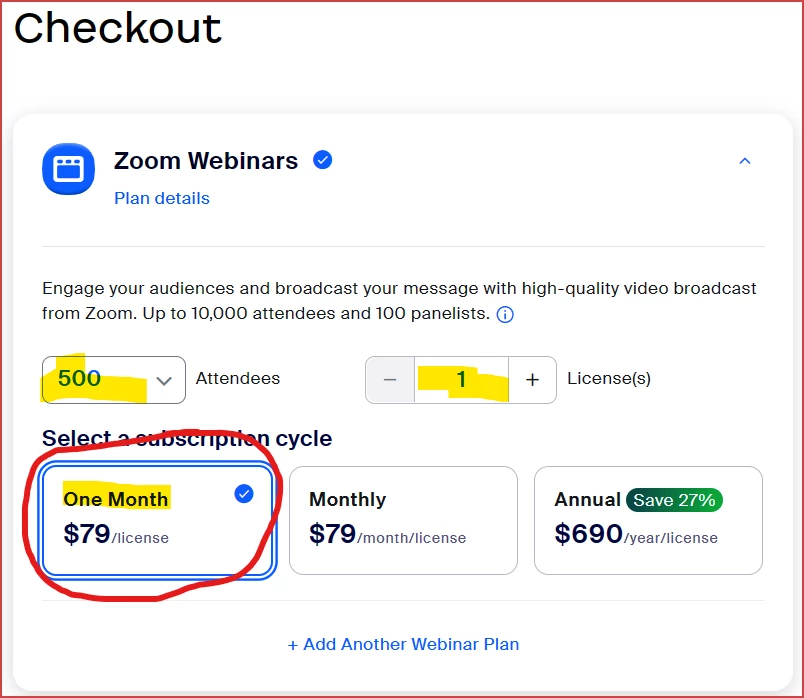
If your intention is that nobody in the audience can see the names of anyone else, then yes, a Webinar will do that, and I'm not aware of any way to stop attendees from viewing the Participant list in Meeting.  A one-month Webinar 500 license (the smallest size available) is only $79, but be sure to select the 

From https://zoom.us/pricing/events: 

Ray_Harwood_0-1705557790471.png

Then:

Ray_Harwood_1-1705557877772.png

1 License for 500 attendees for One Month only.  Be sure not to subscribe more than a month before your scheduled event!


If you would like some assistance setting up the webinar, contact me through my web site.  I could host your meeting with my Webinar license and help ensure proper set-up.


Ray -- check out the GoodClix website.

View solution in original post

1 REPLY 1

Ray_Harwood
Community Champion | Customer

Welcome to the Zoom Community, @Joyl25.


If your intention is that nobody in the audience can see the names of anyone else, then yes, a Webinar will do that, and I'm not aware of any way to stop attendees from viewing the Participant list in Meeting.  A one-month Webinar 500 license (the smallest size available) is only $79, but be sure to select the 

From https://zoom.us/pricing/events: 

Ray_Harwood_0-1705557790471.png

Then:

Ray_Harwood_1-1705557877772.png

1 License for 500 attendees for One Month only.  Be sure not to subscribe more than a month before your scheduled event!


If you would like some assistance setting up the webinar, contact me through my web site.  I could host your meeting with my Webinar license and help ensure proper set-up.


Ray -- check out the GoodClix website.