


cancel
Showing results for 
Search instead for 
Did you mean: 

[Events] Session Hosts Automatically Added?

Froyd
Contributor I
Contributor I

Hello

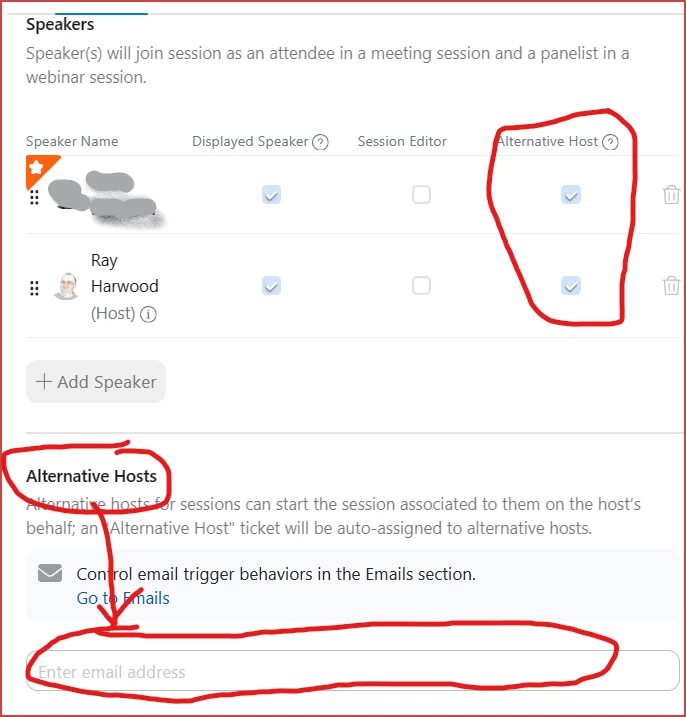
I have many webinar sessions set up for a Zoom event. My question is about hosts and who starts the webinar. As an example, I've attached a screenshot of the Speaker section for a webinar. 


  • Do I need to assign one of them as an alternative host?
  • If I don't, who can start the webinar besides me?  

Cheers

EDIT: I am the admin that is created and is producing the webinar
1 ACCEPTED SOLUTION

Ray_Harwood
Community Champion | Customer

Hi again, @Froyd.


There has to be someone who can start the session-be it Webinar or Meeting. Only the Event Host (typically the owner of the Zoom Events license) or an assigned Alt Host (either by checking the Alt Host box for a session speaker, or by adding someone as Alt Host in the section below the speakers).

Ray_Harwood_0-1705558570813.png

My recommendation is to NOT enable Alt Host for anyone that does not have experience running a Meeting or Webinar. There are things an inexperienced Panelist can do in a Webinar that "messes up the normal Webinar flow".  I'll leave it at that.


Sometimes you have no choice: you as the Host can't be there, and only one person -- the speaker -- will be available.  Spend some time explaining the process to them -- it can be done, but takes some work.  


Ray -- check out the GoodClix website.

View solution in original post

3 REPLIES 3

Ray_Harwood
Community Champion | Customer

Hi again, @Froyd.


There has to be someone who can start the session-be it Webinar or Meeting. Only the Event Host (typically the owner of the Zoom Events license) or an assigned Alt Host (either by checking the Alt Host box for a session speaker, or by adding someone as Alt Host in the section below the speakers).

Ray_Harwood_0-1705558570813.png

My recommendation is to NOT enable Alt Host for anyone that does not have experience running a Meeting or Webinar. There are things an inexperienced Panelist can do in a Webinar that "messes up the normal Webinar flow".  I'll leave it at that.


Sometimes you have no choice: you as the Host can't be there, and only one person -- the speaker -- will be available.  Spend some time explaining the process to them -- it can be done, but takes some work.  


Ray -- check out the GoodClix website.

That's what I figured! Thanks again, @Ray_Harwood!

Hi, how can I prevent speakers in Zoom Webinar Plus from starting the webinar? At the moment, they can join the backstage and start the session, but only the host or alternative host should have that permission.