Zoomtopia is here. Unlock the transformative power of generative AI, helping you connect, collaborate, and Work Happy with AI Companion.
Register nowEmpowering you to increase productivity, improve team effectiveness, and enhance skills.
Learn moreKeep your Zoom app up to date to access the latest features.
Download Center Download the Zoom appDownload hi-res images and animations to elevate your next Zoom meeting.
Browse Backgrounds Zoom Virtual BackgroundsEmpowering you to increase productivity, improve team effectiveness, and enhance skills.
Zoom AI CompanionUser groups are unique spaces where community members can collaborate, network, and exchange knowledge on similar interests and expertise.
Help & Resources is your place to discover helpful Zoom support resources, browse Zoom Community how-to documentation, and stay updated on community announcements.
The Events page is your destination for upcoming webinars, platform training sessions, targeted user events, and more. Stay updated on opportunities to enhance your skills and connect with fellow Zoom users.
ā2025-06-30 06:29 AM
hi enveryone ,
we would like to get confirmation of Zoom room application audio processing , as we have a problem with our setup .
BELOW IS THE SETUP
we have Shure MXA920 - via Dante routing to - Biamp Tesira DSP - Analog output to - Poly codec G7500 - Running Zoom Application
currently Audio Processing is used only in Mics ( PEQ) andin Biamp Tesira we are only receiving via Dante and routing with matrix mixer to analog output.
During Zoom call , when both end speak together or simultaneously - the audio from one end gets suppressed. is it normal behavior or audio processing conflict from the DSP or room system.
Solved! Go to Solution.
ā2025-07-16 03:38 PM
Short answer - yes.
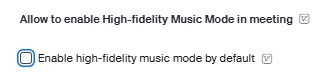
The most you can do to reduce Zoom's processing downstream is set the room for 'High-Fidelity Music Mode'
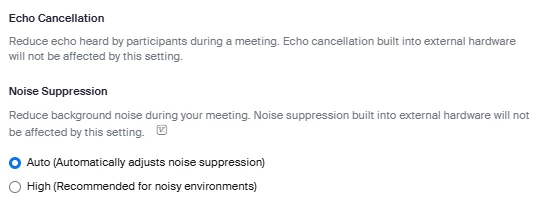
You can also attempt to turn off Echo Cancellation and Noise Reduction, but most ZR Appliances (including G7500) will try to flip these right back on by default:
Besides all of that, there is processing further downstream at the cloud MMR level that you will have absolutely no control over.
After designing and tuning many rooms with DSPs + Zoom Rooms, my best suggestion is to work around Zoom and let it do its thing. Join a call from the far-end and then craft your DSP config for VTC Tx.
ā2025-07-16 03:38 PM
Short answer - yes.
The most you can do to reduce Zoom's processing downstream is set the room for 'High-Fidelity Music Mode'
You can also attempt to turn off Echo Cancellation and Noise Reduction, but most ZR Appliances (including G7500) will try to flip these right back on by default:
Besides all of that, there is processing further downstream at the cloud MMR level that you will have absolutely no control over.
After designing and tuning many rooms with DSPs + Zoom Rooms, my best suggestion is to work around Zoom and let it do its thing. Join a call from the far-end and then craft your DSP config for VTC Tx.