
cancel
Showing results for 
Search instead for 
Did you mean: 
Effective January 9th, 2026 through January 22nd, 2026: The Zoom Community is currently in read-only mode with login disabled, to deliver you a new and improved community experience!

The site is still accessible to view, however, the ability to login, create content, or access your community account is temporarily unavailable. We appreciate your patience during this time. If seeking support, please browse existing community content or ask our Zoom Virtual Agent.

Security Warning: Untrusted Server Certificate

NocturnalDC
Contributor II
Contributor II

Anyone else ever receive this error and know how to resolve?
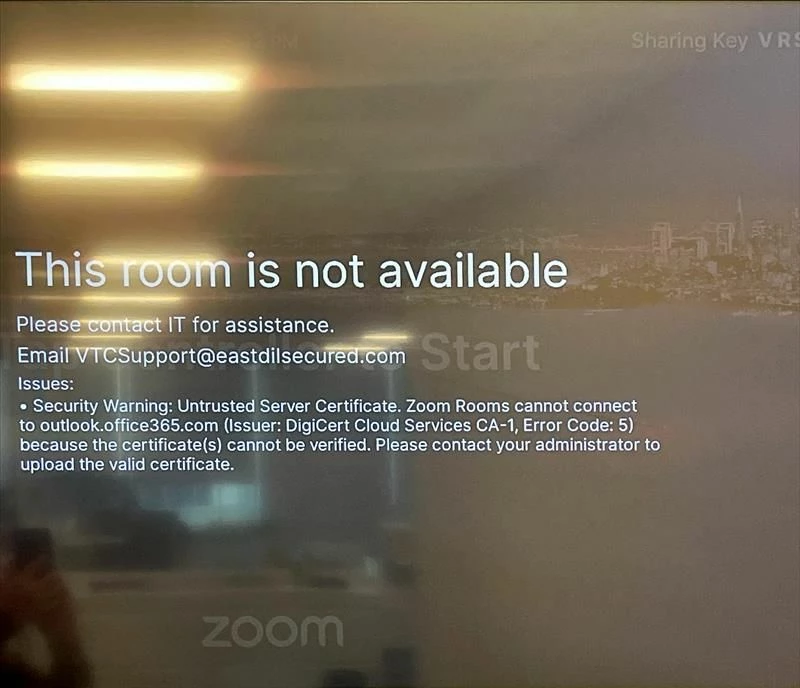
5159d989-ffe3-42c4-a6cf-8b544c16eb05.jpg

1 REPLY 1

ZoomZoom
Community Champion | Employee

Hi, NocturnalDC.


Error code: 5 means there is a problem with the validation of the certificate, but it is not clear why. I would recommend opening a ticket with Zoom Technical support so that the issue can be identified.


By the way, does the error disappear if you restart the Zoom Room? That might be a workaround while the issue is not fixed. If you just started the device up, you might want to wait 10 minutes before this. A lot of these certificate issues are usually related to time settings misconfiguration or connection issues to a NTP server.


More on Zoom Untrusted Server Certificate issues: https://support.zoom.com/hc/en/article?id=zm_kb&sysparm_article=KB0067461


If this answer helps you, please hit the “Accept as Solution” button.
Thank you,

ZzZz
