

Room Camera not positioning on home | Community
Skip to main content
Newcomer
October 2, 2022
Solved

Room Camera not positioning on home

  • October 2, 2022
  • 1 reply
  • 0 views

Hi,


I am using Logitech Meetup. I have set home position on Room Controller (iPad). When I start the meeting, camera does not default to home position, but I have to manually press the camera control to set the camera pan and tilt. 
    Best answer by ChrisO

    Hi Damjan,


    I wonder, does the camera show up under devices in the web portal under the Zoom  Room?


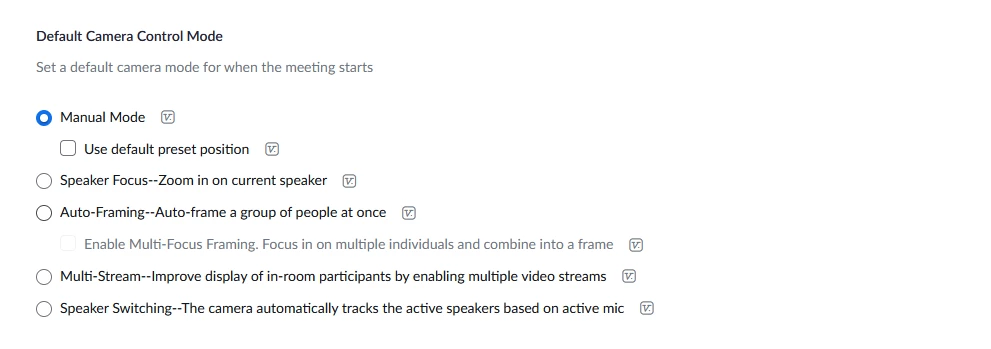
    I also noticed that they have added an option under that device. Make sure the check box is selected for use default position.


    1 reply

    ChrisO
    Participant
    Participant
    October 3, 2022

    Hi Damjan,


    Did you remember to save the position and then go back into that position setting and set it as default? See the section under "to configure Camera preset" https://support.zoom.us/hc/en-us/articles/204065759-Zoom-Rooms-camera-controls.

    DamjanAuthor
    Newcomer
    October 4, 2022

    Hi Chris. I have set it as default. There is "home" icon in front of Preset name, but still when I start zoom meeting, I have to manually press the preset button.

    ChrisO
    Participant
    ChrisOAnswer
    Participant
    October 4, 2022

    Hi Damjan,


    I wonder, does the camera show up under devices in the web portal under the Zoom  Room?


    I also noticed that they have added an option under that device. Make sure the check box is selected for use default position.