

Cisco WebEx Room and Zoom DTMF Commands | Community
Skip to main content
Newcomer
October 30, 2023
Solved

Cisco WebEx Room and Zoom DTMF Commands

  • October 30, 2023
  • 1 reply
  • 0 views

I am attempting to build a Macro within my Cisco Room Systems and am not sure how to get the information I need and hoping this community can help.

We will be using Zoom with the Hybrid Calendar OBTP to join meetings.The issue I am facing is when joining a meeting, currently you must hit

  1. Show/Hide Non Video Participants
  2. Show/ Hide Name Labels
  3. Manually enter the passcode from the invite.


I would like to bake all of this in so that when a user joins the call, all of this happens suppressed and there is no extra user interaction on the system.

Question:
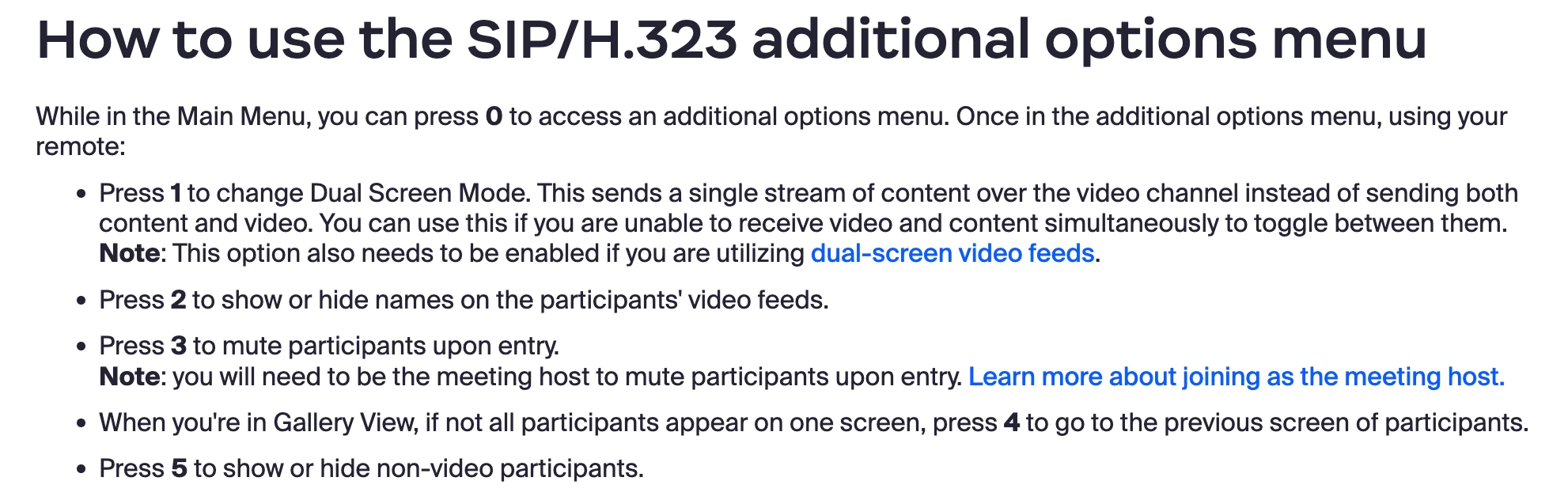
What are the DTMF commands for these items? All the articles I am finding do not have the first 2 on my list.

Best answer by bstrelko

For show/hide names, please refer to the original article I sent and scroll all the way down.


For hide/show non-video participants, you can do this in-call:


If you are using macros, you should be able to script the in-call sequence fairly easily.


1 reply

bstrelko
Community Champion | Customer
October 31, 2023

You should have everything you need here: https://support.zoom.us/hc/en-us/articles/202405539-SIP-H-323-Room-Connector-Dial-Strings#h_01EX5JRNZFZSNNESK5E814QZBV


All of the commands you've requested can be baked into the initial dial-string on a Cisco system - please review prerequisites listed in the article.

Nate85Author
Newcomer
November 9, 2023

Thanks, that semi gets me there, minus the show/hide name labels, show/hide non video participants. Any idea where those commands are?

Apologies if this is somewhere I am missing as I am very inexperienced with Cisco Macro building.

bstrelko
Community Champion | Customer
bstrelkoAnswer
Community Champion | Customer
November 10, 2023

For show/hide names, please refer to the original article I sent and scroll all the way down.


For hide/show non-video participants, you can do this in-call:


If you are using macros, you should be able to script the in-call sequence fairly easily.