

cancel
Showing results for 
Search instead for 
Did you mean: 
Effective January 9th, 2026 through January 22nd, 2026: The Zoom Community is currently in read-only mode with login disabled, to deliver you a new and improved community experience!

The site is still accessible to view, however, the ability to login, create content, or access your community account is temporarily unavailable. We appreciate your patience during this time. If seeking support, please browse existing community content or ask our Zoom Virtual Agent.

Certificate for ZDM expiring, iPads

carlson1
Participant
Participant

Hi all, 


We have several iPads as controllers that are not supervised but are on ZDM, and our ZDM certificate is coming up for renewal.  Is it necessary to actually update the certificate for it to work?  Or does it just no longer receive commands from the web if it is expired?


Also, what is the best way to update it?  I can't recall what we did last year, but I seem to remember having to reinstall the Zoom Rooms app.


Thanks!
1 ACCEPTED SOLUTION

bstrelko
Community Champion | Customer

Lack of ZDM connection will break ZDM features only.

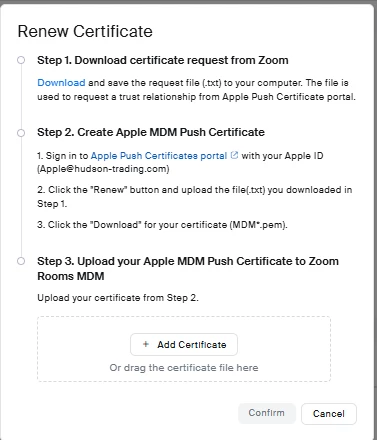
Renewal is fairly straightforward - these steps can be found when clicking 'renew' at zoom.us/device/enroll

bstrelko_0-1759425775059.png


View solution in original post

1 REPLY 1

bstrelko
Community Champion | Customer

Lack of ZDM connection will break ZDM features only.

Renewal is fairly straightforward - these steps can be found when clicking 'renew' at zoom.us/device/enroll

bstrelko_0-1759425775059.png