

vvx-d230 zoom provisioning | Community
Skip to main content
Newcomer
September 7, 2022
Solved

vvx-d230 zoom provisioning

  • September 7, 2022
  • 6 replies
  • 0 views

I used Assisted provisioning URLs : https://provpp.zoom.us/api/v2/pbx/provisioning/Polycom/vvx250

 for our VVX D230 Poly Cordless Phone , but it is not registering to Zoom .

On Zoom I can see following message

Offline Factory reset needed for provisioning”

I have reset to factory default but problem still persist.
    6 replies

    Community Super Champion | Partner
    September 7, 2022

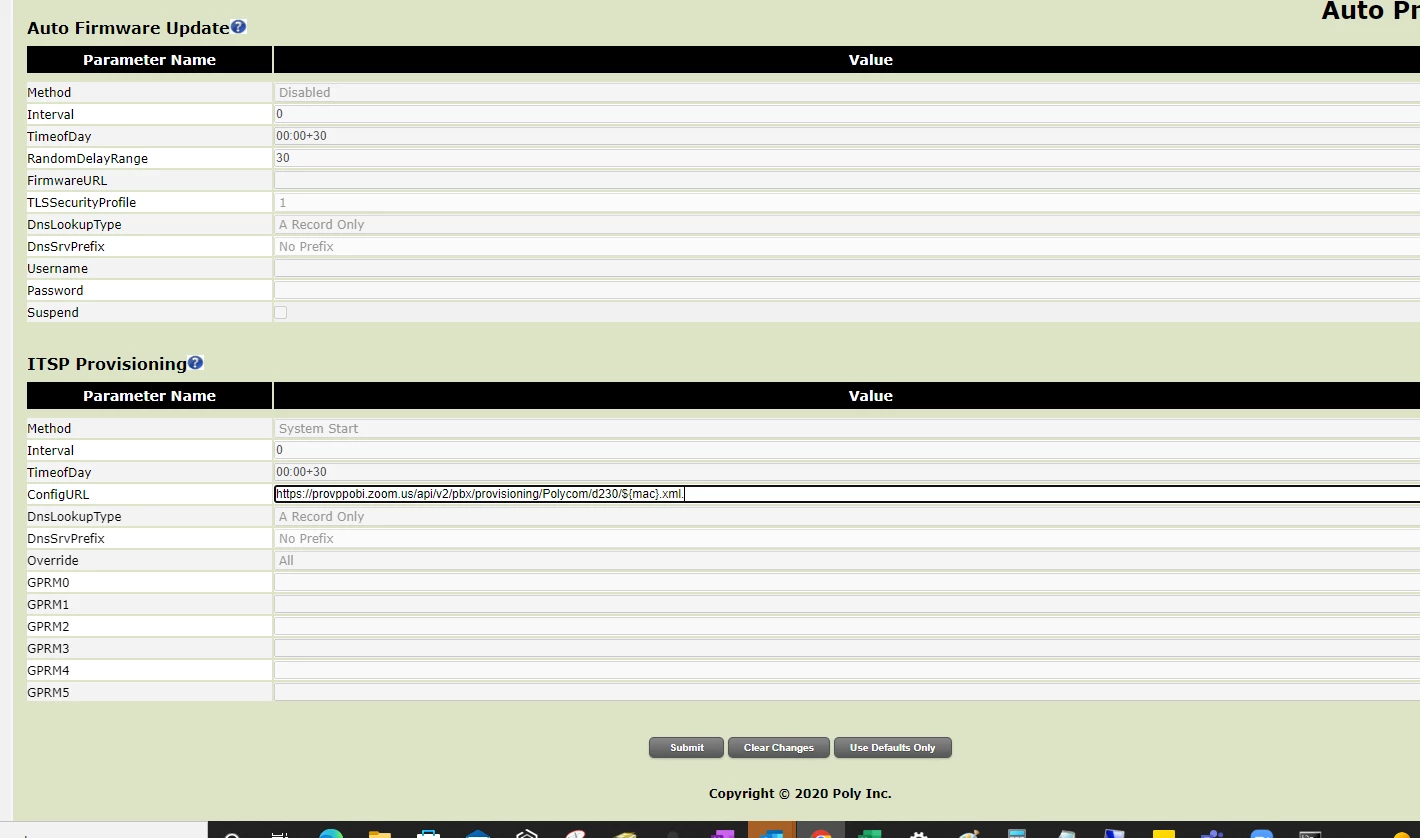
    your provisioning url should be for d230 not vvx250.  when you go to phones & devices>add desk phone, select model d230.

    please see attached screen shots.


    IrshadAuthor
    Newcomer
    September 7, 2022

    I will check and update , Thanks 

    Community Super Champion | Partner
    September 8, 2022

    a few poly resources for vvx d230 i found helpful

    Poly VVX D230 DEC IP Phone Release Notes (polycom.com)

    Getting Started (poly.com)  (vvx d230 admin guide)

    Getting Started with VVX D230 DECT IP Phones (poly.com) (vvx d230 user guide)

    Community Champion | Employee
    September 9, 2022

    @Irshad Hi, Here is the Poly assisted provisioning process but you should need only the factory reset and firmware update to the zoom supported version since you have already reset a few times (https://support.zoom.us/hc/en-us/articles/360001299063-Zoom-Phone-Certified-Hardware#h_8b9397f0-47ba-48f2-b81b-0fab14b6d967

    D230 needs 7.1.2

    https://support.zoom.us/hc/en-us/articles/360021957332


    Please ensure all phone ports are open before provisioning a phone

    https://support.zoom.us/hc/en-us/articles/201362683-Zoom-network-firewall-or-proxy-server-settings#h_01EEBSGCKBYVB20MCVPR78T0NN


    Also, the D230 is a UCS device ( from Poly) so in addition go to this link from Poly

    https://docs.poly.com/bundle/pdms-sp-ag-current/page/c2742577.html

     Browse to 

    PDMS-SP Provisioning Trusted Hosts

    Make sure All the URLs that say UCS = Y are allowed

    Lastly,  all phones should be able to access ztp.polycom.com on ports 80.443


    If you ensure all network ports are open, do a factory reset, firmware update as required, your phone should ZTP and you will not need the Assisted provisioning process.

    Let me know how that goes.


    Contributor I
    September 9, 2022

    We have found the Poly D230 DECT phones to be problematic when setting up for unknown reasons. Seem to have odd issues with DHCP with the phone appearing to hold onto old IP addresses.  Check if the base station status light is blicking on/off at 1 second intervals, that means either:

    - waiting for network (typically DHCP)

    - registering a handset

    We have had several times the issue where the phone says it has an IP address, but is not reachable from the same network. Basically fixed by multiple resets and trying different ports. We have yet to determine any particular cause or solution. 

    Also, frequently the switch says there is no link with the base station which is odd as one would expect that to be up whenever the ethernet cable is plugged in and the unit is on.  

    Community Champion | Employee
    September 10, 2022

    Hi @enielsen I suggest looking at all firewall/ network ports I posted above specially the Poly ones. That may be causing inconsistencies.  Also, I recommend opening a ticket with Poly if the issues continue to occur

    Contributor I
    September 12, 2022

    It is definitely not a firewall issue - we don't have enough of these models and haven't run into the issue enough to be able to get a good diagnosis.  Personally I think it is the phone itself that is the cause but unless we get more and get the cycles to debug the situation, won't know for sure. I'm actually pushing to look at an alternate brand such as yealink as these d230's don't use the same templates as the wired polycoms  - I think these are actually made by someone else that Poly acquired?