

Zoom Phone calls going directly to voicemail | Community
Skip to main content
Newcomer
February 2, 2023
Solved

Zoom Phone calls going directly to voicemail

  • February 2, 2023
  • 3 replies
  • 3 views

I have 2 users whose incoming calls are going directly to voicemail. They can make outgoing calls without issues and can receive voicemail messages. They can also see the missed call in their history. They both have the Zoom softphone only. When I look at their status both are available so I don't know what to check to see if something is blocked. 


A ticket has also been open with Zoom.


If anyone can help, that would be great!
    Best answer by sachinzoom

    Hi Sachin,


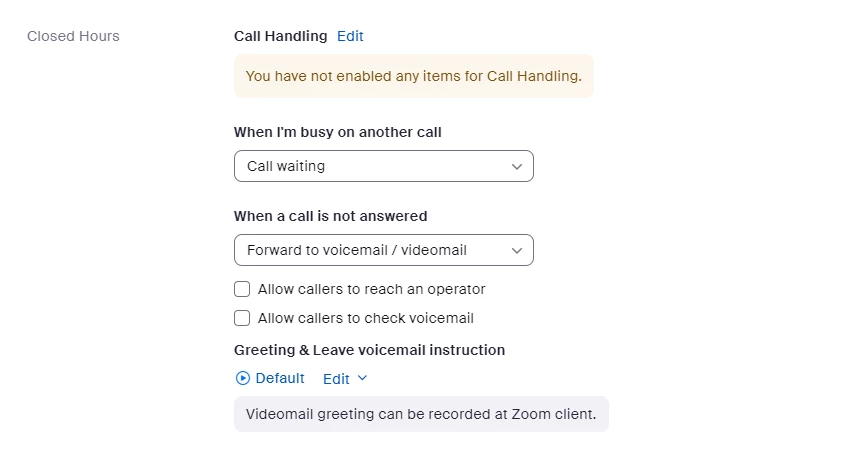
    Here is the full screen shot for the after hours call handling and it says nothing in enabled. I will ask the users to log out and log back in tomorrow. I did ask them to check for updates and reboot their PC but I know that is different than logging out and back in again.


    Thanks!


    Ashwini


    Hi Ashwini,


    Glad we were able to root cause this since after Business hours calls are expected to go to VM, based on her current config.


    If this response helped, please accept the answer as an accepted solution, so others can benefit as well.

    3 replies

    Community Champion | Employee
    February 2, 2023
     

    Hi Please ensure they have NOT removed all devices under Call handling.


    If this response helps, please accept the answer as an accepted solution, so others can benefit as well.


    AshhbcAuthor
    Newcomer
    February 2, 2023

    Hi there,

    That has not been removed.


    Community Champion | Employee
    February 3, 2023

    Hi,


    Do you see the logs ? Can you upload here for the calls they received. 


    Another thing to check is Under Phones numbers, go to their phone number and ensure their inbound calling is not unchecked.

    AshhbcAuthor
    Newcomer
    February 3, 2023

    Hi there,

    This is not a physical phone. Here are a few sample calls


    Community Champion | Employee
    February 3, 2023

    Also, seems like these calls came in after 3.30 PM which is after business hours in call handling ? Can you confirm ? Calls are supposed to go to VM after that time based on your screenshot


    If this response helps, please accept the answer as an accepted solution, so others can benefit as well.


    AshhbcAuthor
    Newcomer
    February 3, 2023

    Hi Sachin,


    Here is the full screen shot for the after hours call handling and it says nothing in enabled. I will ask the users to log out and log back in tomorrow. I did ask them to check for updates and reboot their PC but I know that is different than logging out and back in again.


    Thanks!


    Ashwini


    AshhbcAuthor
    Newcomer
    February 3, 2023

    I also looked at the phone number and incoming/outgoing are checked.


    Community Champion | Employee
    February 3, 2023

    Can you have the users logout and login back to see if that fixes the issue ?