
SMS email notifications | Community
Skip to main content
Newcomer
December 25, 2022
Solved

SMS email notifications

  • December 25, 2022
  • 7 replies
  • 24 views

Some team members would like to receive email notifications when an SMS comes in.

Is this possible? If yes - how can we set that up? If no - what alternative is there? 

 

    Best answer by Matt-LACA

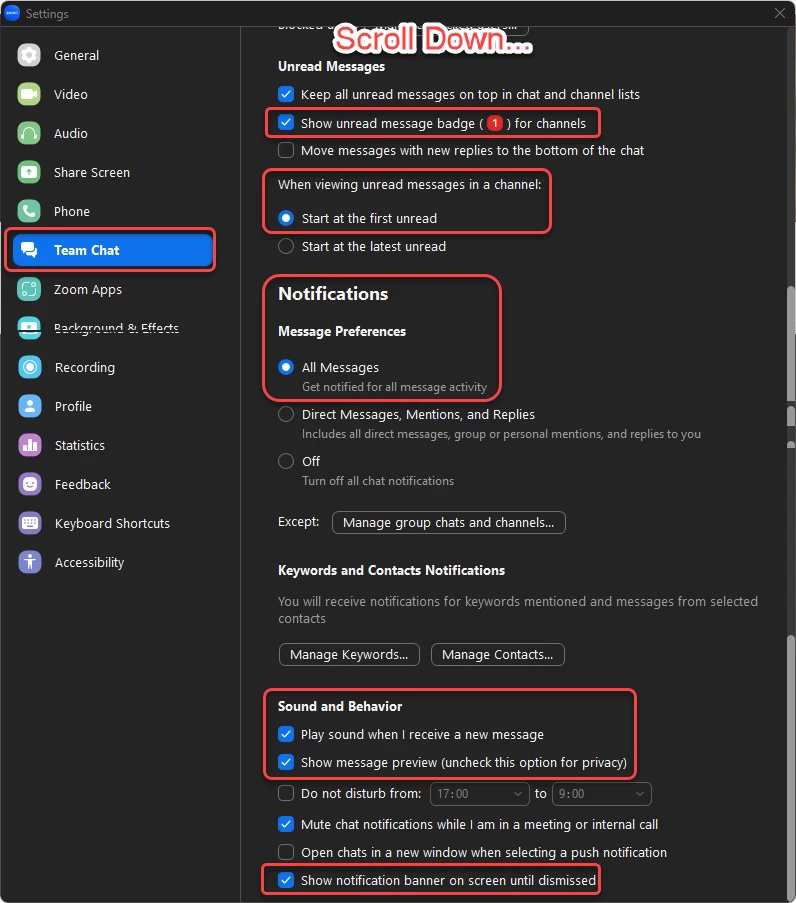
    All of these settings might help you... Especially the bottom one as it assures your on screen alert notifications remains in place until you dismiss it. So, if you get a text while out at lunch it will still be on the screen with your alert when you get back to your desk...


    7 replies

    Community Super Champion | Partner
    December 26, 2022

    hi merav181,


    you may need to use Zoom Phone Power Pack license add-on for each team members to receive email notifications when sms text comes in to a call queue or autoreceptionist.  please see support article

    Using SMS with call queues or auto receptionists – Zoom Support


    other sms support articles

    Setting up SMS – Zoom Support

    Using SMS – Zoom Support

    Using SMS message and conversation options – Zoom Support

    Frequently asked questions about SMS – Zoom Support


    thanks,  eliot


    Explorer
    May 11, 2023

    All of these settings might help you... Especially the bottom one as it assures your on screen alert notifications remains in place until you dismiss it. So, if you get a text while out at lunch it will still be on the screen with your alert when you get back to your desk...


    Newcomer
    May 11, 2023

    I don't want to be notified for ALL Messages.  I don't really consider that an option.
    I just want to be notified for SMS.

    Newcomer
    March 31, 2023

    We are also looking for SMS notifications to email.  But just for Standard users.  A lot of our staff are used to Google Voice where that is a standard feature.

    Newcomer
    May 11, 2023

    Seems surprising that this isn’t standard. I had this with my lines on RingCentral

    Explorer
    May 11, 2023

    I get a popup in the lower right corner like other Team IMs which I notice right away... That works like a charm for me. Do you have that setting turned on, or do you find that not adequate for your needs?


    You also have the on screen alerts in your interface... 


    That's just like the Voicemail alert I'd have...


    Matt-LACAAnswer
    Explorer
    May 11, 2023

    All of these settings might help you... Especially the bottom one as it assures your on screen alert notifications remains in place until you dismiss it. So, if you get a text while out at lunch it will still be on the screen with your alert when you get back to your desk...


    Newcomer
    June 27, 2023

    +1 to this post. You would feel that this is a standard feature


    Newcomer
    June 5, 2025

    This should ABSOLUTELY be a standard feature! What the heck Zoom?!?