Solved
Reaching Front Desk Operator by Dialing "0" (2025 Solution)
Hello everyone,
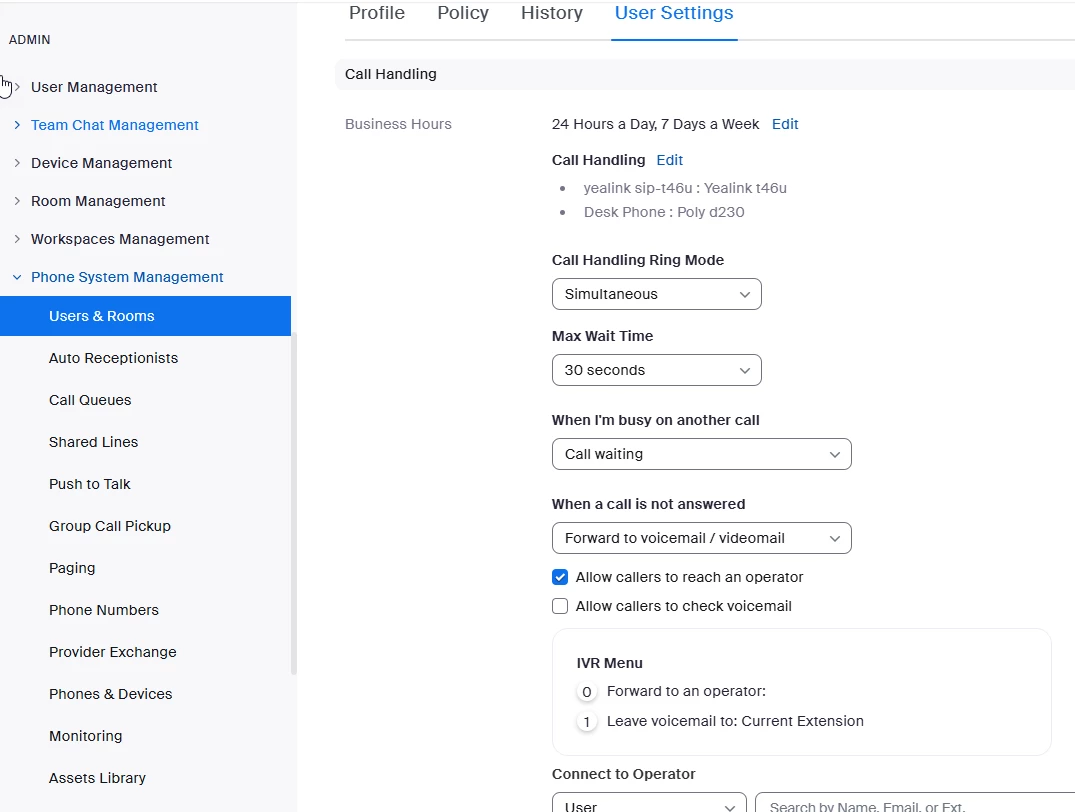
I'm having trouble setting up my phone number in the Zoom Phone system. When someone calls the number, they hear the message: "Please press 0 to speak to the operator." However, when "0" is pressed, the caller hears: "There’s nobody at that extension."
I’ve tried configuring this in my Zoom account settings but haven’t been able to figure out where or how to fix this. I’m looking for help with the following:
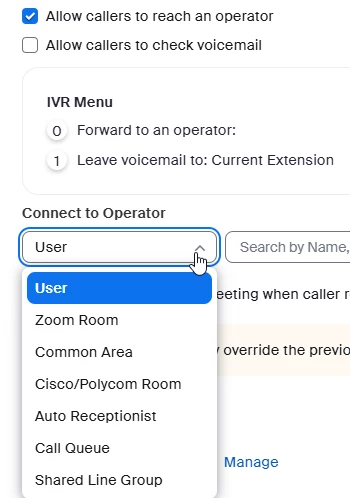
- How to correctly set up the "Press 0 for operator" functionality so it routes to the correct person or extension.
- Where in the Zoom admin settings I can configure this behavior.
- Any specific settings I need to review or adjust to make this work as intended.
I would appreciate detailed guidance or any steps I can follow to troubleshoot and resolve this issue.
Thank you in advance for your help!