Zoomtopia is here. Unlock the transformative power of generative AI, helping you connect, collaborate, and Work Happy with AI Companion.
Register nowEmpowering you to increase productivity, improve team effectiveness, and enhance skills.
Learn moreKeep your Zoom app up to date to access the latest features.
Download Center Download the Zoom appDownload hi-res images and animations to elevate your next Zoom meeting.
Browse Backgrounds Zoom Virtual BackgroundsEmpowering you to increase productivity, improve team effectiveness, and enhance skills.
Zoom AI CompanionUser groups are unique spaces where community members can collaborate, network, and exchange knowledge on similar interests and expertise.
Help & Resources is your place to discover helpful Zoom support resources, browse Zoom Community how-to documentation, and stay updated on community announcements.
The Events page is your destination for upcoming webinars, platform training sessions, targeted user events, and more. Stay updated on opportunities to enhance your skills and connect with fellow Zoom users.
2025-08-26 08:24 AM
Is there any possible way to prevent users from using their individual voice numbers for Online Fax while still allowing them to use the Call Queue number? We have a department that has high turnover and deals with the public for processing government paperwork. We want to prevent the use of their personal line to send/receive faxes as that may allow missed filings if submissions come in after an employee separation occurs. Plus when that extension is re-assigned it may go to another employee that doesn't need to fax and we want to avoid that number being circulated and the new employee receives a bunch of annoying inbound fax attempts.
Solved! Go to Solution.
2025-08-26 05:50 PM
hi @GoodmanTC
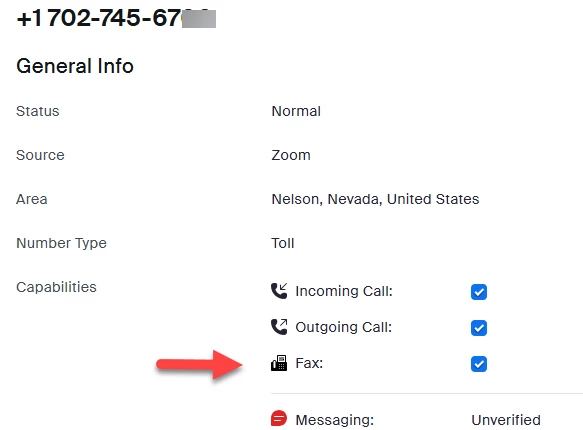
You can use Number Management. Click on the number and then click on Fax to enable or disable faxing with this number.
How to enable or disable phone numbers' capabilities in Number Management
Sign in to the Zoom web portal as an admin with the privilege to edit account settings.
In the navigation menu, click Number Management then Phone Numbers.
You will see a list of phone numbers and their details.
(Optional) Use the search field to enter a phone number to search.
Click the phone number you want to manage.
In the Capabilities section, enable or disable the following features for the phone number:
Note: Numbers without outgoing capability cannot be used as a caller ID for extensions that do not have a local phone number. If you disable Outgoing Call, you must select a checkbox that acknowledges this limitation before you can save your settings.
Incoming Call: Select the checkbox to enable incoming calls. Deselect the checkbox to disable incoming calls.
Outgoing Call: Select the checkbox to enable outgoing calls. Deselect the checkbox to disable outgoing calls.
Fax: Select the checkbox to enable Online Fax. Deselect the checkbox to disable Online Fax.
Click Save.
Account owners and admins can designate specific phone numbers exclusively for faxing purposes through the Online Fax service. When selecting numbers in Number Management, admins are shown which numbers are fax-capable and which are not. The system performs several automatic checks before allowing a number to be assigned for faxing:
Phone number capability check: Verifies that the number is fax-enabled (default for most countries except India and Japan).
Policy check: Confirms that the Online Fax policy is enabled.
Billing check: Confirms that the destination number’s country is enabled under billing.
Managing phone number capabilities in Number Management
Did my response answer your question? If so, please don't forget to mark the reply as an accepted solution.
thanks, eliot

2025-08-26 05:50 PM
hi @GoodmanTC
You can use Number Management. Click on the number and then click on Fax to enable or disable faxing with this number.
How to enable or disable phone numbers' capabilities in Number Management
Sign in to the Zoom web portal as an admin with the privilege to edit account settings.
In the navigation menu, click Number Management then Phone Numbers.
You will see a list of phone numbers and their details.
(Optional) Use the search field to enter a phone number to search.
Click the phone number you want to manage.
In the Capabilities section, enable or disable the following features for the phone number:
Note: Numbers without outgoing capability cannot be used as a caller ID for extensions that do not have a local phone number. If you disable Outgoing Call, you must select a checkbox that acknowledges this limitation before you can save your settings.
Incoming Call: Select the checkbox to enable incoming calls. Deselect the checkbox to disable incoming calls.
Outgoing Call: Select the checkbox to enable outgoing calls. Deselect the checkbox to disable outgoing calls.
Fax: Select the checkbox to enable Online Fax. Deselect the checkbox to disable Online Fax.
Click Save.
Account owners and admins can designate specific phone numbers exclusively for faxing purposes through the Online Fax service. When selecting numbers in Number Management, admins are shown which numbers are fax-capable and which are not. The system performs several automatic checks before allowing a number to be assigned for faxing:
Phone number capability check: Verifies that the number is fax-enabled (default for most countries except India and Japan).
Policy check: Confirms that the Online Fax policy is enabled.
Billing check: Confirms that the destination number’s country is enabled under billing.
Managing phone number capabilities in Number Management
Did my response answer your question? If so, please don't forget to mark the reply as an accepted solution.
thanks, eliot

2025-08-27 05:33 AM
Has this always been there? I've asked this question through a zoom support probably 3 months ago and was told it wasn't possible. This worked exactly as I wished for and will make for a much easier transition for the remaining departments.
2025-08-27 06:15 AM
Has this always been an option? I've asked support this same question around 3 months ago and was told that it was not possible.
2025-08-27 10:01 AM
hi @GoodmanTC
i believe that this is a very recent addition for number management. It appears in the 8/17/2025 release notes for Zoom phone and in the 8/17/2025 number management support article also dated 8/17/2025.
what was not possible in the old days (3 months ago) and may now be possible.
as you may know, Zoom Communications, Inc. spends a lot of money on research and development. For Zoom's fiscal year ending 1/31/2025, according to Zoom's SEC filings, Zoom spent USD 852 million.
Inline Viewer: Zoom Communications, Inc. 10-K 2025-01-31
in my humble opinion, Zoom's fast development of new and improved features for existing products and development of new products is beneficial for customers. one negative is that is hard to keep up.
to keep current, i suggest customers read the product release notes for products they use or may want to use on a monthly basis, follow Zoom blog and attend Zoomtopia. in addition, it may be a good practice to ask your Zoom account team to update you on the latest developments at least once per year.
thanks, eliot