Hello @spencerc
Where are you putting the Greeting and the IVR Options prompt in the ZAR (Auto Receptionist)?
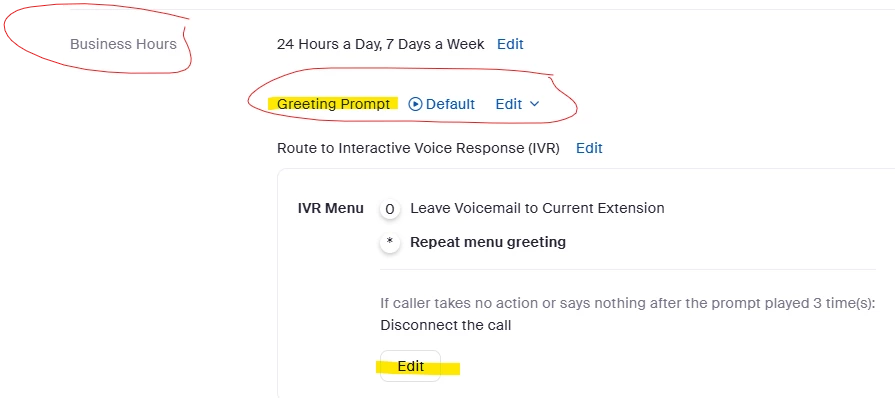
There is a "ZAR Greeting Prompt" (What I like to call the "pre-greeting") which is played either during Business Hours, Closed Hours, etc. depending on the situation, and each schedule has its own.
Then, there is the Greeting "inside" the option you choose; in this case, you chose "Route To [Interactive Voice Response (IVR)]"
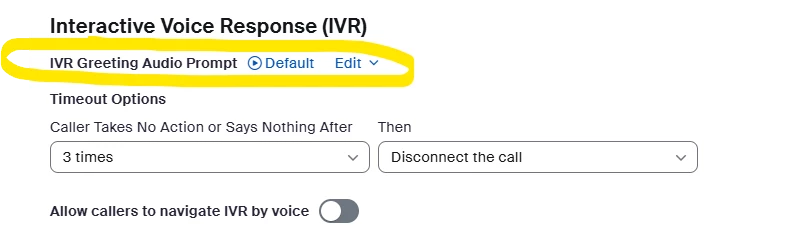
This second option has its own Default which plays by default whatever is your Account Settings Default for the Zoom Phone location: i.e. If you enabled "Dial-by-extension", it will play both, "If you know your party's extension, please dial it now, otherwise, press 0 for the operator. This greeting is at the top of the IVR Options you are configuring.
I don't know how you did it, but I have seen this many times (and I suspect this could be happening to you) that if you configured all in one Audio File or TTS ("Greeting + IVR Options") outside this IVR config into the Main ZAR settings, you might be the so-easily-overlooked greeting in the top of the IVR-Edit menu. I have done quite a few times.
What I do as my own Best Practice is to separate the Welcome Greeting and the IVR Menu Options into two separate Audio Files (or TTS if that is your case):
- In the ZAR config, and the Outside the IVR my "Greeting Prompt" only say "Thank you for calling...etc.".
- In side the "IVR Menu - Edit" is where I enumerate/list my IVR options, replacing the default message that contains the "Dial the Extension if you know it, 0 for the Operator, etc.)
I hope this helps,
Vinnie.

