

How to Stop Zoom Phone Call From Taking Focus | Community
Skip to main content
Explorer
September 20, 2023
Solved

How to Stop Zoom Phone Call From Taking Focus

  • September 20, 2023
  • 2 replies
  • 2 views

Hello.  When an incoming call comes in, it takes the focus.  This is frustrating for our customer support reps as they are in the middle of typing notes and the focus is taken away as they type.  Is there a way to have the call still appearing, but not take the front focus?
    Best answer by afeit

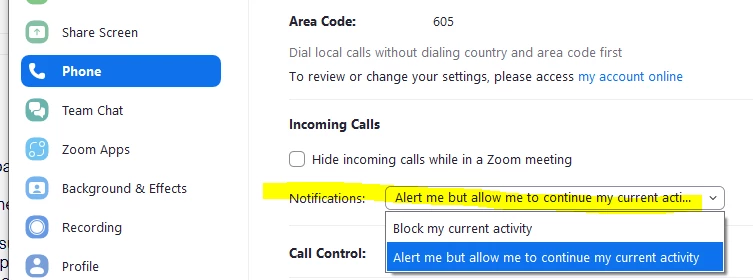
    Hi Megan.  I have great news!  I couple days after I created this topic, I received a "What's New at Zoom September 2023 Recap" email.  In that email was this little nugget:

    Zoom Phone Updates

    • Incoming call focus – Users have the choice to opt for either permitting incoming calls to take focus or maintaining their ongoing focus. Existing users will experience no alteration in their behavior after the feature release, with incoming calls prioritizing focus over the application being used. New users will find that the default setting preserves the focus on the application in use when a call is received. Submit a request to Zoom Support to enable Incoming Call Notification Focus Control for your account. This feature is also available for Windows and macOS Zoom desktop clients. 

    I emailed zoom to have this enabled on my account and within 24 hrs it was done.  Now each individual user can set this to their liking.  It is such a welcome enhancement!


    2 replies

    Community Champion | Employee
    October 11, 2023

    Hello,


    Welcome to zoom community. To address this, you can drag the phone call to the side of the screen and continue typing since you still want to continue receiving the call.


    A better way is to make use of Zoom phone Assistant. If you use the Zoom Assistant, your call will be received only on the assistant, which docks on the side of the screen when not in use. Else if you receive a call, it will show up but not take the focus away.


    To enable, Zoom Assistant, Please follow these steps:

    https://support.zoom.us/hc/en-us/articles/14098545961101-Using-Zoom-Assistant#h_01GVRQAQEF4CAC2ZVH104BAZCQ


    If this response helps, please accept the answer as an accepted solution, so others can benefit as well.


    Newcomer
    October 17, 2023

    This drives everyone in our company crazy as well!  People have been compaining about it since 2020.

    "you can drag the phone call to the side of the screen and continue typing since you still want to continue receiving the call"
    The above fix isn't a fix, we run a support desk so hundreds of calls come through a day.  You might be finishing your notes from the last call or typing an email and EVERY SINGLE CALL interrupts what you are doing and takes focus... often you have typed almot a sentence before you realise it has happened again.


    Just create a setting in Zoom where you can disable it taking focus for an incoming call.

    Community Champion | Employee
    October 18, 2023

    Hi @Megan5 


    Thanks for your comment. Understand and hence Have you looked at using the Zoom Assistant ? 

    Newcomer
    October 18, 2023

    Zoom Assistant comes at a additional charge, you need a Zoom Pro License.


    It feels a littlemuch to pay for a premium license just to stop Zoom taking focus every time a call comes through our call centre.