

Anyone have an example of Amazon Polly Speech Synthesis Markup Language (SSML) in text to speech | Community
Skip to main content
Newcomer
November 16, 2021
Solved

Anyone have an example of Amazon Polly Speech Synthesis Markup Language (SSML) in text to speech

  • November 16, 2021
  • 3 replies
  • 1 view

Zoom team - do you have a full example of how to use SSML for text to speech.

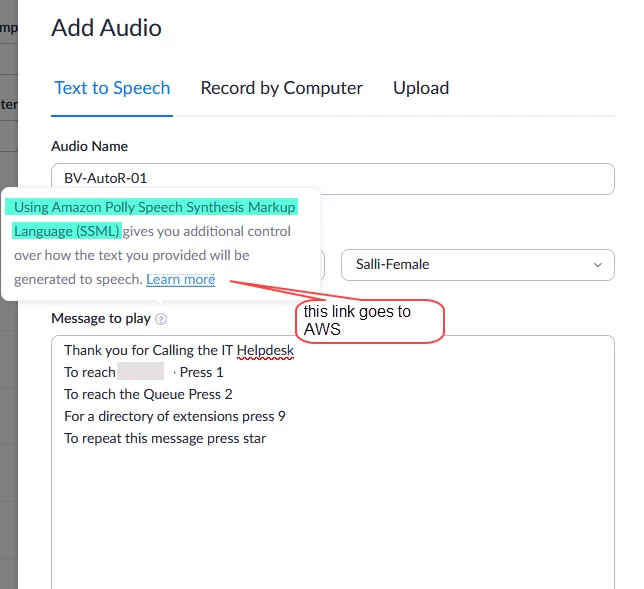
The help link goes directly to a AWS web page with table of tags. 

For a person not familiar with the tags it's confusing.

can you provide an example how to use it in a typical text to speech like shown below ?


    Best answer by naveen

    @bvanbens - Generally no need to use any of SSML TAG and it will convert all plan text to speech (wave file)...


    E.g. If you want to add more pause time in between option1 to option2, then need to use SSML TAGs. (here adding additional 3 seconds delay)

    <speak> Thank you for calling the IT Helpdesk <break time="3s"/> To open a new ticket press1 <break time="3s"/>  To check existing ticket press 2</speak>


    More saemple tags, plz refer to:   supportedtags 


    3 replies

    naveenAnswer
    Community Champion | Employee
    November 18, 2021

    @bvanbens - Generally no need to use any of SSML TAG and it will convert all plan text to speech (wave file)...


    E.g. If you want to add more pause time in between option1 to option2, then need to use SSML TAGs. (here adding additional 3 seconds delay)

    <speak> Thank you for calling the IT Helpdesk <break time="3s"/> To open a new ticket press1 <break time="3s"/>  To check existing ticket press 2</speak>


    More saemple tags, plz refer to:   supportedtags 


    Newcomer
    November 10, 2022

    The SSML tags are not working for me. The voice simply reads the tags and their contents.

    For example the following:

    Please wait while we connect your call.
    <break time="3s"/>
    A representative will be with you shortly.

    Is read as:

    Please wait while we connect your call.
    Break time equals 3's. Greater than
    A representative will be with you shortly

    Newcomer
    November 10, 2022

    Solved. 

    Any text outside of the <speak> tags appears to break the code and they are read literally.

    Newcomer
    January 26, 2022

    Adding onto this thread, in the Amazon docs there is a column in the table for "Availability with Neural Voices", with values of "full availability", "partial availability" and "not available". It looks like Zoom supports the ones marked as "full availability" but not "partial availability", is this correct?

    The one I'm trying to get working is <say-as> to pronounce digits correctly as well as say text characters:

    <say-as interpret-as=\"digits\">123456</say-as>

    <say-as interpret-as=\"characters\">ID</say-as>


    When I add these to the message to play field, I'm getting an error of "Invalid SSML request".


    thanks!

    Newcomer
    January 26, 2022

    My bad - looks like <say-as> is supported, I escaped the ".  This works:

    <speak><say-as interpret-as="characters">ID</say-as></speak>

    Partner
    December 23, 2024

    Curious, does this only work when published.  If I use the play function in the widget, it still reads the SSML as text.