zoom audio controls | Community
Skip to main content
Newcomer
October 30, 2023
Solved

zoom audio controls

  • October 30, 2023
  • 5 replies
  • 0 views

when I google "zoom audio controls windows desktop" - this link on the Zoom website gives options for windows


https://support.zoom.us/hc/en-us/articles/360046244692-Configuring-professional-audio-settings-for-Zoom-Meetings


when I click on the 3rd option " How to enable and configure live performance audio mode" -


The article says click on your profile picture and shows what looks like a smart phone screen (not a windows desktop) - and instructs one to click on the profile picture and then look for the Audio icon. I see no such "Audio" tab, nor any audio icon.


I have the Pro plan.
Best answer by bstrelko

Got it, you may have a different plan that shows different options when logged in.

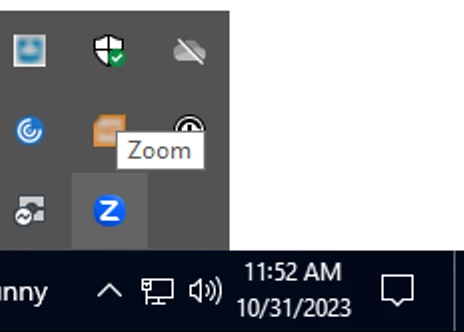
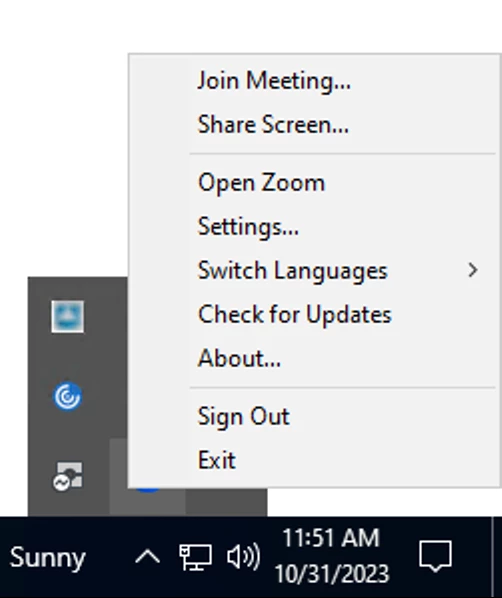
Can you try clicking the up-caret next to the clock at the bottom-right of your Windows screen to show active applications icons? From there, right-click on the Zoom icon (when Zoom is open) and see if you can see an option to reach the 'Settings' menu:


5 replies

bstrelko
Community Champion | Customer
October 31, 2023

It's a snapshot of a portion of the Windows client, not a smartphone screen. Click on your profile picture (upper right) when running Zoom Client for Windows in order to see the drop-down menu shown.

jordan44Author
Newcomer
October 31, 2023

 When I click on my profile pic in upper right - I get 3 items on my drop down - 1. my email address which when clicked upon, just takes me back to my profile. 2. Plans and Billing, and 3. Sign Out. I see no option to find the Audio control for noise suppression anywhere in my Settings.

Newcomer
October 31, 2023

I agree with jordan44 - I don't see any "Audio" tab when I'm in Settings from my profile pic. Everyone tells me my audio is choppy or they don't hear me and I need it fixed


bstrelko
Community Champion | Customer
bstrelkoAnswer
Community Champion | Customer
October 31, 2023

Got it, you may have a different plan that shows different options when logged in.

Can you try clicking the up-caret next to the clock at the bottom-right of your Windows screen to show active applications icons? From there, right-click on the Zoom icon (when Zoom is open) and see if you can see an option to reach the 'Settings' menu:


jordan44Author
Newcomer
October 31, 2023

I didn't find the Zoom Icon after clicking on the up-arrow next to the clock, but it was in the tool bar and bottom of page. And I was able to find the Audio settings that way. But why can't you find Audio settings in the online Zoom website page when logged into one's account? Zoom seems quite convoluted at times.

bstrelko
Community Champion | Customer
October 31, 2023

Online settings (via web browser) govern your account. Settings in the Windows/Mac/Linux client govern the Zoom application itself and its relationship to the device you're using.


The reason you wouldn't have audio settings on the website is that the website has no relation to your specific installation of Zoom, just the account you log into when using your installation of Zoom.


Hopefully this clarifies and doesn't further convolute. Glad you were able to access Settings ultimately!

jordan44Author
Newcomer
October 31, 2023

Huh? When I login to my (paid) Zoom account on Windows - how does that not relate to my account? I can set many different parameters within Settings - but not these particular Audio settings related to noise suppression? It's still convoluted to me.

bstrelko
Community Champion | Customer
October 31, 2023

I'd need to see screenshots to better understand, but what I was referring to was the discrepancy between the settings found via your web browser (specific to your account) vs those found in your app (specific to the performance of the Zoom software).