

zoom app on windows is not showing upcoming meetings. | Community
Skip to main content
Newcomer
July 11, 2023
Solved

zoom app on windows is not showing upcoming meetings.

  • July 11, 2023
  • 10 replies
  • 0 views

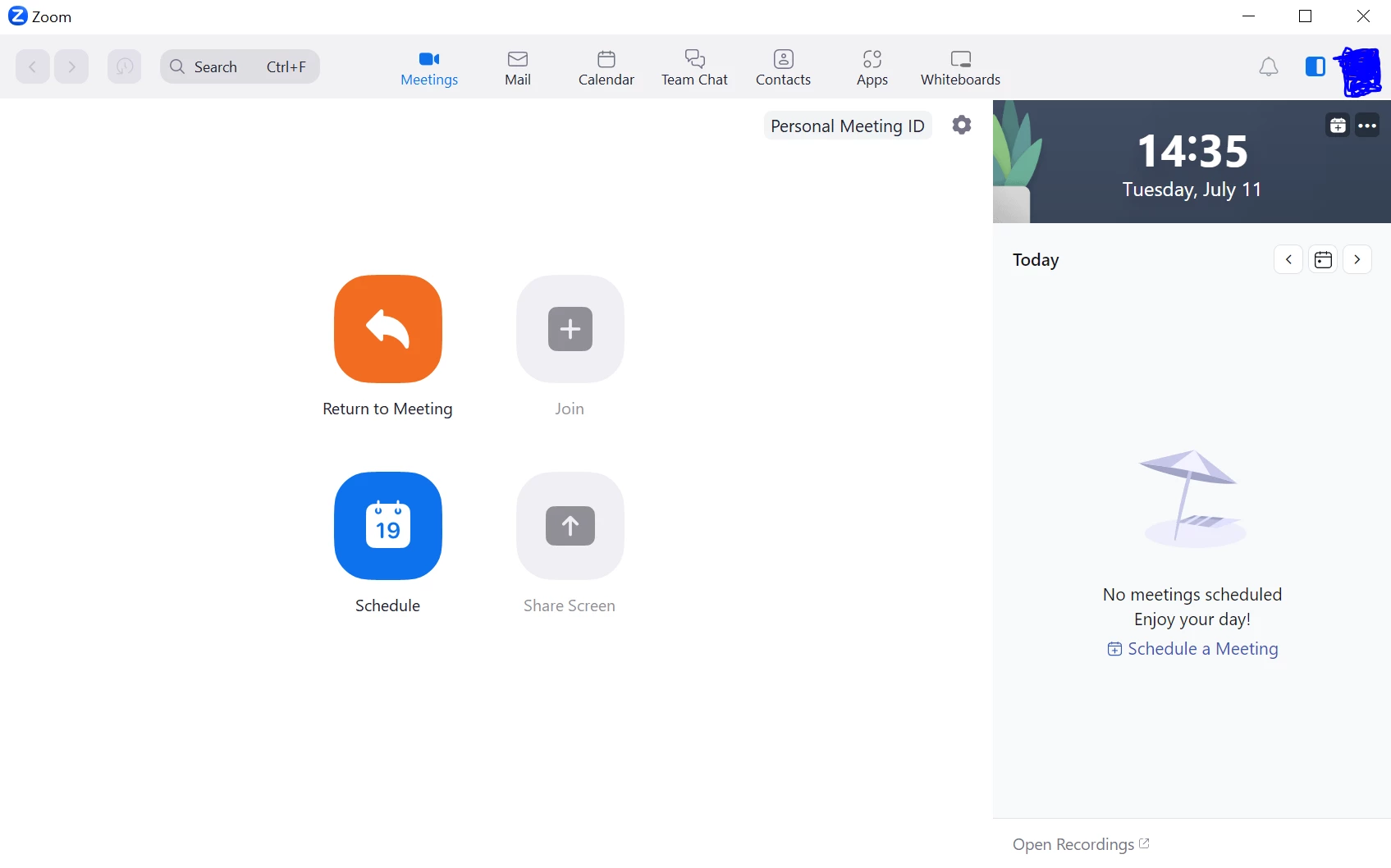
Where to find the upcoming meetings? Earlier I was able to find. I can find upcoming meetings here: https://us06web.zoom.us/meeting#/upcoming


But can't find it in zoom windows client. I have the latest zoom app: 5.15.3 (18551).

I have disabled calendar sync completely here:

Automatically sync Zoom calendar events information bi-directionally between Zoom and integrated calendars.
 

Best answer by Ray_Harwood

IMPORTANT UPDATE:


Zoom has listened! 


The removal of the Home tab and replacing the contents of the Meeting tab with the one-day calendar of events has been REVERTED.  Log out and back in on your desktop app to see the Home and Meetings tabs at the top, and select the Meetings tab to see the layout previously available prior to the roll-out of 5.15.3.


Please see this Zoom Support article for details:

https://support.zoom.us/hc/en-us/articles/17564111105677

10 replies

Newcomer
July 11, 2023

This happened for me too since today. I can't see any of my meetings on the zoom app... 😭

Newcomer
July 12, 2023

Same here! Please fix this thing people from Zoom!

Newcomer
July 12, 2023

Same here! All my meetings on the zoom meetings vanished. Please zoom help us!

Newcomer
July 11, 2023

Same for me, today could not access any of my recurring scheduled meetings, and doing a refresh did not help. 


Newcomer
July 11, 2023

Ditto. I opened my PC App as usual, and my "Meetings" vanished. Updated to the latest version of Zoom in hoped this would be the fix, but this did not fix it. 

Newcomer
July 12, 2023

Same for me ...

Newcomer
July 12, 2023

SOLUTION:  Another user explained where the recurring meetings are now listed:  The new format with the side panel has them located under the `Anytime Meetings' down arrow (located beneath the image of an umbrella)!


To Zoom:  this is terrible UI!!

Newcomer
July 12, 2023


I'm not sure what "umbrella" icon or the "Anytime Meetings" down arrow that other user is talking about. I seem not to have this "new format". 100% agreed this is pretty bad, Zoom. 

Now, I certainly can access my Upcoming Meetings/Regularly Scheduled Meetings if I sign into Zoom on the desktop version, but this is a mildly irritating extra step. I much prefer just launching Zoom from the App and presto! finding my meetings there.


Newcomer
July 12, 2023

Even though I can access them by logging in on my browser, I can't copy the invite links. So frustrating. Apart from the first 20 minutes I spent searching and clicking on the desktop app to try and find the meetings!


Newcomer
July 12, 2023

Found it, see attached image. Select “Anytime Meetings” and it will show your list of anytime meetings. 

Newcomer
July 12, 2023

Unfortunately, I do not see the anytime meetings option.  I can still see my meetings on my mobile phone using the zoom app.   I can start the meeting from my mobile device and then I am able to see the meeting in progress on my desktop and can select the switch option to access the meeting on the desktop.  Until Zoom fixes the issue, this a solution to access meetings.

Newcomer
July 13, 2023

I am having the same problem. I saw that apparently it appears under the image of an umbrella on the side panel, but it isn't showing for me. Is it maybe to do with the fact that I only have a basic free account? If so, this is a really sucky thing for Zoom to do. They are slowly making it more difficult to be a free account holder.

Ray_Harwood
Community Super Champion | Customer
July 14, 2023

IMPORTANT UPDATE:


Zoom has listened! 


The removal of the Home tab and replacing the contents of the Meeting tab with the one-day calendar of events has been REVERTED.  Log out and back in on your desktop app to see the Home and Meetings tabs at the top, and select the Meetings tab to see the layout previously available prior to the roll-out of 5.15.3.


Please see this Zoom Support article for details:

https://support.zoom.us/hc/en-us/articles/17564111105677

Newcomer
July 14, 2023

Thanks, Ray.

I was delighted to find Zoom had indeed reverted to the previous style when I opened the App today for a regularly scheduled meeting.

Newcomer
July 14, 2023

In the navigation panel, click Account Management then Account Settings. Click the Meeting tab. Under Schedule Meeting, verify that Upcoming meeting reminder is enabled. If the setting is disabled, click the toggle to enable it.


Regards,

Diana