
Zoomtopia is here. Unlock the transformative power of generative AI, helping you connect, collaborate, and Work Happy with AI Companion.
Register nowEmpowering you to increase productivity, improve team effectiveness, and enhance skills.
Learn moreKeep your Zoom app up to date to access the latest features.
Download Center Download the Zoom appDownload hi-res images and animations to elevate your next Zoom meeting.
Browse Backgrounds Zoom Virtual BackgroundsEmpowering you to increase productivity, improve team effectiveness, and enhance skills.
Zoom AI CompanionUser groups are unique spaces where community members can collaborate, network, and exchange knowledge on similar interests and expertise.
Help & Resources is your place to discover helpful Zoom support resources, browse Zoom Community how-to documentation, and stay updated on community announcements.
The Events page is your destination for upcoming webinars, platform training sessions, targeted user events, and more. Stay updated on opportunities to enhance your skills and connect with fellow Zoom users.
2025-08-09 12:13 PM
I can't seem to get the timestamps removed from my recordings, even though I have it unchecked in my settings. Any ideas how to fix this?

Solved! Go to Solution.
2025-08-11 09:44 AM
Hi @virginiaparsons, welcome to Zoom Community! To remove timestamps from recordings, please check both:
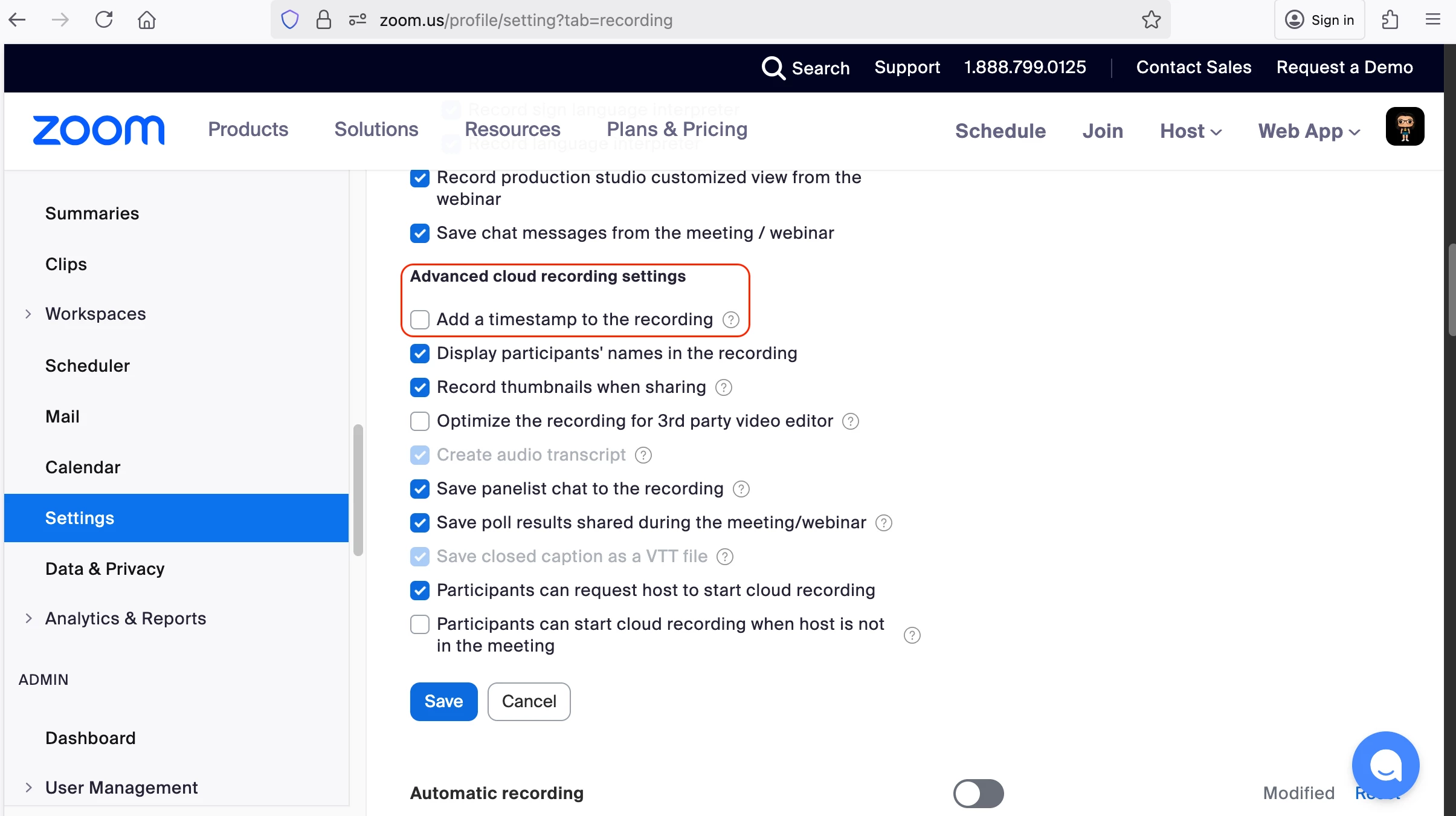
Disable timestamps in the web portal settings:
Go to your account settings
Look for recording preferences or timestamp options
Ensure the timestamp option is unchecked/disabled
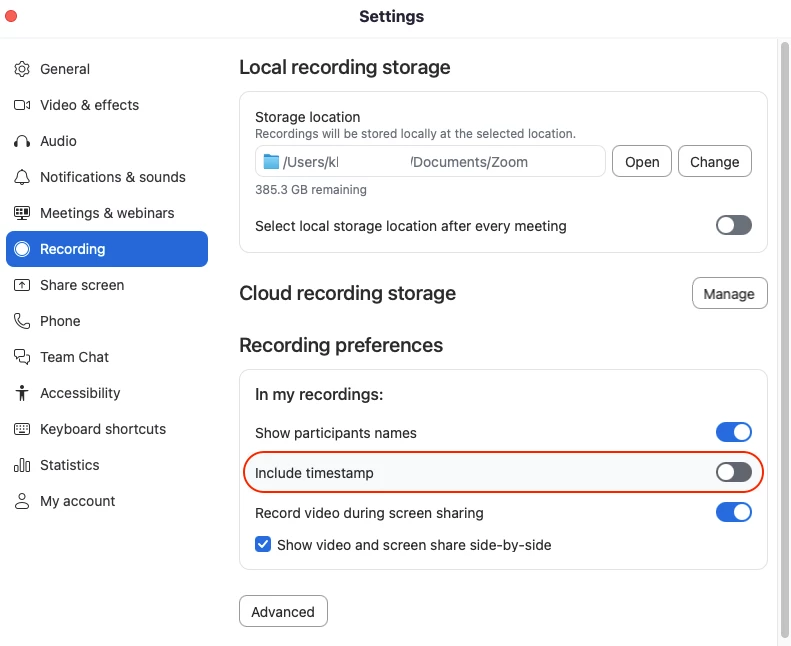
Disable timestamps in the client settings:
Open your client application settings
Navigate to recording preferences
Verify timestamps are unchecked/disabled
After disabling timestamps in both locations, create a new recording to verify the changes have taken effect. I hope this helps!
2025-08-11 09:44 AM
Hi @virginiaparsons, welcome to Zoom Community! To remove timestamps from recordings, please check both:
Disable timestamps in the web portal settings:
Go to your account settings
Look for recording preferences or timestamp options
Ensure the timestamp option is unchecked/disabled
Disable timestamps in the client settings:
Open your client application settings
Navigate to recording preferences
Verify timestamps are unchecked/disabled
After disabling timestamps in both locations, create a new recording to verify the changes have taken effect. I hope this helps!
2025-08-11 10:55 AM
Thanks for your help. Unfortunately my menu does not look the same as your lower image. I am unable to find "recording preferences" and when I do a search for it nothing comes up. I had already unchecked the box in the first image. Can you help me navigate to "recording preferences" ..."In my recordings"?
2025-08-12 11:49 AM
The lower image refers to the desktop app. If you click your profile photo or name initials at the top right corner of the app, you should see Settings almost at the bottom of the list. When clicked, the Settings window should pop up and you can go to the Recording tab to find the timestamp setting. Just wanted to confirm if this is where you went to look it up?
2025-08-12 05:25 PM
Yea! I found it and was able to disable the second location. No more timestamps! Thanks so much for your help.
2025-08-14 10:14 AM
Glad to know it worked! Please mark my comment as 'accepted solution' if you're all good. 😊
2025-08-21 10:50 AM
Hello @virginiaparsons! Thank you for confirming the answer @KhatC provided for you worked. I'm marking this as the solution so that others who encounter the same issue can benefit from it.
2025-08-14 07:11 PM
Thanks so much KhatC. The timestamp is gone, but now I have a big ZOOM showing on the right side of my videos. How do I remove that? I never used to have these issues. Sigh!
2025-08-19 12:02 PM
Can you share a screenshot for reference, @virginiaparsons?