
"Waiting for host to start the meeting" I HAVE started it. What do? | Community
Skip to main content
Newcomer
August 23, 2021
Solved

"Waiting for host to start the meeting" I HAVE started it. What do?

  • August 23, 2021
  • 11 replies
  • 22 views

My participants can´t join the meeting. It says "waiting for host to start the meeting". I have started it. What am I doing wrong?

    Best answer by CarlaA

    Hi everyone! 


    Please kindly check the email address that is signed in to the Zoom scheduler extension in Chrome?
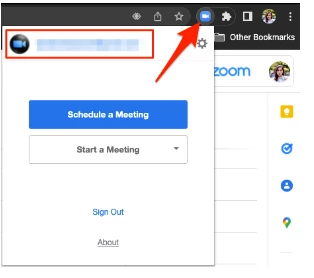


    Please also be aware if there are other Zoom profiles that are logged in to your browser. This issue typically arises when there's another profile logged in to the web portal and it was not properly signed out. When a user clicks a meeting link, the system will recognize the profile that is logged in instead of the profile of the host. 

    Related article: Using the Zoom Scheduler extension for Chrome

    Additionally, please try to reinstall the Zoom desktop client and kindly update me if it worked.

    For Mac:

    Uninstall Zoom version 4.4.53932.0709 and higher
     

    1. Open the Zoom desktop application.
    2. Select zoom.us at the top of your screen and select Uninstall Zoom.
    3. Select OK to confirm uninstalling the Zoom desktop application and all of its components.
    4. Once completed, reinstall Zoom on our download center.

    Uninstall Zoom version 4.4.53909.0617 and below

    1. Open Finder.
    2. Select Go at the top of your screen.
    3. Select Go to Folder...
    4. Once opened, input ~/.zoomus/
    5. Move ZoomOpener to your trash.
    6. Once completed, repeat steps 3 through 5 for the following folders and files:
      • Folder: /Applications/ Move to Trash: zoom.us.app
      • Folder: ~/Applications/ Move to Trash: zoom.us.app
      • Folder: /System/Library/Extensions/ Move to Trash: ZoomAudioDevice.kext
      • Folder: ~/Library/Application\ Support/ Move to Trash: zoom.us
        Note: Zoom may not be installed in both the /Applications and ~/Applications folders.
    7. Once completed, download Zoom from our download center and reinstall.

     
    For more information, please refer to this article: https://support.zoom.us/hc/en-us/articles/201362983-Uninstalling-and-reinstalling-the-Zoom-application


    If after following these troubleshooting steps you continue to encounter this issue, let me know!


    I hope this helps!

    Carla
    Zoom Community Team

    11 replies

    jdott16
    Community Champion | Employee
    Community Champion | Employee
    August 24, 2021

    Hello @PeaKL 


    I believe this may have been related to an issue Zoom experienced yesterday. You can find out more on Zoom's status page at: https://status.zoom.us/incidents/r5pcn7rfbwl1 


    The issue has since been resolved. If you are still experiencing issues I think that the next option would be to reach out to Zoom Support for further analysis and investigation. You can find out more on reaching support here: https://support.zoom.us/hc/en-us/articles/201362003-Zoom-technical-support. I hope this helps and please make sure to mark the solution as accepted if this information is what you needed.

    Newcomer
    October 19, 2022

    I raised the same issue with support because it occurred consistently. It turns out there's a default setting that does not allow participants to join before the host, so that even after the host joins, the participants (who receive a message telling them to wait until the host begins the meeting) are left in a waiting room indefinitely. 

    Unfortunately it is not widely known that users must go to:

    Account>Settings>Allow participants to join meeting before host. Without that option activated, everyone has the experience described by @PeaKL . @mt99 did you also verify this setting? If you're having this experience consistently, it is not a temporary Zoom issue but a permanent design one.

    Newcomer
    August 9, 2024

    Having this same issue. I am the host and I get a dialog box that says, "Waiting for host to start the meeting."


    I found that once I made the mistake of launching my personal meeting room instead of the pre-scheduled meeting that I had sent a link to....could that be happening here?

    Newcomer
    March 7, 2022

    I'm having this problem too. some participants get the message "waiting for host to start the meeting" which continues after it has started. I can't access the link above - I get a "page does not exist" message.


    Newcomer
    March 20, 2022

    I sent out 7 invites , all the same ,but only 3 of the invites were allowed to join the meeting.

    Newcomer
    January 29, 2023

    Are you using the web portal or the desktop app to start your meeting.  I am beginning to believe that if I start the meeting from the desktop app, only folks with the desktop app installed on their device can enter.  If it is not installed they can't.  To fix it, I end the meeting and restart it using the web portal and then everyone can get in.  I do not believe it is a timing issue - I start my meetings long before anyone tries to join.  Still not sure about any of this, but until someone comes up with a fix, I will use the web portal.  It is very confusing to me and my guests when they are locked out.

    Newcomer
    May 6, 2022

    I'm seeing this issue very often recently actually. 

    Newcomer
    May 10, 2022

    This is happening more frequently. I send a link. The participant clicks on it. I can't see them. They say they are 'waiting for the host to start the meeting.' 

    We switch to Microsoft Teams.


    Newcomer
    June 25, 2022

    It has happened to us often in the last two weeks. At least 4 or 5 times in different meetings. Users get the "Waiting for host to start the meeting" message, even if the meeting has already started.

    If the user closes and tries to connect again with the same link, it ends up accepting them in.

    I can't find any mistake on our side, in the meeting set-up or the link sharing.

    Messy.

    Newcomer
    August 8, 2022

    Zoom doesn't explain this option exists, but it turns out that you need to go to Account > Settings > Allow participants to join before host. There's a drop-down that allows you to select 5 minutes, 10, or 15 before start.

    In other words, if you start the meeting at 12:01, but they joined at 11:59, if you didn't open this setting and allow them, they will find themselves lost in cyberspace. They will be told that they are waiting for the host to start the meeting, but even after you start it they won't be admitted. It's an ongoing glitch I've seen around the past year I've been using this platform a lot. I liaised with customer service a lot, it seems you need to know that this option exists, and not expect Zoom to perform the way it tells the participants that it will. 

    Newcomer
    October 18, 2022

    I have the same issue.  I create a zoom meeting on PC / Chrome, invite everyone.  Everyone can click the zoom link including me.  Zoom says 'waiting for host to start the meeting' ... but I am the host that created the meeting.  So, I them us my ipad to start the meeting and it works, so I have to use two devices to start the meeting, one to create the meeting, and the ipad to run the meeting.  It works ok, but I'd prefer if the zoom meeting worked on the PC so everywhere I travel I don't have to carry two devices (PC + ipad).  I've checked all the buttons like 'allow uses to enter meeting without host..' but the meetings still don't start until I use the iPad.  

    Newcomer
    January 10, 2023

    Just had the same experience. Attempted to start a meeting from link in the invitation and received "waiting for host to start meeting" message when I'm the host. Stopped when I logged in via the desk top but that's unintuitive and inconvenient. PLEASE ALLOW HOSTS TO JOIN THEIR MEETINGS FROM A LINK IN THEIR CALENDARS!

    CarlaA
    Community Manager
    CarlaAAnswer
    Community Manager
    February 8, 2023

    Hi everyone! 


    Please kindly check the email address that is signed in to the Zoom scheduler extension in Chrome?


    Please also be aware if there are other Zoom profiles that are logged in to your browser. This issue typically arises when there's another profile logged in to the web portal and it was not properly signed out. When a user clicks a meeting link, the system will recognize the profile that is logged in instead of the profile of the host. 

    Related article: Using the Zoom Scheduler extension for Chrome

    Additionally, please try to reinstall the Zoom desktop client and kindly update me if it worked.

    For Mac:

    Uninstall Zoom version 4.4.53932.0709 and higher
     

    1. Open the Zoom desktop application.
    2. Select zoom.us at the top of your screen and select Uninstall Zoom.
    3. Select OK to confirm uninstalling the Zoom desktop application and all of its components.
    4. Once completed, reinstall Zoom on our download center.

    Uninstall Zoom version 4.4.53909.0617 and below

    1. Open Finder.
    2. Select Go at the top of your screen.
    3. Select Go to Folder...
    4. Once opened, input ~/.zoomus/
    5. Move ZoomOpener to your trash.
    6. Once completed, repeat steps 3 through 5 for the following folders and files:
      • Folder: /Applications/ Move to Trash: zoom.us.app
      • Folder: ~/Applications/ Move to Trash: zoom.us.app
      • Folder: /System/Library/Extensions/ Move to Trash: ZoomAudioDevice.kext
      • Folder: ~/Library/Application\ Support/ Move to Trash: zoom.us
        Note: Zoom may not be installed in both the /Applications and ~/Applications folders.
    7. Once completed, download Zoom from our download center and reinstall.

     
    For more information, please refer to this article: https://support.zoom.us/hc/en-us/articles/201362983-Uninstalling-and-reinstalling-the-Zoom-application


    If after following these troubleshooting steps you continue to encounter this issue, let me know!


    I hope this helps!

    Carla
    Zoom Community Team

    Newcomer
    November 3, 2023

    I'm on PC and I've uninstalled and reinstalled, but I'm still having this issue. I am not the host, just a participant. 

    I made a post about it here:
    https://community.zoom.com/t5/Meetings/quot-Waiting-for-host-to-start-meeting-quot-But-they-have-and-I/m-p/151959#M85148

    Newcomer
    November 25, 2024

    Hi @zoom team, it is the 25th of November 2024 and not only for my office work but also for an online course that I am taking, Zoom has completely become non-functional because it gives me the message that ''Waiting for the host to start a meeting'' but in reality, the hosts had started the meeting. We are now in a situation where we need to look and use alternatives to Zoom this week to continue working and taking the online course lessons. If a solution is reached to have this completely resolved then please kindly confirm over my email ***********.