

"Failed to create conference" Google Calendar | Community
Skip to main content
Newcomer
February 11, 2022
Solved

"Failed to create conference" Google Calendar

  • February 11, 2022
  • 17 replies
  • 3 views


Issue: When the user attempts to a Zoom Meeting to her Google Calendar invite she gets the follow error: Failed to create conference. 
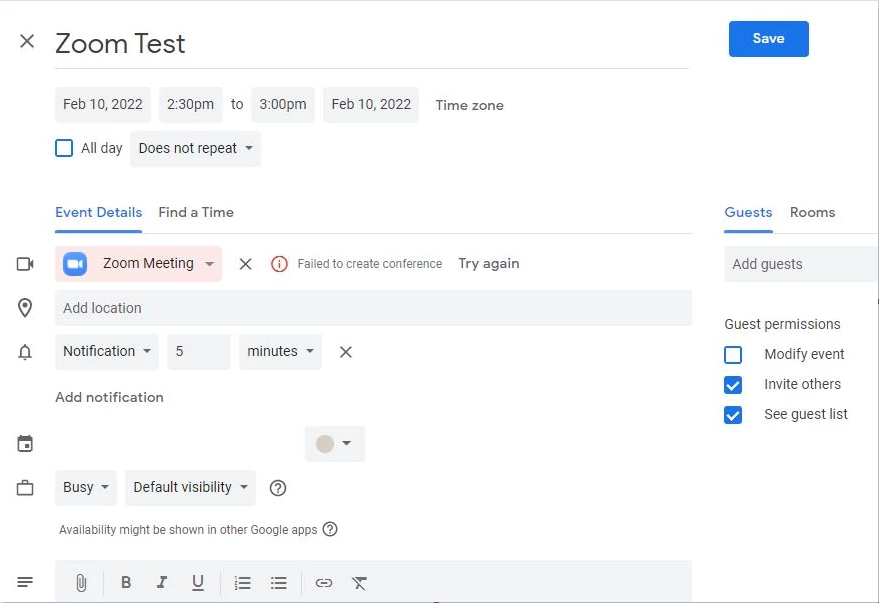
However, when she attempts to create meeting invite on her executives Google Calendar, she is able to without error. 


OS: Windows 7

Steps taken:

Removed Zoom Calendar and Contact Integration,

Removed Google Workspace from Zoom Marketplace for user,

Signed user out of Zoom for G-Suite

Removed Zoom Third Party permissions from Google Account. 

We then went through the process of integrating Zoom and Google Workspace.

Issue still remains. Has anyone else experienced this issue and have a resolution?

    Best answer by DanicaRemy

    Thanks for this tip. Sadly the zoom for Google workspace gives me a "content can't be loaded" error.

    17 replies

    Newcomer
    June 19, 2022

    Issue still exists, still getting failed to create conference.

    Any idea or workaround will greatly appreciated

    YaBoiB
    Community Champion | Employee
    Community Champion | Employee
    June 24, 2022

    Hello, 

     Zoom Engineering is working with Google Engineering on this issue. That is all of the information that I have at this time. The solution looks to be still in progress. It appears to be a event syncing issue possibly on the Google side, so if you have not already put in a support ticket with Zoom and Google I suggest that you do so. Both teams will need data to solve this issue. 


    Thanks, 

    Brandon 

    Newcomer
    June 28, 2022

    I have been having the same issue and haven't been able to resolve it. Its been really frustrating.

    YaBoiB
    Community Champion | Employee
    Community Champion | Employee
    June 29, 2022

    @tava-hai , 


     Please submit a support ticket and reference this thread. That way we can work with our Engineering teams to find a solution. Sorry for the inconvenience. 


    Regards,

    Brandon

    Newcomer
    August 2, 2022

    I submitted a ticket @YaBoiB .  Do you have any idea on what the turn around/response time is?

    Newcomer
    August 2, 2022

    Zoom Live chat Support fixed for me:

    Go to gmail Calendar

    On the right hand bar, click on the zoom icon

    press on the 3 vertical dots on the top of the bar that's come out

    Sign out

    Sign in

    Should be all good

    Newcomer
    August 2, 2022

    Thanks for this tip. Sadly the zoom for Google workspace gives me a "content can't be loaded" error.

    danielbAuthor
    Newcomer
    August 2, 2022
    CarlaA
    Community Manager
    Community Manager
    September 21, 2022

    Hi @danielb ! I just wanted to let you know that as a result of your posted discussion here in the community, our technical writers have added this section: "Failed to create conference" error when scheduling a meeting to our existing "Using the Zoom for Google Workspace add-on" support article. Thank you for making an important contribution to the Zoom Community! 🙂


    Carla,
    Zoom Community Team

    Newcomer
    May 9, 2024

    Hey team - I am still getting this issue (start about 1 month ago).

    Has anyone found a solve?

    Newcomer
    July 9, 2024

    Has anyone managed to fix this? All my Zoom app connections magically broke on June 30, 2024. I've tried re-installing the apps for Google Workspace, Calendly, Fathom, and Notion Calendar, but the integrations still do not work. Google Calendar provides this error: "Failed to create conference". Given how none of my app integrations work, this has got to be a Zoom related issue. I'm at a loss what it could be. I haven't changed any Zoom settings for months.