

how i can mute/unmute during zoom meeting using my airpods pro controls? | Community
Skip to main content
Newcomer
December 4, 2023
Solved

how i can mute/unmute during zoom meeting using my airpods pro controls?

  • December 4, 2023
  • 18 replies
  • 14 views

Hi, 


While in a zoom meeting on my macbook, when i try to mute/unmute myself using airpods call control (press once by default) it doesn't work and give me a message "Can't control mic with Airpod Pro" . Why is that? Is it a bug? 


The same functionality works when i join zoom from iPhone or iPad, so how we can make it work on macs also?


Please help this is really very useful for productivity when zoom window is buried somewhere (it could be in different desktop or under so many windows) and i need to unmute quickly 


Thanks

Aiman 
Best answer by MGSR

hi mark,


assuming the issue has been fixed, can you confirm that the fix works for all airpods including:

In-ear
AirPods 4
AirPods 4 with Active Noise Cancellation
AirPods Pro 2
AirPods (2nd generation)
AirPods (3rd generation) with Lightning Charging Case
AirPods (3rd generation) with MagSafe Charging Case
Over-ear
AirPods Max


thanks,  eliot


Hello @Eliot,

Thank you for your patience. 

Yes, the issue has been fixed on the 6.4.0 release, and it is for all AirPods models.
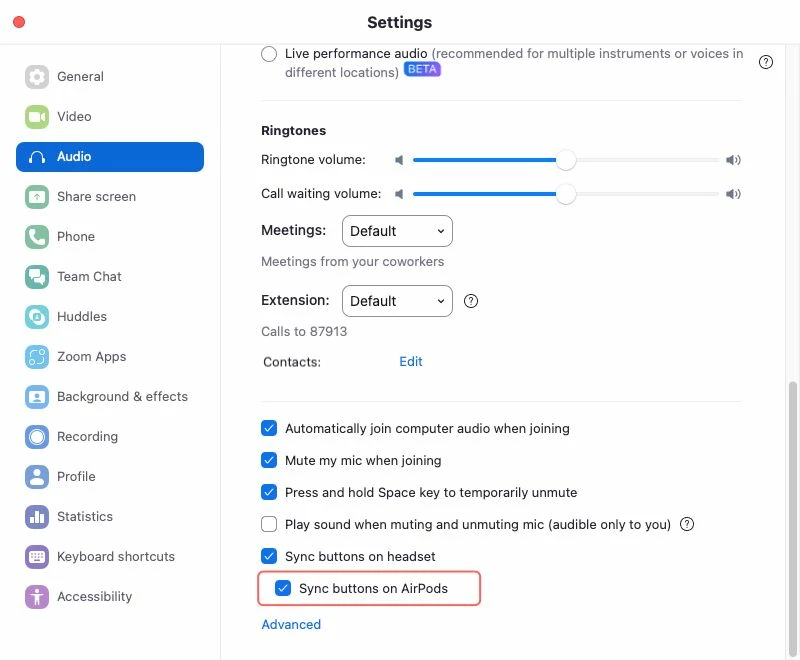
There is a new option in the audio settings to let customers decide if they want the sync feature for AirPods.


Please let us know if you have further concerns. 

18 replies

Newcomer
March 11, 2025

To Whom It May Concern ( @MGSR ),

I am writing to express my extreme disappointment regarding the recent removal of the AirPods mute/unmute functionality within the Zoom application. I, like many other users, relied heavily on this feature for efficient and seamless communication. I've just updated my Zoom client and am finding it incredibly difficult to manage my daily workload without it.


I use Zoom extensively, essentially from 9:00 AM to 6:00 PM daily. The AirPods Max mute button was an indispensable tool for managing background noises and interruptions on my end. It allowed for quick and discreet muting when I needed to sneeze, take a quick bite, or address sudden noises like lawn service outside. The ability to quickly mute and unmute allowed me to contribute to meetings without disrupting others or being disruptive. Furthermore, it was incredibly useful when stepping away briefly to refill my water or coffee; I could remain engaged in the conversation and contribute without having to excuse myself each time.


Frankly, the absence of this feature is significantly impacting my productivity and overall Zoom experience.

It appears I am not alone in this sentiment. Based on feedback from other users, I understand there is widespread frustration regarding this change. Many are questioning the rationale behind removing a feature that, for competent users, enhanced their workflow.


I understand that decisions like this are made with careful consideration, but I urge you to re-evaluate the impact of this change on your user base. The AirPods mute functionality was a valuable asset for many, and its removal has created significant inconvenience.


I am hopeful that you will consider reinstating this feature in a future update. Even if that’s a setting in some configuration file hidden in some folder somewhere in the computer, it would be enough for me. I understand that this is not sustainable but it's enough to get by.


In the meantime, any temporary solution or workaround, even if it involves accessing a hidden configuration file, would be greatly appreciated. The need to quickly and discreetly control my audio input is paramount to my daily workflow, and I am eagerly awaiting a resolution to this issue. I just need this feature back ASAP please.

Thank you for your time and consideration.


Newcomer
March 12, 2025
  1. Check Zoom Audio Settings:

    Open Zoom and go to the settings.
    Under the "Audio" settings, ensure that "Automatically join audio by computer" is selected and that your AirPods Pro is selected as the input and output device.
    Update Zoom & macOS:

    Ensure that both Zoom and macOS are up-to-date, as updates might contain bug fixes that resolve these kinds of issues.
    Use Keyboard Shortcuts for Mute:

    You can always use the keyboard shortcut Alt + A (on macOS) to toggle mute, which can be a quick workaround when your AirPods controls don’t work.
    Re-pair Your AirPods Pro:

    Sometimes, a fresh connection can resolve connectivity issues. Try unpairing and then re-pairing your AirPods Pro with your MacBook.
    If you’re looking for a more reliable way to enhance your workflow, you could also use a tool like Setapp to streamline your Zoom meetings. Setapp offers a collection of apps that can boost productivity, and some of them integrate nicely with macOS to improve overall user experience and control.

akhammashAuthor
Newcomer
March 12, 2025

thanks for sharing the info , but it's not relevant to the topic here. this functionality was supported and used by a lot of people who find it very productive . We want the feature/functionality back. clearly the other options or workarounds are not productive , and why we need to install a tool/software to allow me to do something that was natively supported . these software applications are not supported everywhere due to security certification 

Newcomer
March 18, 2025

Zoom finally fixed it with 6.4.0 release today. Thanks!

Newcomer
March 18, 2025

This news made my day. Downloaded the update and can confirm everything is working?

Newcomer
March 18, 2025

Fixed in Version: 6.4.0. Thank you.

Newcomer
March 18, 2025

Just installed 6.4.0 on my Mac and it indeed works again.  I can mute/unmute from my AirPods directly.  Thank you so much for this quick response!!

Newcomer
March 20, 2025

Had the same issue. 6.4.0 release fixed it. Thanks for the quick fix! Makes my day so much smoother. 


Newcomer
July 14, 2025

Hello, with version Version: 6.5.3 (58803) and Airpods Pro Gen2 how can I enable to mute button? Thank you in advance.

Community Super Champion | Partner
July 14, 2025

hi @bartonlourd99 


Change how you end a call and mute yourself with your AirPods Pro


By default, you can double-press the stem on your AirPods to end a call, and

press once to mute and unmute.


You can switch these actions.


Wear your AirPods, and make sure they’re connected to your device.


Do one of the following:

iPhone or iPad: Go to Settings , then tap the name of your AirPods near the top of the screen. Tap End Call or Mute & Unmute, then choose Press Once or Press Twice. The other option automatically switches.


Mac: Choose Apple menu > System Settings, then click the name of your AirPods in the sidebar. On the right, select an option next to “End call” or “Mute & unmute.” The other option automatically switches.


please see

Change settings for AirPods Pro 1 and 2 - Apple Support


Did my response answer your question? If so, please don't forget to mark the reply as an accepted solution.


thanks,  eliot

Newcomer
July 14, 2025

Hello @Eliot thank you for your answer, it's a good one. I have to rephrase my question. 

I am looking to mute myself using Zoom App while wearing Airpods Pro Gen2. The message I receive cannot mute mic with Airpods Pro. Zoom version Version: 6.5.3 (58803) Thanks again.

Newcomer
July 14, 2025

Try unchecking and re-checking the "Sync buttons on AirPods" checkbox within "Settings > Audio > Headset > Automatically sync headset buttons". Whenever I get this error on my Airpods Max, this seems to fix the issue.

Newcomer
July 15, 2025

I see the button but I cannot toggle it left right, could it be related to the fact that the computer is company based running under a certain set of rules? Thanks